
Dead pixels can be annoying on any laptop screen. They look like tiny dots that stay black or colored. You might see them on OLED or LCD screens. But how do you fix them? Can software tools help? Let’s learn step by step.

Credit: www.reddit.com
What Are Dead Pixels?
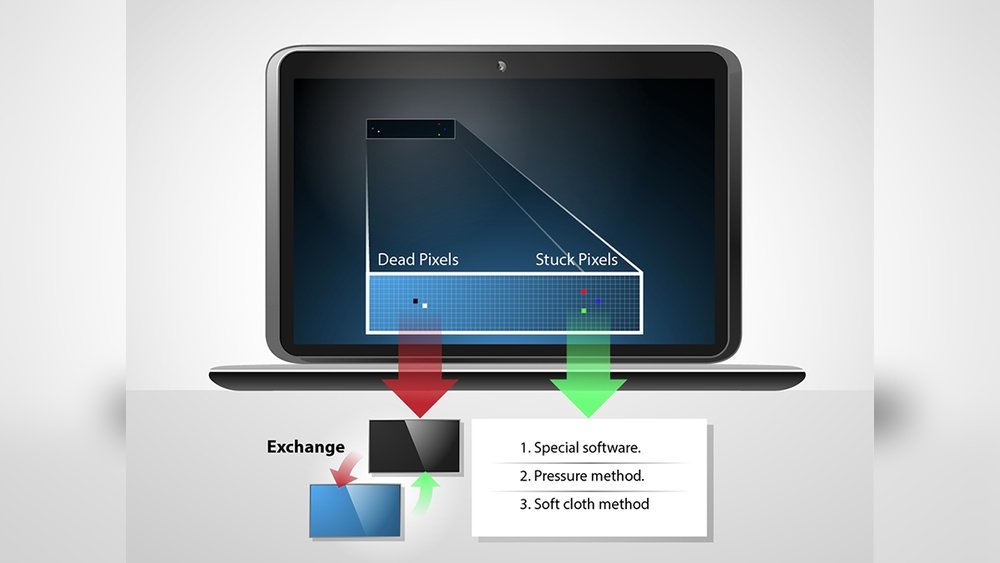
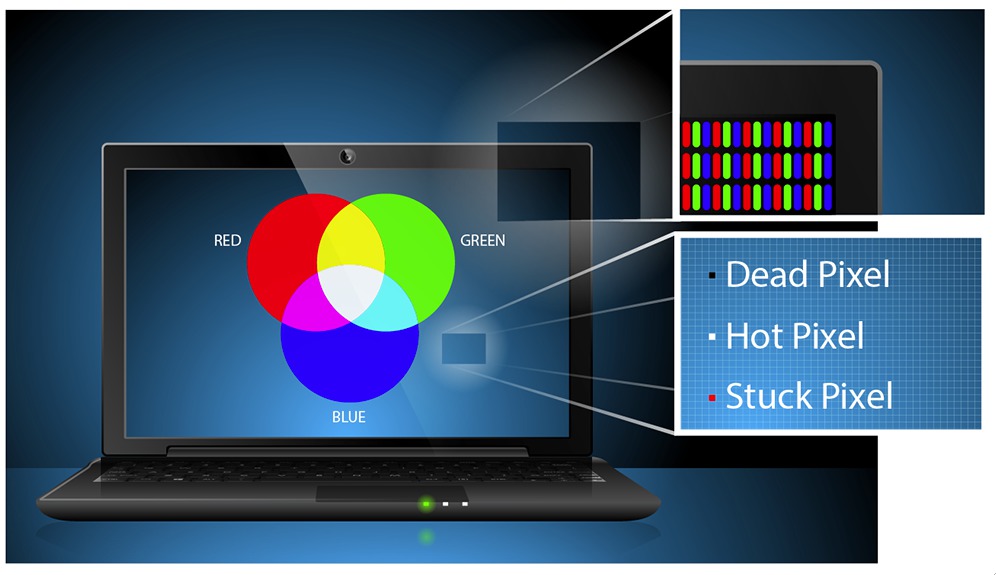
Dead pixels are tiny spots on your screen that do not show the right color. Sometimes they are black, white, red, green, or blue. They are different from stuck pixels, which show one color but might still work.
Dead pixels: The pixel is completely off. It does not light up at all.
Stuck pixels: The pixel is stuck on one color but still works.
OLED vs. LCD Screens: What’s the Difference?
Before fixing dead pixels, it helps to know your screen type.
| Feature | OLED Screen | LCD Screen |
|---|---|---|
| Light Source | Each pixel lights itself. | Backlight shines through pixels. |
| Color Quality | Vivid colors, deep blacks. | Good colors, not as deep black. |
| Pixel Problems | Pixels can burn or die. | Pixels can get stuck or die. |
| Cost | Usually more expensive. | Usually less expensive. |
Why Do Dead Pixels Happen?
Dead pixels usually happen because of physical damage. Sometimes, the transistor that controls the pixel stops working. Other times, it’s stuck due to signal problems.
- Pressure or impact on the screen.
- Manufacturing defects.
- Heat or static image damage.
- Wear and tear over time.
Can Software Fix Dead Pixels?
Many people ask if software can fix dead pixels. The answer is a bit tricky.
Stuck pixels can often be fixed using software. These pixels are still alive but stuck on one color.
Dead pixels are usually hardware failures. Software cannot fix them because the pixel is not working at all.
Still, some software tools try to fix both stuck and dead pixels. They work by flashing colors quickly on the screen. This can help the pixel start working again.
Popular Software Tools to Fix Pixels
Here are some free software tools you can try. They work on both OLED and LCD screens.
1. Pixelhealer
PixelHealer is a free program. It flashes colors on the screen fast. This can help stuck pixels start working again.
- Easy to use.
- Works on LCD and OLED screens.
- Runs for about 10 minutes or more.
You can download it from Aurelitec website.
2. Jscreenfix
JScreenFix is an online tool. It runs in your browser, so no download needed. It flashes colors to help stuck pixels.
- Works on LCD and OLED.
- Runs for 10 minutes or more.
- Easy to use for beginners.
Visit JScreenFix to start.
3. Rizonesoft Pixel Repair
This tool combines pixel fixing and locating dead pixels. It can help you find the exact spot of the problem.
- Locates dead and stuck pixels.
- Flashes colors to fix pixels.
- Works on both screen types.
Download it from Rizonesoft.
How to Use Software Tools to Fix Pixels
Follow these simple steps to try software fixes.
- Find the dead or stuck pixel. Look closely at your screen. You may need to use a white or black background to see it clearly.
- Run the software tool. Open PixelHealer, JScreenFix, or Rizonesoft Pixel Repair.
- Place the flashing area over the pixel. Move the flashing box to the exact spot of the dead or stuck pixel.
- Run the fix for 10 to 30 minutes. Let the software flash colors quickly. This can help the pixel work again.
- Check the pixel. After the time ends, see if the pixel is fixed.
Sometimes, the pixel fixes after a few tries. Sometimes, it will not fix at all. Be patient and try again if needed.
Tips to Avoid Dead Pixels in the Future
Prevention is better than fixing. Here are some ways to avoid dead pixels.
- Do not press hard on the screen. Avoid pushing or poking it.
- Keep your screen clean. Use a soft cloth and plain water only.
- Turn on pixel shift features. Some OLED laptops have this to avoid burn-in.
- Avoid showing static images for long. Change your screen content regularly.
- Keep your laptop cool. Heat can damage pixels.
Credit: www.laptopscreen.com
What to Do if Software Cannot Fix Dead Pixels
If software tools do not help, the pixel is likely dead. This means it is a hardware problem.
In this case, the only way to fix it is to replace the screen. Screen replacement can be costly but may be needed for many dead pixels.
If your laptop is new and has dead pixels, check the warranty. Some brands allow screen replacement for dead pixels within a certain time.
Summary
Dead pixels are small screen problems that can be very annoying. Stuck pixels can often be fixed with software tools like PixelHealer or JScreenFix. These tools flash colors to try and wake up the stuck pixel.
Dead pixels, however, are usually hardware faults. Software cannot fix them. You may need to replace your screen if dead pixels bother you a lot.
Remember to take care of your laptop screen. Avoid pressure, heat, and static images. Use pixel shift if your laptop has it. This helps keep your screen healthy.
Try software tools first. They are free and easy to use. You might fix your stuck pixels without spending money. If not, consider professional help or screen replacement.
Frequently Asked Questions
What Software Fixes Dead Pixels?
PixelHealer and JScreenFix are popular software tools that attempt to fix stuck pixels by cycling colors rapidly. True dead pixels usually need hardware replacement.
How To Avoid Dead Pixels On Oled?
Avoid pressure and impacts on the OLED screen. Use Pixel Shift and Panel Care features to reduce wear. Clean gently with a microfiber cloth. Prevent static images and heat buildup to protect pixels.
Can You Fix Dead Pixels On A Laptop?
Dead pixels on laptops usually result from hardware failure and cannot be fully fixed. Some software may revive stuck pixels, but dead ones often require screen replacement.
How To Fix Lcd Screen Dead Pixels?
Use software like PixelHealer or JScreenFix to try fixing stuck pixels. Dead pixels usually need screen replacement. Avoid pressing or damaging the screen to prevent dead pixels.