

Looking for a versatile device that can handle both work and play can be challenging. Many people want something portable but also powerful enough for their daily tasks.
Choosing between tablet-laptop hybrids can be confusing. Some models focus on performance, while others prioritize battery life or screen quality. There are trade-offs in size, weight, and flexibility that can make the decision harder. Budget considerations also come into play, with options ranging from more affordable to premium devices.
This article will help you understand the key differences and find the right fit for your needs without the stress.
What Really Matters When Choosing
Think about how you plan to use the device daily. Portability, battery life, and screen clarity often impact satisfaction more than raw specs. Also, consider whether you need a device that easily switches between tablet and laptop modes or one optimized for a single use.
The products below are grouped to reflect different user needs and preferences. This way, you can compare options based on what matters most to you, whether it’s performance, display, or flexibility.
Microsoft Surface Pro 11 Tablet Bundle
The Microsoft Surface Pro 11 is ideal for professionals and creatives seeking a versatile, powerful tablet for productivity and creative work.

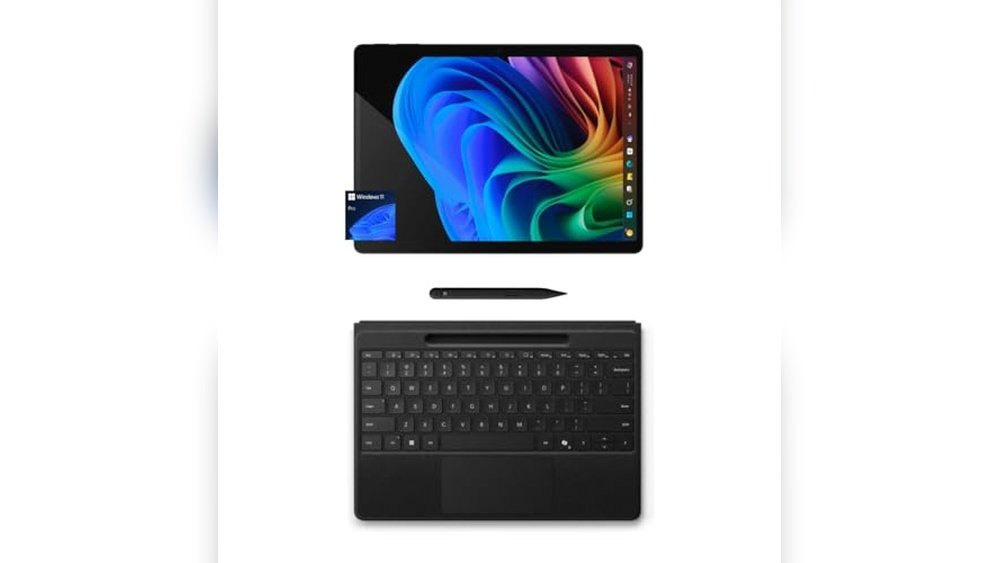
The Microsoft Surface Pro 11 Copilot PC Bundle is a 13-inch touchscreen tablet that combines portability with robust computing power. It addresses the need for a sleek device that can handle demanding tasks thanks to its Snapdragon X Plus 10-core processor, allowing users to work efficiently wherever they go. Its PixelSense Flow display with 2.8K resolution ensures clear, vibrant visuals for both work and entertainment.
Using this Surface Pro 11 feels fluid and natural, especially with the Surface Slim Pen and flexible keyboard that offer a laptop-like experience or tablet freedom. Instant Copilot access simplifies multitasking and productivity, making it a reliable companion for creatives and professionals alike. I found the near edge-to-edge display particularly immersive during extended use.
Key Advantages
- AI-enhanced Studio Camera for clear video calls and automatic framing
- Long-lasting battery life suitable for all-day use
- Flexible keyboard and pen storage for versatile setups
- High refresh rate (up to 120Hz) for smooth touch interactions
Who Should Consider This Tablet
This tablet is perfect for users who need a lightweight yet powerful device for on-the-go productivity and creative tasks. If you value a high-quality display, versatile input options, and AI-enhanced features for video conferencing, the Surface Pro 11 fits well.
However, if you primarily require a traditional laptop with extensive ports or prefer a lower price point device for basic tasks, this might not be the best fit. The Surface Pro 11 removes the confusion of choosing between a tablet and laptop by offering a hybrid solution with strong performance and flexibility.
One tip: invest time in customizing the Instant Copilot key to streamline your most frequent workflows. Rest assured, this device is backed by Microsoft’s reliable ecosystem and updates, ensuring long-term usability and peace of mind.
Microsoft Surface Pro 11 2-in-1 Laptop
The Microsoft Surface Pro 11 is ideal for professionals and creatives who need a versatile and powerful device for work and entertainment.

The Microsoft Surface Pro 11 is a 2-in-1 laptop and tablet hybrid that solves the challenge of balancing portability with performance. Featuring a 12-inch PixelSense touchscreen display and powered by the Snapdragon X Plus processor, it delivers a fast and intelligent computing experience ideal for multitasking and creative work.
Using this device feels smooth and flexible, whether you’re working on the go as a tablet or typing up documents with the keyboard attached. The impressive battery life of up to 16 hours provides confidence to stay productive throughout the day without frequent charging interruptions.
- Strengths: Versatile 2-in-1 design, AI-powered Windows 11 Copilot+ for smarter workflows, long-lasting battery life, vibrant 12″ touchscreen display.
- Limitations: Surface Pro Keyboard is sold separately, which may add to the overall cost.
Who Should Consider the Surface Pro 11
This device is perfect for users who want the power of a laptop combined with the convenience of a tablet—ideal for students, professionals, and creatives who move between different environments often. If you prefer an all-in-one device that adapts to your workflow and appreciate AI-enhanced productivity tools, this is a solid choice.
However, if you rely heavily on high-end software requiring discrete graphics or need a device with a built-in keyboard, you might want to consider alternatives or factor in the additional cost for accessories. Remember to budget for the keyboard if you plan to use it as a full laptop replacement.
Choosing the Surface Pro 11 removes the stress of carrying multiple devices and offers a seamless transition between work modes. For best results, invest in the official keyboard accessory to unlock its full laptop potential. You can feel reassured knowing this device balances performance, portability, and smart features thoughtfully.
Microsoft Surface Pro 11 Oled Tablet
The Microsoft Surface Pro 11 is perfect for professionals and creatives seeking a versatile 2-in-1 laptop and tablet with a stunning OLED display.

The Microsoft Surface Pro 11 is a cutting-edge 2-in-1 laptop and tablet designed to boost productivity and creativity. Featuring Windows 11 Copilot+ and a vivid 13″ OLED touchscreen, it delivers exceptional color accuracy and sharpness, making it ideal for both work and entertainment. Its Snapdragon X Elite 12-core processor ensures outstanding performance, allowing you to handle demanding tasks efficiently.
Using the Surface Pro 11 feels intuitive and flexible, especially with the detachable Surface Pro Flex Keyboard (sold separately) and its unique kickstand that supports multiple angles. The impressive 14-hour battery life provides all-day usage without frequent charging, offering peace of mind and reliability whether you’re working remotely or on the go.
Key Strengths
- Brilliant 13″ OLED touchscreen with a 1M:1 contrast ratio for rich colors
- Long-lasting 14-hour battery life with fast 65W charging support
- Powerful Snapdragon X Elite (12-core) processor outperforms many competitors
- Flexible 2-in-1 design adapts from tablet to laptop to sketchbook
- Windows 11 Copilot+ enhances productivity with AI capabilities
Who Should Consider the Surface Pro 11
This device is ideal for students, professionals, and creatives who want a portable yet powerful device that seamlessly switches between laptop and tablet modes. If you value a vibrant display and long battery life for extended use, this Surface Pro 11 fits well. However, if you require heavy-duty gaming or very high storage capacity, you might want to explore alternatives.
Choosing the Surface Pro 11 removes the stress of carrying multiple devices and worrying about battery life during long workdays. A practical tip is to invest in the detachable keyboard to unlock its full potential as a laptop replacement. You can feel confident knowing you have a reliable, sleek device designed for modern multitasking and creativity.
Microsoft Surface Pro 11 2-in-1
The Microsoft Surface Pro 11 is ideal for professionals and creatives seeking a versatile 2-in-1 laptop/tablet with powerful AI features and portability.
The Microsoft Surface Pro 11 is a sleek 2-in-1 laptop and tablet running Windows 11 Copilot+, designed to enhance productivity with integrated AI tools. It solves the challenge of needing both a powerful laptop and a portable tablet by combining both functionalities in one device, highlighted by its fast Snapdragon X Plus processor and 12-inch touchscreen display.
Using the Surface Pro 11 feels smooth and intuitive, whether you’re typing, drawing, or multitasking. The all-day battery life and lightweight design make it easy to carry and reliable for long workdays or creative sessions, giving you confidence to stay productive anywhere.
- Strengths: Built-in AI Copilot tools, versatile 2-in-1 design, Snapdragon X Plus processor, vibrant 12” PixelSense touchscreen, up to 16 hours battery life
- Dimensions & Weight: 11.55″ length × 8.24″ width × 1.43″ height; 2.55 pounds for easy portability
Who Should Consider the Surface Pro 11
This device is perfect for users who want a flexible machine that adapts as both a tablet and a laptop, especially professionals, students, and creatives who value portability without compromising on performance. If you rely on AI-assisted productivity tools or need long battery life, this is a solid choice.
However, if you need a laptop with a dedicated keyboard included or require extensive high-end gaming capabilities, you might want to consider other options. The Surface Pro Keyboard is sold separately, so factor that into your setup needs.
Choosing the Surface Pro 11 removes the stress of juggling multiple devices by offering a single, intelligent solution. One practical tip is to invest in the Surface Pro Keyboard for the best laptop experience. Rest assured, this device delivers a smooth, dependable performance that fits well into a busy lifestyle.
Microsoft Surface Pro 11 Ai Tablet
The Microsoft Surface Pro 11 is ideal for professionals and creatives seeking a powerful, AI-enhanced tablet for on-the-go productivity.

The Microsoft Surface Pro 11 is a versatile AI-powered tablet designed to enhance everyday computing with advanced features such as the Qualcomm Snapdragon X Plus processor and a stunning 13″ PixelSense Flow touchscreen. It solves the problem of balancing high performance with portability, making it perfect for users who need a reliable device for multitasking, creative projects, and business applications.
Using the Surface Pro 11 feels intuitive and smooth, thanks to its 120Hz dynamic refresh rate and seamless AI integration. Whether working remotely or in the office, the device offers confidence and ease with its secure Windows 11 Pro environment and long-lasting performance, helping you save time and stay productive.
- AI-Powered Performance: Snapdragon X Plus with 45 TOPS for fast, efficient multitasking
- Impressive Display: 13″ 2880×1920 120Hz touchscreen for vibrant visuals and smooth touch response
- Security Features: Secured-core PC with facial recognition and strong password protection
- Connectivity: Dual USB-C 4 ports supporting up to three 4K monitors at 60Hz
Who Should Consider the Surface Pro 11
This tablet is well suited for professionals, creatives, and tech enthusiasts who prioritize AI capabilities, portability, and a high-quality display. If you often switch between tasks like video calls, image editing, and document work, this device will streamline your workflow.
If you need a device with cellular connectivity or prefer a traditional laptop form factor, you might want to explore other options. However, for those focused on AI-enhanced productivity within a Windows environment, the Surface Pro 11 removes the stress of juggling multiple devices and offers a reliable, sleek solution.
When choosing this tablet, consider pairing it with a compatible keyboard and stylus to maximize productivity. Rest assured, the Surface Pro 11 delivers consistent performance and security, making it a dependable tool for your daily tech needs.
How To Choose The Right Microsoft Surface Pro 11 Model For Your Needs
Consider how you plan to use the device daily—whether as a tablet, a laptop, or both. Balance portability with performance based on your typical tasks and battery life expectations. Reflect on the importance of display quality and keyboard flexibility. Think about whether AI features and processing power are priorities for your workflow. Let your lifestyle and work habits guide your choice rather than just technical specifications.
Common Pitfalls And Who Should Consider Other Options
- Expecting a Surface Pro 11 to replace a high-performance desktop or gaming laptop may lead to disappointment.
- If you need extensive offline software compatibility, some ARM-based models might not support all applications.
- Those who prefer a traditional clamshell laptop design might find the 2-in-1 form factor less comfortable for long typing sessions.
- Users requiring multiple high-speed ports or legacy connections should verify compatibility carefully.
- People who prioritize screen size above portability might want to look beyond the Surface Pro 11 line.
Common Questions About Microsoft Surface Pro 11 Devices
Can I use the Surface Pro 11 as both a tablet and a laptop easily?
Yes, the Surface Pro 11 is designed as a 2-in-1 device that supports tablet use and can attach to a keyboard to function like a laptop. Its detachable keyboard and adjustable kickstand provide flexibility for different modes.
How does battery life vary between different Surface Pro 11 models?
Battery life depends on the processor and usage, with some models offering up to 16 hours under typical workloads. More powerful processors or higher screen refresh rates may reduce battery duration.
Are all Surface Pro 11 models compatible with the Surface Slim Pen?
Most Surface Pro 11 models support the Surface Slim Pen, which can be stored and charged with compatible keyboards. However, it’s best to check specific model compatibility before purchasing.
Do Surface Pro 11 devices run all Windows applications?
Surface Pro 11 models with ARM-based processors may have limitations running some traditional Windows applications. Many popular apps are optimized, but some specialized or legacy software may not run natively.
Is the Surface Pro 11 suitable for heavy video editing or gaming?
The Surface Pro 11 is optimized for productivity and general use rather than high-end gaming or intensive video editing. Users with those needs might find more powerful dedicated devices more suitable.
What are the differences in display quality among the Surface Pro 11 options?
Some models feature OLED displays with higher contrast ratios, while others have LCD screens with high refresh rates. Your choice depends on whether color accuracy or smoothness is more important for your tasks.
How secure is the Surface Pro 11 for business use?
Many Surface Pro 11 models include Secured-core PC features, offering enhanced security like facial recognition and robust password protection. This makes them suitable for sensitive business environments.
Feeling Confident About Choosing Your Surface Pro 11
Making a choice among the Surface Pro 11 lineup is about understanding your own needs and how each device fits into your daily routine. Taking time to consider your priorities around portability, performance, and flexibility will lead you to a device that feels right.
There is no single perfect model for everyone, but with clear expectations, you can select a Surface Pro 11 that supports your work and lifestyle comfortably. Trust your judgment and the insights you’ve gathered to feel settled in your decision.









