

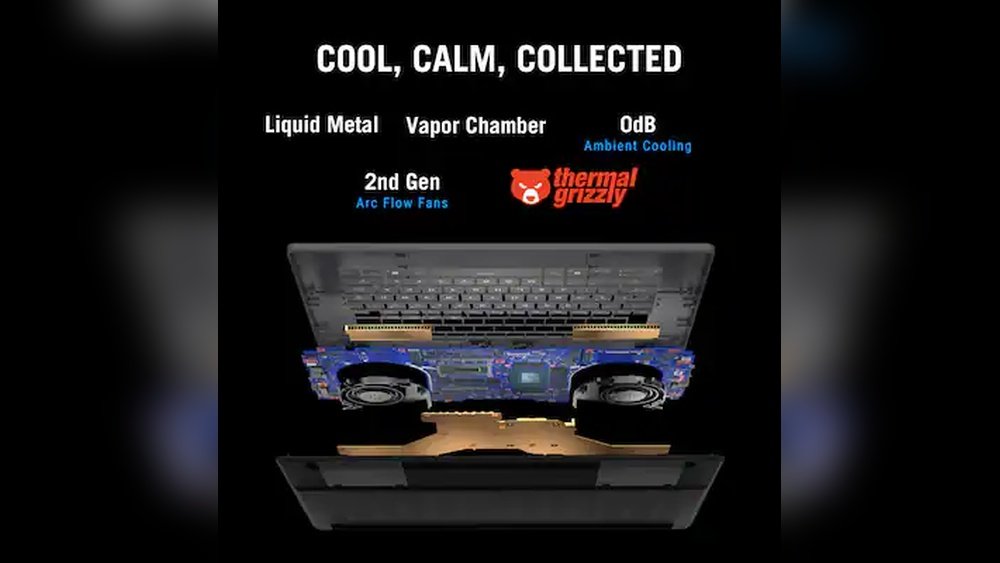
When it comes to keeping your laptop cool, you want a solution that works efficiently without adding bulk or noise. You might have heard about two popular cooling technologies: vapour chambers and liquid metal cooling.
But which one actually keeps your laptop cooler during those intense gaming sessions or long work hours? Understanding the difference between these two can make a big impact on your laptop’s performance and lifespan. You’ll discover how each cooling method works, their pros and cons, and which one might be the best fit for your needs.
Ready to find out which cooling tech will keep your laptop running cooler and smoother? Let’s dive in!
Vapor Chamber Basics
Vapor chambers are a popular cooling technology in modern laptops. They help manage heat by spreading it evenly. This keeps laptop parts from getting too hot. Vapor chambers are thin and flat, perfect for slim devices. They work silently, without fans or pumps. Many high-end laptops use vapor chambers to stay cool under pressure.
Understanding how vapor chambers work helps us compare them with other cooling methods. Their design and function reveal why they suit certain laptops better. At the same time, they have limits that affect their performance.
Design And Function
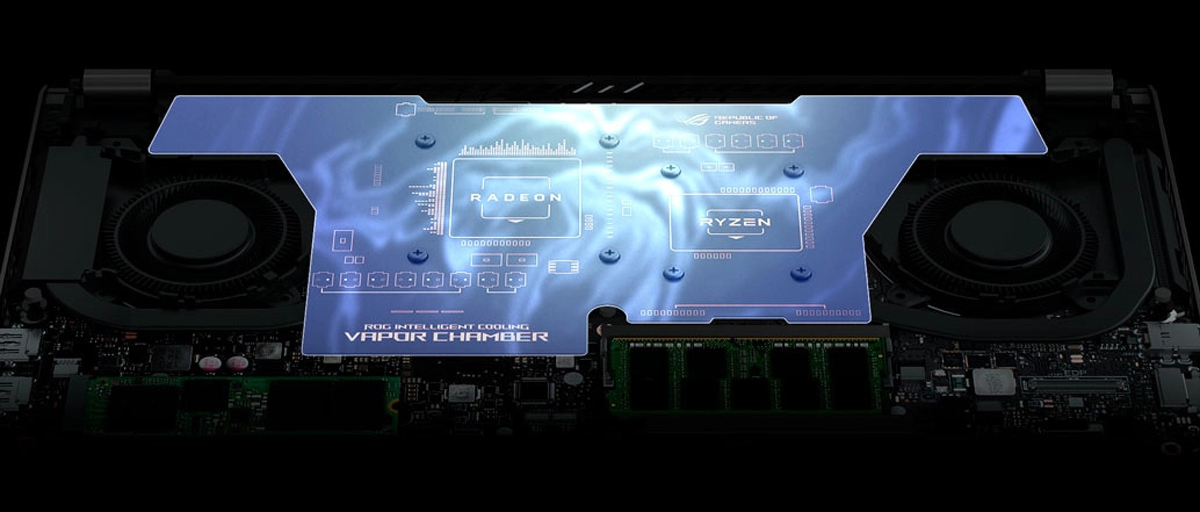
A vapor chamber is a sealed metal plate with a small amount of liquid inside. Heat from the laptop causes the liquid to evaporate. The vapor spreads the heat across the chamber surface quickly. Then, it cools and condenses back into liquid. This cycle repeats to move heat efficiently. The flat shape allows it to cover a large area. It spreads heat evenly to prevent hotspots.
Advantages In Laptops
Vapor chambers cool laptops quietly, without noise. They fit well in thin and light laptops. These chambers spread heat faster than regular heat pipes. This improves cooling in tight spaces. They help keep important parts like CPUs and GPUs safe. Vapor chambers use no moving parts, so they last longer. Their thin profile allows for sleek laptop designs.
Limitations And Challenges
Vapor chambers face limits in how much heat they can move. They work best for moderate heat loads, not extreme ones. The flat design cannot bend much, limiting fitting options. Manufacturing vapor chambers costs more than traditional heat pipes. Repairing them inside laptops can be difficult. These factors restrict their use in very powerful machines.
Liquid Metal Cooling Explained
Liquid metal cooling uses a special metal alloy that stays liquid at room temperature. It replaces traditional thermal paste between a chip and heat sink. This metal conducts heat better than regular compounds. It helps the laptop chip stay cooler during heavy use.
This cooling method suits high-performance laptops that generate a lot of heat. The liquid metal spreads heat quickly away from the chip. It improves overall system stability and performance under load.
How Liquid Metal Works
Liquid metal fills tiny gaps between the chip and heat sink. It forms a smooth, even layer for better contact. This reduces thermal resistance, allowing heat to move faster. The metal alloy usually contains gallium, indium, and tin. These metals stay liquid and do not dry out like pastes.
Benefits For High-performance Chips
Liquid metal cools chips more efficiently than regular thermal paste. It lowers CPU and GPU temperatures by several degrees. This can boost laptop speed and reduce fan noise. Gamers and creators benefit from better performance. It also helps maintain stable temperatures for longer sessions.
Potential Drawbacks
Liquid metal can be tricky to apply correctly. It may cause short circuits if it touches other components. The metal can corrode aluminum parts, so careful use is needed. It also requires reapplication after some time. This cooling solution is usually costlier than standard thermal paste.
Heat Dissipation Methods
Heat dissipation methods play a key role in keeping laptops cool. They manage the heat generated by processors and graphics chips. Different technologies focus on moving or spreading heat to avoid overheating. Vapour chambers and liquid metal cooling are two popular approaches. Each uses a unique way to handle heat inside thin laptop bodies. Understanding their differences helps find the best cooling for your device.
Heat Spreading Vs Heat Removal
Vapour chambers work by spreading heat evenly over a larger surface. They use a sealed chamber with liquid that evaporates and condenses. This spreads heat quickly across metal plates. It reduces hotspots but does not remove heat from the laptop.
Liquid metal cooling uses a special metal alloy with high thermal conductivity. It sits between the chip and heat sink. This metal transfers heat directly and faster than traditional pastes. Liquid metal helps remove heat from the chip more efficiently.
Impact On Laptop Chassis
Vapour chambers distribute heat across the laptop chassis. This can warm up larger areas but keeps critical parts cooler. The heat is less concentrated, which lowers the risk of damage to components.
Liquid metal cooling focuses heat transfer at specific points. It keeps the chip temperature very low but may cause hot spots in the chassis. Careful design is needed to avoid overheating other parts.
Effectiveness In Thin Designs
Thin laptops benefit from vapour chambers because they spread heat in tight spaces. They fit well under slim panels without adding much thickness.
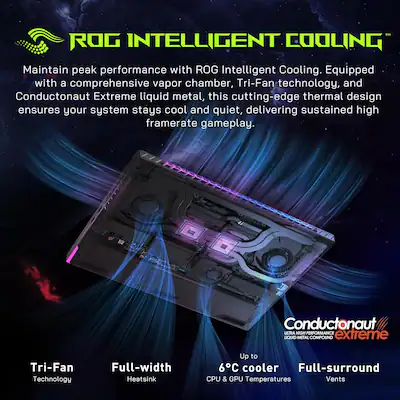
Liquid metal cooling offers better chip cooling but needs careful application. It can be tricky in very thin laptops due to limited space for heat sinks. Still, it provides superior heat removal for demanding tasks.
Credit: www.bestbuy.com
Performance Comparison
Comparing Vapour Chamber and Liquid Metal cooling reveals key performance differences. Each cooling method affects laptop temperature, noise, and power in unique ways. Understanding these factors helps identify which system keeps laptops cooler during heavy use.
Cooling Efficiency Under Load
Liquid metal coolers excel at quickly moving heat away from the processor. They lower core temperatures more effectively during intense tasks. Vapour chambers spread heat evenly but may not cool as deeply under heavy load. This makes liquid metal better for demanding applications that generate high heat.
Temperature Control And Stability
Vapour chambers maintain steady temperatures by distributing heat across a wide area. This leads to fewer spikes and dips in temperature over time. Liquid metal coolers can show more rapid temperature changes, reacting directly to processor heat. Vapour chambers offer more stable cooling, which benefits long sessions of use.
Noise And Power Consumption
Vapour chamber systems often run quieter because they rely on passive heat spread. Fans may spin slower, reducing noise and power use. Liquid metal setups usually need faster fans to cool efficiently, increasing noise levels and power draw. Vapour chambers suit users who want a quiet laptop without sacrificing much cooling.
Durability And Maintenance
Durability and maintenance are key factors when choosing between vapour chamber and liquid metal cooling systems for laptops. These aspects affect how long the cooling solution lasts and how easy it is to keep it working well. Understanding these points helps users decide which cooling method fits their needs better.
Longevity Of Vapor Chambers
Vapor chambers are sealed units filled with liquid and vapor. This design makes them very durable over time. They do not require refilling or frequent attention. The sealed nature prevents leaks and contamination, which can prolong their lifespan.
They handle heat cycles well without degrading quickly. This stability helps laptops maintain consistent cooling over years of use. Vapor chambers rarely fail unless physically damaged.
Handling Liquid Metal Risks
Liquid metal offers excellent thermal conductivity but comes with risks. It can corrode aluminum parts if spilled, causing hardware damage. Careful application is necessary to avoid short circuits.
Liquid metal may dry out or move over time, reducing cooling efficiency. This requires periodic reapplication or inspection. Users must be cautious during installation and maintenance to prevent leaks or contact with sensitive components.
Serviceability Considerations
Vapor chambers are mostly maintenance-free and easy to service if needed. They fit into a laptop like a solid heat spreader, simplifying repairs or replacements. Technicians can handle them without special tools or chemicals.
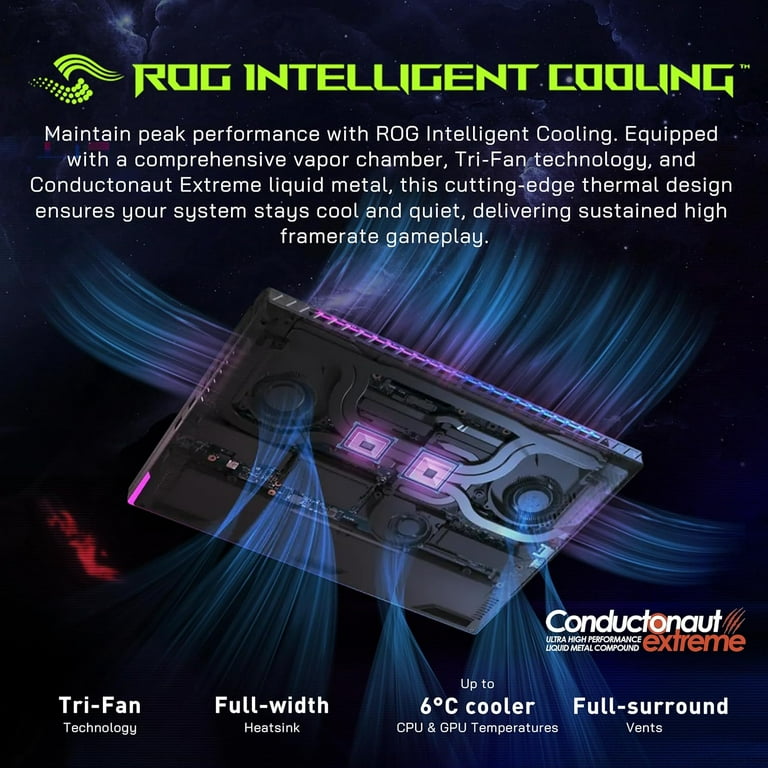
Liquid metal requires more skill for servicing. Removing and reapplying it can be tricky and messy. It also demands careful cleaning to avoid damage. This makes liquid metal cooling less user-friendly for routine laptop maintenance.
Credit: www.walmart.com
Use Case Scenarios
Cooling technology in laptops varies based on usage needs. Different laptops benefit from different cooling methods. Vapour chambers and liquid metal cooling each suit specific scenarios. Choosing the right system depends on the type of laptop and user demands. Below are common use cases that highlight their effectiveness.
Gaming Laptops
Gaming laptops generate high heat due to powerful CPUs and GPUs. Liquid metal cooling excels here by conducting heat away quickly. It lowers core temperatures more effectively during intense gaming sessions. Vapour chambers also help spread heat evenly but may not cool as deeply. Liquid metal suits gamers who push their hardware hard for long periods.
Ultrabooks And Thin Notebooks
Thin laptops have limited space for cooling solutions. Vapour chambers fit well in slim designs due to their compact size. They spread heat over a larger area without adding bulk. Liquid metal improves thermal contact but requires good airflow to work best. Vapour chambers keep ultrabooks cooler silently and efficiently under light to moderate loads.
Professional Workstations
Workstations perform heavy tasks like video editing and 3D rendering. Both cooling methods can help but serve different needs. Liquid metal offers lower temperatures for sustained high performance. Vapour chambers provide stable cooling with less risk of leakage. Professionals benefit from liquid metal in powerful setups needing maximum thermal control.
Cost And Availability
Cost and availability play key roles in choosing between vapour chamber and liquid metal cooling. Both technologies differ in price and how easy they are to find in laptops. Understanding these factors helps buyers decide which cooling system suits their needs and budget.
Manufacturing Costs
Vapour chambers cost more than traditional heat pipes but less than liquid metal solutions. They require precise manufacturing to ensure the chamber is sealed and effective. Liquid metal cooling uses special alloys that are expensive to produce and apply carefully.
The production process for liquid metal is complex. It demands skilled labor to avoid leaks and corrosion. Vapour chambers have simpler assembly but still need quality control to prevent failure. Overall, liquid metal cooling raises the laptop’s manufacturing cost more significantly.
Market Adoption Trends
Vapour chamber cooling appears in many mid-range and high-end laptops. Brands prefer it for thin designs due to its slim profile and effective heat spreading. Liquid metal cooling remains limited to some premium gaming and workstation models.
Manufacturers hesitate to use liquid metal widely because of risks like corrosion and difficulty in servicing. Vapour chambers gain popularity as they balance performance and reliability. The market sees more vapour chamber options than liquid metal at present.
Value For Consumers
Vapour chamber cooling offers good thermal performance at a reasonable price. It suits most users who want quieter and cooler laptops without extra cost. Liquid metal cooling benefits those demanding top cooling power and willing to pay more.
Liquid metal may extend laptop lifespan by reducing heat stress. Still, its higher price and maintenance risk can deter average buyers. Vapour chambers provide better availability and cost-effectiveness for everyday laptop users.
Future Trends
Advances in laptop cooling evolve rapidly. Keeping laptops cool is crucial for performance and longevity. Future trends explore new methods beyond vapor chambers and liquid metal. Innovations aim for better heat control in smaller spaces.
Emerging Cooling Technologies
New cooling systems combine airflow and phase change materials. Thermoelectric coolers gain attention for active heat removal. Miniature fans with smart sensors adjust speed automatically. These technologies reduce noise and improve efficiency.
Hybrid Cooling Solutions
Mixing vapor chambers with liquid metal offers unique benefits. Hybrid designs spread heat evenly while cooling hotspots fast. Combining passive and active cooling helps handle intense workloads. This approach balances power and quiet operation well.
Material Innovations
Researchers develop new materials with higher thermal conductivity. Graphene and diamond-like carbon show promise for heat spreaders. Liquid metals are improving with better stability and less corrosion. These materials boost cooling without adding bulk.
Credit: rog.asus.com
How The Laptop Scout Can Help You with Vapour Chamber Vs Liquid Metal Cooling: Which Laptop Stays Cooler?
Learning From Cooling Technologies: Practical Insights for Laptop Buyers
Understanding the differences between vapour chamber and liquid metal cooling isn’t just tech trivia—it’s a practical skill when choosing a laptop that suits your needs. From our earlier discussion on heat dissipation methods and performance comparison, you can see how each cooling solution balances efficiency and durability differently.
For instance, if you’re a content creator or hybrid worker who values silent operation and portability, a vapour chamber might serve better despite its slightly higher cost and limited maintenance needs. On the other hand, liquid metal cooling excels under sustained heavy workloads but requires more attention to durability and upkeep.
As someone who’s navigated these choices with real-world experience, I recommend weighing these factors carefully rather than buying into brand hype. If you want to dive deeper or have specific questions, feel free to reach out to The Laptop Scout team at contact@thelaptopscout.com for straightforward, no-nonsense advice tailored to your lifestyle and budget.
Frequently Asked Questions
Is Vapor Chamber Cooling Better Than Liquid Cooling?
Vapor chamber cooling spreads heat evenly and suits thin devices. Liquid cooling removes more heat, ideal for high-power, demanding workloads.
What Is The Most Effective Laptop Cooler?
The most effective laptop cooler combines vapor chamber technology for even heat spread and liquid metal for lower chip temperatures. External coolers like Targus Chill Mat also improve cooling efficiently. Choice depends on laptop design and workload intensity.
What Are The Disadvantages Of A Vapor Chamber?
Vapor chambers cost more than heat pipes and have limited height and angle flexibility. They also require longer lead times.
What Is The Difference Between Liquid Metal Cooling And Vapor Chamber Cooling?
Liquid metal cooling uses liquid metal for direct chip contact, offering lower temps. Vapor chambers spread heat evenly across surfaces but have limited heat dissipation.
Conclusion
Both vapour chamber and liquid metal cooling have clear strengths. Vapour chambers spread heat evenly and work well in slim laptops. Liquid metal cooling lowers temperatures faster and suits high-performance needs. The best choice depends on your laptop’s design and how you use it.
Consider which cooling fits your laptop style and tasks. Staying cool means better performance and longer device life. Choose wisely for a cooler, smoother experience.