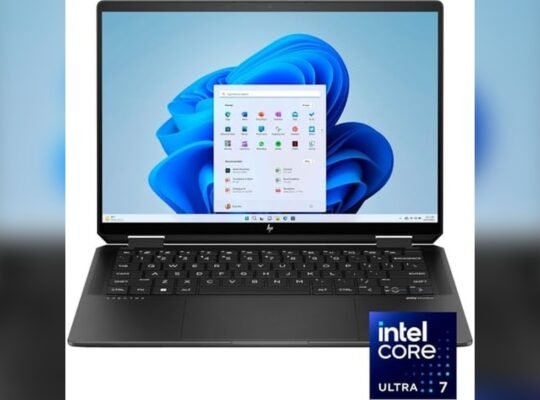
Choosing the right business laptop can feel overwhelming, especially when top contenders like the HP EliteBook 1040 G12 and the ThinkPad X1 Carbon Gen 13 are on your radar. You want a device that not only looks professional but also handles your daily tasks smoothly, keeps up with your busy schedule, and lasts through long workdays.
Which one truly fits your needs? This head-to-head comparison will help you decide which laptop deserves a spot in your work arsenal in 2026. Stick with me, and by the end, you’ll know exactly which powerhouse matches your style, performance demands, and budget.
Let’s dive in!
Design And Build
The design and build quality of a business laptop affect daily use and long-term value. Both the HP EliteBook 1040 G12 and ThinkPad X1 Carbon Gen 13 offer strong designs that suit professional needs. Their structure supports frequent travel and heavy workloads.
Each model balances style and toughness, ensuring a reliable companion for business tasks. Let’s explore how their materials, portability, and input devices compare.
Materials And Durability
The HP EliteBook 1040 G12 uses aluminum in its chassis, giving it a sleek, premium look. It feels solid in the hand and resists scratches well. The ThinkPad X1 Carbon Gen 13 features carbon fiber and magnesium alloy. This mix creates a very tough yet lightweight frame. Both laptops pass military-grade tests for durability, handling drops, dust, and temperature changes. The ThinkPad’s carbon fiber may offer better shock absorption. The EliteBook’s metal body excels in scratch resistance.
Portability And Weight
The EliteBook 1040 G12 weighs about 2.7 pounds. It stays slim and fits easily in briefcases. The ThinkPad X1 Carbon Gen 13 is lighter, around 2.5 pounds, making it one of the lightest business laptops. It also has a thin profile that slips into bags without bulk. Both models offer great portability for busy professionals. The ThinkPad edges ahead for those who value ultra-light travel. The EliteBook balances weight and a sturdy feel.
Keyboard And Trackpad
Typing comfort is critical for long work sessions. The EliteBook 1040 G12 provides a quiet, responsive keyboard with good key travel. Its backlit keys help in low light. The trackpad is smooth and supports multi-touch gestures accurately. The ThinkPad X1 Carbon Gen 13 features the classic ThinkPad keyboard, known for tactile feedback and precision. Its keys have a slightly firmer feel but remain comfortable. The trackpad is large and responsive, with integrated buttons for easier clicking. Both keyboards suit heavy typing and productivity. Personal preference may decide the better option here.
Display Features
The display plays a vital role in business laptops. It affects clarity, comfort, and productivity. Both the HP EliteBook 1040 G12 and ThinkPad X1 Carbon Gen 13 offer advanced screens designed for professionals. Understanding their display features helps find the best fit for your work needs.
Screen Size And Resolution
The HP EliteBook 1040 G12 features a 14-inch screen. The ThinkPad X1 Carbon Gen 13 offers a slightly smaller 13.3-inch display. Both models deliver sharp visuals with resolutions up to 4K UHD. This ensures crisp text and detailed images, ideal for spreadsheets and presentations.
Color Accuracy And Brightness
Color accuracy matters for tasks involving design or media. The EliteBook provides excellent color precision with wide color gamut support. Brightness levels reach up to 1000 nits, making it usable in bright environments. The ThinkPad X1 Carbon Gen 13 also offers strong color accuracy and up to 500 nits brightness, suitable for most office lighting conditions.
Touchscreen And Oled Options
Both laptops offer touchscreen versions, enhancing interactivity. The EliteBook supports an optional OLED panel, providing deeper blacks and vivid colors. The ThinkPad X1 Carbon Gen 13 also comes with OLED display choices, known for better contrast and energy efficiency. These options improve viewing comfort and visual experience during long work hours.
Performance Specs
The performance of a business laptop defines its efficiency in handling daily tasks. Both the HP EliteBook 1040 G12 and ThinkPad X1 Carbon Gen 13 offer strong specs. These specs impact speed, multitasking, and software compatibility. Understanding their differences helps choose the right laptop for work.
Processor And Chipsets
The HP EliteBook 1040 G12 runs on the latest Intel Core Ultra processors. These chips balance power and energy use well. The ThinkPad X1 Carbon Gen 13 features Intel’s 13th-gen Core processors. They focus on delivering fast and smooth performance. Both laptops support advanced chipsets for business security and connectivity.
Ram And Storage Options
The EliteBook offers up to 32GB of RAM, suitable for multitasking. Its storage options include fast PCIe SSDs up to 2TB. The ThinkPad X1 Carbon Gen 13 matches with 32GB RAM and up to 2TB SSD storage. Both laptops allow enough memory and storage for heavy workloads and large files.
Graphics Capabilities
The HP EliteBook 1040 G12 uses integrated Intel Iris Xe graphics. It handles business visuals and light editing smoothly. The ThinkPad X1 Carbon Gen 13 also features Intel Iris Xe graphics. It supports multiple displays and sharp visuals. Neither laptop targets heavy gaming but excels in professional tasks.
Battery Life
Battery life remains a top priority for business laptops. The HP EliteBook 1040 G12 and ThinkPad X1 Carbon Gen 13 both promise long-lasting power. This section breaks down how each performs in real-world conditions, charging speed, and power management. Understanding these factors helps you choose the best laptop for your work needs in 2026.
Real-world Usage
The HP EliteBook 1040 G12 offers up to 12 hours of typical use. This includes browsing, video calls, and light multitasking. The ThinkPad X1 Carbon Gen 13 lasts slightly longer at around 14 hours. It handles similar tasks with ease and a bit more endurance. Both laptops support all-day work without needing frequent charges.
Charging Speed
The EliteBook supports fast charging, reaching 50% in just 30 minutes. This helps when you need a quick power boost during breaks. The ThinkPad X1 Carbon Gen 13 also features rapid charging but takes about 40 minutes for the same level. Both models use USB-C charging, making them convenient for business travel.
Power Management Features
HP’s EliteBook includes AI-based power optimization that adjusts settings automatically. It reduces background activity to save energy. Lenovo’s ThinkPad uses Intelligent Cooling technology, balancing performance and battery life. Both laptops come with customizable power plans. You can easily switch modes to extend runtime or boost performance as needed.
Connectivity And Ports
Connectivity and ports matter a lot for business laptops. They affect how well you connect devices and work on the go. The HP EliteBook 1040 G12 and ThinkPad X1 Carbon Gen 13 both offer strong options. They suit different needs and styles. Below, we check their ports and wireless features to help you pick the best fit.
Usb And Hdmi Availability
The HP EliteBook 1040 G12 includes multiple USB-C ports for fast data and charging. It also offers a USB-A port for older devices. A full-size HDMI port is present, useful for presentations and external monitors.
The ThinkPad X1 Carbon Gen 13 has two Thunderbolt 4 USB-C ports. It lacks a full HDMI port but uses a USB-C to HDMI adapter. It also features a USB-A port for legacy devices.
Wireless Technologies
Both laptops support Wi-Fi 6E for faster, more reliable internet. Bluetooth 5.3 is standard on both, ensuring good connection with wireless accessories. These wireless standards fit well with modern office setups and remote work.
Docking And Expansion
The HP EliteBook 1040 G12 supports HP’s Thunderbolt docks and USB-C hubs. This expands ports for multiple monitors and Ethernet connections. It suits users who need many peripherals.
The ThinkPad X1 Carbon Gen 13 works well with Lenovo’s Thunderbolt docking stations. It provides easy access to extra USB ports, video outputs, and network options. This is helpful for desk setups needing fast expansion.
Credit: www.notebookcheck.net
Security Features
Security is a key concern for business laptops. Both the HP EliteBook 1040 G12 and ThinkPad X1 Carbon Gen 13 offer strong security features. These features protect sensitive data and keep your work safe from threats. This section covers biometric options, encryption, TPM, and physical security measures of each laptop.
Biometric Options
The HP EliteBook 1040 G12 includes a fingerprint reader and an IR camera for facial recognition. These biometric tools allow quick and secure login without typing passwords. The ThinkPad X1 Carbon Gen 13 also offers a fingerprint sensor and an IR camera. Both laptops support Windows Hello, which enhances login security and user convenience.
Encryption And Tpm
HP EliteBook 1040 G12 uses TPM 2.0 (Trusted Platform Module) to secure hardware encryption keys. It helps protect data from unauthorized access. The ThinkPad X1 Carbon Gen 13 also features TPM 2.0 for encryption purposes. Both laptops support BitLocker encryption in Windows, keeping your files safe even if the device is lost or stolen.
Physical Security
The HP EliteBook 1040 G12 offers a physical webcam shutter to block the camera lens. It also has a Kensington lock slot to secure the laptop in public places. The ThinkPad X1 Carbon Gen 13 provides similar physical security features. Its robust chassis resists tampering, and it includes a webcam privacy shutter and lock slot as well.
Software And Support
Software and support play a crucial role in choosing a business laptop. They ensure smooth operation and reliable assistance. Both the HP EliteBook 1040 G12 and ThinkPad X1 Carbon Gen 13 come with tailored software and solid support options. This section explores their pre-installed software, warranty, customer service, and business tools.
Pre-installed Software
The HP EliteBook 1040 G12 includes essential productivity apps and security tools. It often features HP Wolf Security for protection against threats. Meanwhile, the ThinkPad X1 Carbon Gen 13 comes with Lenovo Vantage for system optimization. Both laptops have Windows 11 Pro, ideal for business tasks. Users get software that helps maintain efficiency and security right out of the box.
Warranty And Customer Service
HP offers a standard one-year warranty with options to extend coverage. Their customer service includes 24/7 phone support and onsite repairs. Lenovo provides a similar one-year warranty with upgrade possibilities. Lenovo’s support also features rapid response times and global service centers. Both brands prioritize quick, reliable help to reduce downtime for business users.
Business-oriented Tools
The EliteBook supports HP Manageability Integration Kit for IT teams. It simplifies device management and security updates. ThinkPad X1 Carbon Gen 13 integrates with Lenovo ThinkShield, enhancing data protection. It also supports advanced AI-based features to boost productivity. Each laptop equips businesses with tools to manage devices and protect sensitive information efficiently.
Price And Value
The price and value of a business laptop matter greatly for professionals. Both the HP EliteBook 1040 G12 and ThinkPad X1 Carbon Gen 13 offer strong features. Comparing costs helps buyers make smart decisions. Consider the base price, customization fees, and overall cost efficiency. This section explores these points.
Base Model Pricing
The HP EliteBook 1040 G12 starts at a competitive price point. It offers solid performance with essential features included. The ThinkPad X1 Carbon Gen 13 usually has a slightly higher base price. This reflects its premium build and advanced security options. Both laptops provide value at entry level, but price differences exist.
Customization Costs
Upgrading RAM, storage, or display affects the total cost for both models. The EliteBook allows flexible configurations at moderate extra costs. The ThinkPad’s customization options often come with higher price tags. Adding features like a 4K screen or extra security can increase expenses. Choose upgrades based on needs to control budget.
Overall Cost Efficiency
Think about long-term use when assessing cost efficiency. The EliteBook 1040 G12 offers good value for its price with reliable performance. The ThinkPad X1 Carbon Gen 13 tends to last longer with robust build quality. Battery life and service support also impact value. Both laptops justify their costs depending on user priorities.
User Experience
User experience shapes the choice between the HP EliteBook 1040 G12 and ThinkPad X1 Carbon Gen 13. Both laptops aim to serve business users well. Their design, performance, and features affect daily work and productivity. Understanding how users interact with these machines reveals their true value.
Everyday Use Feedback
The HP EliteBook offers a bright display and comfortable keyboard. Users praise its lightweight design for easy travel. Battery life lasts through long workdays without frequent charging. The ThinkPad X1 Carbon is known for its sturdy build and excellent keyboard feel. It also provides a sharp screen and reliable battery. Both laptops handle multitasking smoothly. Users find the EliteBook slightly quieter in operation. The ThinkPad scores higher for typing comfort during extended use.
Business Productivity
The EliteBook 1040 G12 runs business applications quickly. Its fast processor handles spreadsheets, video calls, and presentations well. ThinkPad X1 Carbon Gen 13 excels in performance under heavy workloads. It supports demanding software and multiple virtual desktops easily. Both laptops include security features like fingerprint readers and TPM chips. These protect sensitive business data effectively. Users report smooth video conferencing and quick file transfers. The ThinkPad’s advanced cooling keeps performance stable over time.
Port And Feature Utility
The HP EliteBook includes USB-C, Thunderbolt 4, and HDMI ports. These allow easy connection to external monitors and devices. It also has a microSD card slot for extra storage options. The ThinkPad X1 Carbon offers similar ports with an added Ethernet adapter option. Both laptops provide Wi-Fi 6 and Bluetooth 5.2 for fast wireless connections. The EliteBook features a privacy camera shutter for security. The ThinkPad’s fingerprint sensor is highly responsive. Port placement on both laptops supports efficient cable management.
Credit: gitlab.com
Comparison Summary
The HP EliteBook 1040 G12 and ThinkPad X1 Carbon Gen 13 are top choices for business laptops in 2026. Each model offers unique features that appeal to different professional needs. Both deliver strong performance, but they differ in design, battery life, and usability.
This summary highlights their key strengths and suggests ideal users for each laptop. Understanding these aspects helps you pick the right device for your work demands.
Strengths Of Elitebook 1040 G12
The EliteBook 1040 G12 stands out with its sleek, premium design. It features a bright, high-resolution display that makes reading and presentations clear. Battery life lasts long, supporting full workdays without charging. Security features are advanced, protecting sensitive business data effectively. The keyboard is comfortable for long typing sessions. Port selection is versatile, allowing easy connections to many devices.
Strengths Of Thinkpad X1 Carbon Gen 13
The ThinkPad X1 Carbon Gen 13 excels in durability and build quality. It offers powerful processors that handle demanding tasks smoothly. The laptop is lightweight, perfect for frequent travelers. Its keyboard is highly praised for tactile feedback and accuracy. Battery performance is reliable, lasting through long meetings. It includes business-focused features like enhanced security and multiple ports for accessories.
Ideal User Profiles
The EliteBook 1040 G12 suits users who value style and long battery life. Professionals in sales, marketing, and presentations benefit from its vivid screen and sleek look. The ThinkPad X1 Carbon Gen 13 fits users needing strong performance and durability. Ideal for engineers, analysts, and frequent travelers who require a robust and portable device. Both laptops serve business users well but cater to different work styles.

Credit: www.calameo.com
How The Laptop Scout Can Help You with Hp Elitebook 1040 G12 Vs Thinkpad X1 Carbon Gen 13: Best Business Laptop Scout 2026
Practical Learning from the Elitebook 1040 G12 vs ThinkPad X1 Carbon Gen 13 Comparison
When weighing the HP EliteBook 1040 G12 against the ThinkPad X1 Carbon Gen 13, it’s clear that understanding real-world performance and user experience is key. From my perspective as a trusted tech scout at The Laptop Scout, focusing on factors like battery life and build quality can guide you toward the best fit for your daily workflow. For example, if long hours unplugged are part of your routine, the EliteBook’s battery stamina might be a practical win, while the ThinkPad’s robust design and security features may appeal more if durability and data protection are priorities.
Evaluating these laptops beyond specs—considering how they handle hybrid work scenarios or content creation tasks—helps you make a choice grounded in actual needs rather than marketing hype. If you want to dive deeper or have specific questions, feel free to reach out to us at contact@thelaptopscout.com. We’re here to help you cut through the noise with honest, straightforward advice.
Frequently Asked Questions
Which Is Better, Hp Elitebook Or Lenovo Thinkpad?
Lenovo ThinkPad offers superior durability and performance for demanding tasks. HP EliteBook excels in design and battery life. Choose based on your priority: reliability or aesthetics.
Are Hp Laptops Better Than Thinkpads?
ThinkPads offer superior durability and performance for professionals. HP laptops excel in design and display quality. Choose based on your priorities.
Is The X1 Carbon Gen 13 Any Good?
The X1 Carbon Gen 13 offers excellent performance, lightweight design, and strong battery life. It suits professionals needing a durable, fast laptop.
Which Is Better Hp Or Lenovo Laptops?
Lenovo laptops offer durability, strong performance, and longer battery life. HP laptops excel in design, display quality, and premium aesthetics. Choose based on your priority: Lenovo for reliability and value, HP for style and screen quality.
Conclusion
Both the HP EliteBook 1040 G12 and ThinkPad X1 Carbon Gen 13 offer strong options. Choose the EliteBook for sleek design and good battery life. Pick the ThinkPad if you want durability and high performance. Each laptop suits different business needs and work styles.
Weigh your priorities carefully before deciding. Either way, both deliver quality and reliability for 2026 business use.