Have you ever heard a high-pitched sound coming from your laptop? That annoying noise is called coil whine. It can be very disturbing, especially if you like to work or play games quietly. In this article, we will explain what coil whine is, why it happens, and how you can fix it or make it less loud. Don’t worry. We will use simple words and clear steps.
What Is Coil Whine?
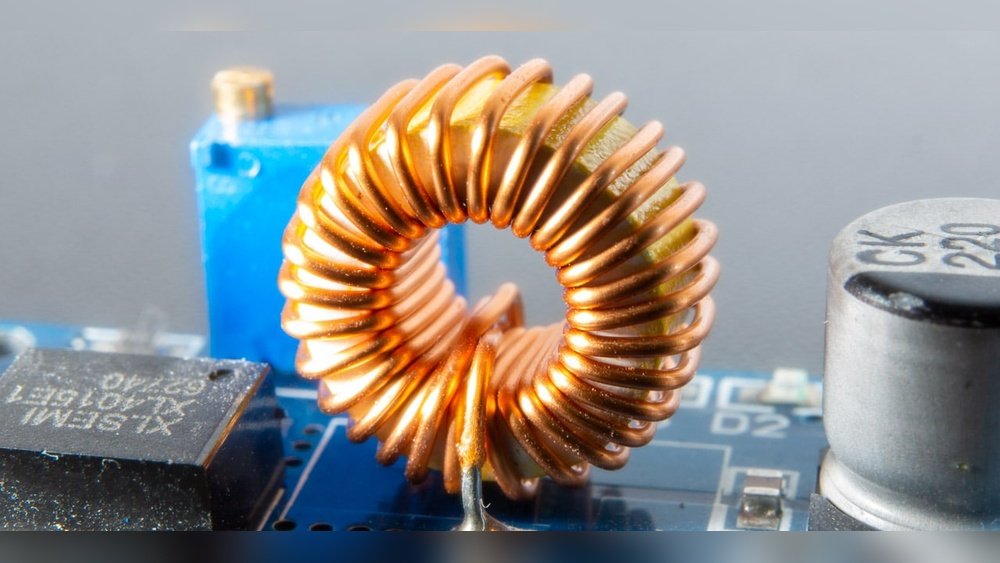
Coil whine is a sound made by small parts inside your laptop. These parts are called coils or inductors. They are tiny wires wrapped around a metal core. When electricity moves through them, they sometimes vibrate. This vibration causes the high-pitched sound you hear. The sound can be very sharp and loud.
Coil whine is common in many electronics. You can find it in laptops, desktop computers, power supplies, and even some TVs. It is not a sign that your laptop is broken. It is just a side effect of how electricity works inside the parts.
Why Does Coil Whine Happen?
Coil whine happens because of how electricity flows in your laptop. Here are some main reasons:
- High power load: When your laptop works very hard, like playing games or running heavy programs, it uses more power. This can make coils vibrate more.
- Electrical frequency: The power changes many times each second. This can cause coils to move and make noise.
- Design and quality: Some laptops have coils that are more likely to whine. It depends on how the laptop is made and the materials used.
- Age and wear: Older laptops or ones with dust can make coil whine worse because parts may not work smoothly.
Is Coil Whine Dangerous?
Coil whine does not harm your laptop. It does not mean the laptop is broken or will stop working. But the noise can be annoying and distracting. Sometimes, it is so loud that it makes it hard to focus or enjoy your work.
If you want to keep your laptop quiet, you can try some simple fixes. Let’s see what you can do.

Credit: www.reddit.com
How to Fix or Reduce Laptop Coil Whine
There is no one perfect way to stop coil whine. But you can try many things. Some work better than others. Here are useful tips you can try.
1. Reduce The Load On Your Laptop
When your laptop works hard, coil whine can get louder. You can reduce the load to help lower the noise.
- Lower screen brightness: Bright screens use more power. Try reducing brightness.
- Close unneeded programs: More programs running means more work for your laptop.
- Limit frame rate in games: Use settings like V-Sync or FPS limit to reduce GPU load.
- Use power saving mode: This lowers CPU and GPU performance to save power and reduce noise.
2. Change Power Settings On Windows
You can change some settings in Windows to reduce coil whine. Here is how:
- Open Control Panel.
- Go to Power Options.
- Click Change plan settings next to your active plan.
- Click Change advanced power settings.
- Find Processor power management.
- Set Maximum processor state to 90% or lower.
- Click OK and restart your laptop.
This can reduce CPU speed and lower the coil whine.
3. Update Your Laptop Drivers And Bios
Sometimes, coil whine happens because of outdated software. Your laptop’s BIOS or drivers control how parts work.
- Go to your laptop maker’s website.
- Find the support or download section.
- Download the latest BIOS and drivers for your model.
- Install them carefully.
Updating these can improve power management and reduce coil whine.
4. Use Software To Limit Frame Rate
If coil whine happens while gaming, try to limit the frame rate (FPS). High FPS can increase power use and noise.
You can use:
- V-Sync option in game settings.
- Software like RivaTuner to cap FPS.
Lower FPS means less work for your GPU and less coil whine.
5. Place Your Laptop On A Soft Surface
Hard surfaces can make coil whine sound louder. Try placing your laptop on a soft mat or cloth.
This can absorb some sound and reduce noise.
6. Use Headphones Or External Speakers
If coil whine is still loud, try using headphones or external speakers. This will help you hear your work or music better without the annoying noise.
7. Check For Dust And Clean Your Laptop
Dust can cause fans and parts to work harder. This may increase coil whine.
- Turn off and unplug your laptop.
- Use a small brush or compressed air to clean vents and fans.
- Be gentle to avoid damage.
Regular cleaning helps keep your laptop quiet and cool.
8. Use Paper Or Foam To Block The Noise
Some people try to block coil whine sound by making a small funnel with paper.
- Roll a piece of paper into a tube.
- Place the tube near the coil whine source.
- This can direct sound away from your ears.
You can also try soft foam around vents to reduce noise. Be careful not to block airflow.
9. Contact Laptop Support Or Service Center
If coil whine is very loud or new, your laptop might have a problem. Sometimes a coil is loose or damaged.
Check if your laptop is still under warranty. Contact the manufacturer or a service center for help.
They may fix or replace parts to stop the noise.
Table: Quick Summary of Fixes
| Fix | What It Does | How to Try |
|---|---|---|
| Reduce laptop load | Lower power use and coil vibration | Lower brightness, close apps, limit FPS |
| Change power settings | Limit CPU speed to reduce noise | Adjust Windows power plan to 90% max CPU |
| Update BIOS and drivers | Fix power management bugs | Download updates from laptop maker site |
| Limit frame rate | Reduce GPU load and coil whine | Use V-Sync or FPS limit software |
| Use soft surface | Absorb sound and reduce noise | Place laptop on cloth or soft mat |
| Use headphones | Hide coil whine noise | Plug in headphones or external speakers |
| Clean laptop | Reduce dust and fan noise | Use brush or compressed air on vents |
| Block noise with paper | Direct sound away from ears | Roll paper tube near noise source |
| Contact support | Fix hardware problems | Call manufacturer or service center |
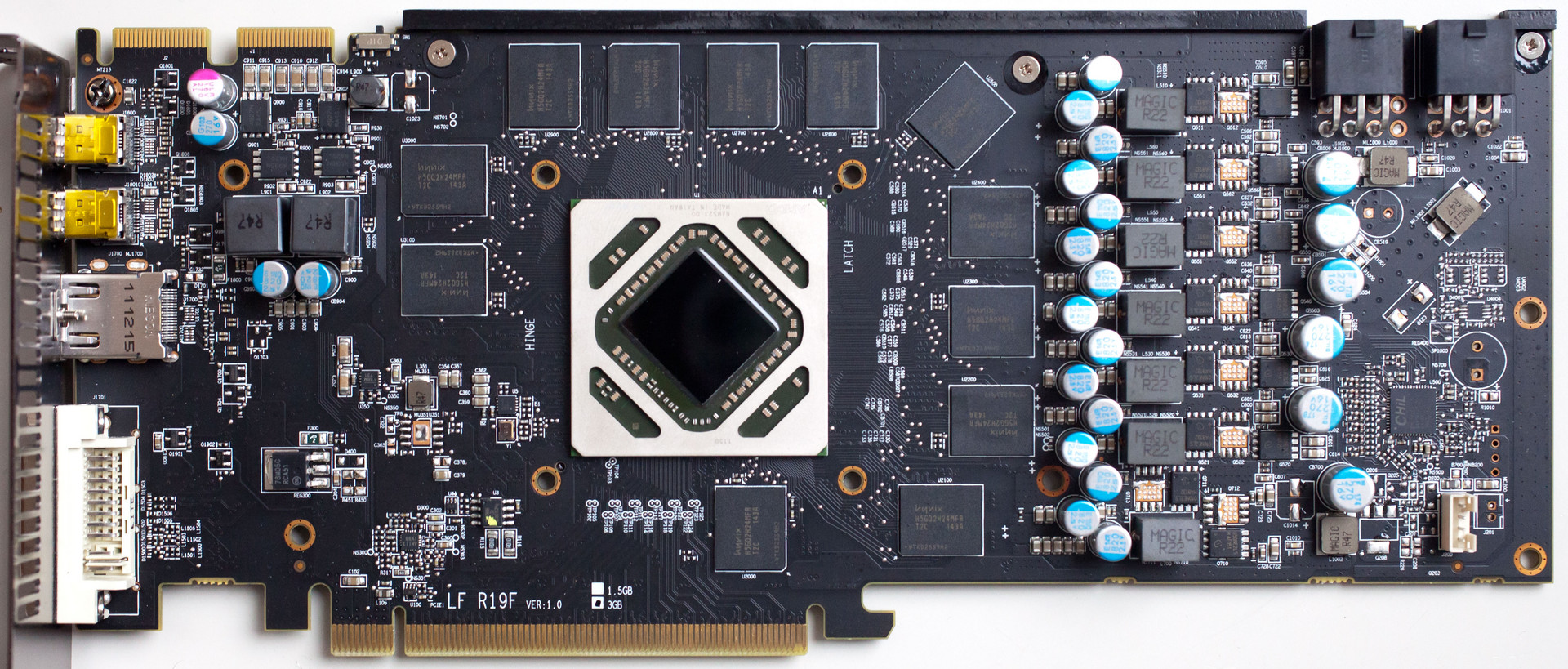
Credit: www.notebookcheck.net
Final Thoughts
Coil whine can be annoying but it is not dangerous. It happens because small parts vibrate inside your laptop. You can try many simple ways to reduce or fix the noise.
Start by lowering your laptop’s power use. Change power settings and limit frame rate if you play games. Keep your laptop clean and use soft surfaces. If the noise stays loud, contact support.
With patience, you can make your laptop much quieter. A quiet laptop is better for work and fun.
Frequently Asked Questions
Is It Possible To Stop Coil Whine?
Yes, you can reduce coil whine by lowering GPU/CPU load or enabling V-Sync to limit frame rates. Applying damping materials may help too. Complete elimination is rare but these methods often minimize the noise effectively.
Why Is My Laptop Making A Whining Noise?
Your laptop’s whining noise often comes from coil whine, fan bearings, or hard drive motors. High electrical currents cause coil whine. Dust, imbalance, or high fan speeds increase noise. Reducing CPU/GPU load or cleaning fans can help minimize the sound.
Is Coil Whine Normal In Laptop?
Coil whine is normal in laptops due to electrical currents in coils. It doesn’t indicate hardware damage. Reducing workload or enabling V-Sync may lower the noise.
What Exactly Causes Coil Whine?
Coil whine happens when electrical current causes electromagnetic coils to vibrate rapidly. This vibration produces a high-pitched noise. It often occurs under heavy GPU or CPU load due to electrical interference and component design. Coil whine is normal and does not indicate hardware failure.