Finding The Right Laptop For Small Dorm Rooms
Living in a small dorm room means space is tight and every inch counts. You’ve probably felt the challenge of balancing a laptop that’s powerful enough for studies but compact enough to fit your limited space. It’s a common situation where you want a device that won’t weigh you down or crowd your desk.
Choosing a laptop for this setting isn’t straightforward. There are trade-offs between size, performance, battery life, and price. Some models offer more power but take up more room or cost more. Others prioritize portability but may lack certain features you need for school tasks or entertainment.
This article will help you understand what matters most when picking a laptop for small dorm rooms. It will guide you through the main considerations to find a balance that fits your lifestyle and study needs.
What Matters Most For Students In Tight Spaces
For dorm use, a laptop’s size and weight are key. You want something easy to carry and that won’t overwhelm your small desk. Screen size around 14 inches often hits the sweet spot—large enough for comfortable viewing but still compact.
Battery life is another big factor. Long-lasting power means fewer trips to find an outlet, which is handy in shared spaces. Also, consider how fast it charges if you need quick boosts between classes or study sessions.
Performance needs vary. Basic tasks like note-taking, web browsing, and streaming don’t require top-tier specs. But if you plan on multitasking or using software like Office applications and video calls, smooth performance with enough RAM is important.
Common Confusions When Choosing
It’s easy to get caught up in specs that don’t always matter. Higher processor numbers or extra storage might seem impressive, but they don’t always translate to better real-world use for students. Also, operating systems can be confusing—Windows, Chrome OS, or others—each has pros and cons depending on your habits and software needs.
Price is often a concern. There are options across the spectrum, from budget-friendly to more premium. Finding the right balance between cost and features without overspending is a frequent challenge.
How To Approach Your Decision
Think about your daily routine and what you’ll use the laptop for most. If portability and battery life top your list, focus there. If you run multiple apps or do creative work, prioritize performance and memory. Remember that size and design also affect how comfortable the laptop will be in your dorm setup.
Choosing a laptop is about matching your needs with what fits your space and budget. With this in mind, the following selections cover a variety of options tailored to small dorm rooms and student lifestyles.
Below, you’ll find laptops chosen for their balance of size, power, and value. Each one suits different needs and preferences, helping you find the right fit for your dorm life and studies.
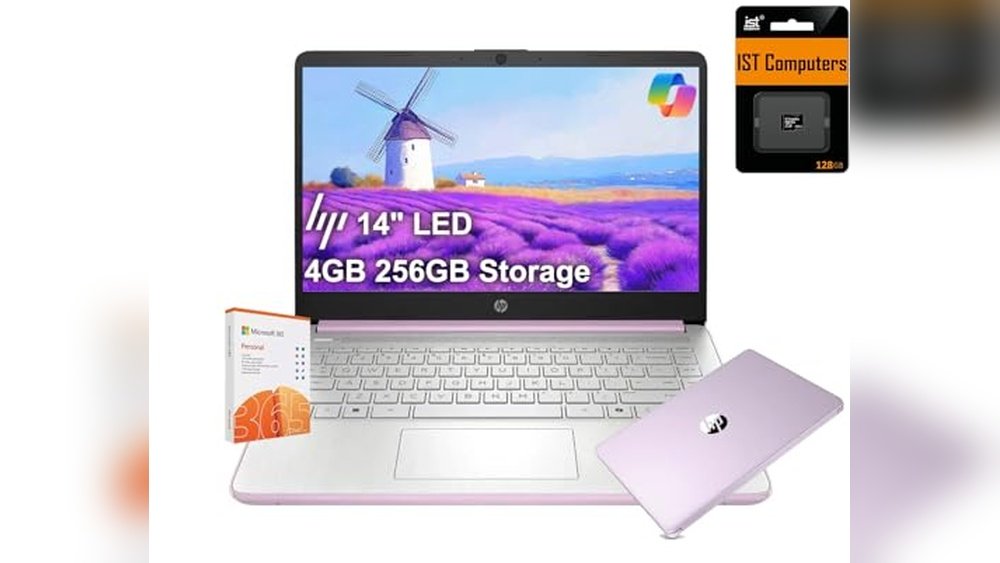
Hp 14 Ultra-light Laptop Lavender
This compact and lightweight laptop is one of the Best Laptops for Students Living in Small Dorm Rooms, offering long battery life and enough power for everyday tasks.

The HP 14 Ultra-Light Laptop is designed for everyday use with a light workload in mind, perfect for students who need a reliable device in small dorm rooms. Its lavender purple shell adds a unique touch, while the long battery life and fast charging help keep you going through study sessions and online classes.
Using this laptop feels straightforward and consistent, with smooth multitasking thanks to its Intel N150 processor and 4GB RAM. The 14-inch anti-glare screen and good connectivity options make it easy to work comfortably in tight spaces without hassle.
Key Advantages for Dorm-Living Students
- Compact and lightweight for easy portability in small spaces
- Up to 11 hours of battery life with fast charge to last through long days
- Includes a one-year Microsoft 365 subscription for school productivity
- Smooth everyday performance with Intel N150 processor and 4GB RAM
- Anti-glare 14″ HD display helps reduce eye strain in bright dorm rooms
- Multiple ports and Wi-Fi 6 for versatile connectivity
- Windows 11 Home in S mode provides security with the option to switch out
Considerations Before Buying
- Display resolution is HD (1366 x 768), not Full HD, which may affect sharpness
- 4GB RAM limits heavy multitasking or demanding applications
- Storage is split between internal UFS and SD card, which may require management
Who This Fits Best
This laptop suits students living in small dorm rooms who need a lightweight and reliable device for daily schoolwork, online classes, and casual use. It removes the stress of carrying heavy laptops and the hassle of frequent charging with its long battery life.
For best results, consider using cloud storage to manage the split storage efficiently. Its solid build and included Office 365 subscription provide peace of mind for both productivity and security. The lavender color adds a personal style that stands out without being flashy.
| Best for | Why |
|---|---|
| Students in tight dorm spaces | Compact size and light weight make it easy to fit and carry |
| All-day use without charging breaks | Long battery life and fast charging keep you productive |
| Basic school tasks and productivity | Includes Microsoft 365 for assignments and presentations |
| Video calls and online classes | 720p HD webcam and good connectivity support clear communication |
Samsung Galaxy Chromebook Go 14″
One of the Best Laptops for Students Living in Small Dorm Rooms, this Samsung model offers a slim, lightweight design ideal for tight spaces and mobility.

The Samsung Galaxy Chromebook Go 14″ is a traditional laptop built for students who need a compact computer for daily tasks. Its slim and lightweight frame fits easily into small dorm rooms while offering solid performance with an Intel Celeron N4500 processor and ChromeOS.
Using this Chromebook feels straightforward and reliable. The long-lasting 12-hour battery and faster Wi-Fi help maintain productivity without frequent charging or connectivity issues, making it a steady companion for study sessions or streaming.
Key Advantages for Dorm Room Students
- Compact and slim design saves space and eases portability.
- Durable military-grade build withstands accidental drops.
- Long 12-hour battery life supports full school days without charging.
- Wi-Fi speed up to three times faster than previous models ensures quick online access.
- Seamless phone integration improves workflow between devices.
Considerations Before Buying
- 4GB RAM and 64GB storage may limit multitasking and file capacity for some users.
- Intel Celeron N4500 is suitable for basic tasks but not heavy software or gaming.
- ChromeOS limits compatibility with some traditional Windows applications.
When This Chromebook Works Best
This laptop fits students living in small dorm rooms who prioritize portability and ease of use over high-end specs. It removes the hassle of bulky equipment and frequent charging, letting you focus on schoolwork and online learning.
To get the most out of it, consider using cloud storage and lightweight apps to stay within the storage and performance limits. The durable build and reliable battery offer peace of mind for daily campus life.
| Best for | Why |
|---|---|
| Students with limited desk space | Slim size and lightweight design fit small dorm setups |
| Users needing long battery life | 12-hour battery supports all-day use without charging breaks |
| Those who want durable portability | Military-grade construction handles drops and bumps |
| Students relying on cloud and web apps | ChromeOS is optimized for online productivity and phone syncing |
Hp 14 Laptop Snowflake White
This laptop offers a compact and portable solution, ideal among Best Laptops for Students Living in Small Dorm Rooms who need a reliable device without space compromises.

The HP 14 Laptop in Snowflake White is a lightweight traditional laptop designed to fit well in tight spaces like small dorm rooms. Its 14-inch micro-edge HD display maximizes screen space despite the compact frame, making it easier to study or stream content without feeling cramped.
Using this laptop feels straightforward and convenient. The thin and portable design allows easy transport between classes or study spots. You can trust its Intel Celeron N4020 processor to handle everyday tasks smoothly, saving time and reducing the hassle of slowdowns.
Key Features for Dorm Room Use
- Thin and light design fits small spaces and easy to carry
- 14-inch micro-edge HD display offers more screen in less space
- Intel Celeron N4020 processor balances performance and power consumption
- 4 GB RAM supports smooth multitasking for school tasks
- 64 GB embedded storage provides reliable flash-based memory
- Intel UHD Graphics 600 enables smooth 4K content streaming
- Comes with one year of Microsoft 365 for productivity apps
Considerations Before Buying
- 64 GB storage may fill quickly with large files or many apps
- Intel Celeron N4020 is suitable for basic tasks, not heavy computing
- HD display resolution is standard, not full HD or higher
Where This Laptop Excels
This laptop is best for students who prioritize space-saving design without sacrificing essential performance. It removes guesswork by offering a balanced configuration for common school tasks and media consumption.
By choosing this model, you avoid the stress of bulky devices in cramped dorm settings. A quick tip: regularly use cloud storage to extend the limited internal storage effectively. You’ll get reliable daily performance and the peace of mind that comes with a familiar Windows 11 environment.
| Best for | Why |
|---|---|
| Students in cramped dorm rooms | Compact size and thin design save valuable space |
| Basic schoolwork and media streaming | Processor and graphics handle everyday tasks and 4K video |
| Budget-conscious buyers | Affordable price with essential features and Microsoft 365 |
| Users needing portable Windows 11 device | Lightweight and preloaded with latest OS for consistent experience |
Hp Chromebook 14
A compact, long-lasting option among Best Laptops for Students Living in Small Dorm Rooms, offering reliable performance and portability.

The HP Chromebook 14 is a lightweight laptop designed for everyday tasks with a 14-inch HD display and Intel Celeron N4120 processor. It fits well in small dorm rooms, providing a balance of portability and power for schoolwork and entertainment.
Using this Chromebook feels straightforward and efficient. Its long battery life and thin design make it easy to carry around and rely on throughout a busy day of classes, study sessions, and downtime.
Key Benefits for Dorm Life
- Lightweight and slim, ideal for tight spaces and backpacks.
- 14-inch anti-glare HD display for comfortable viewing.
- Long battery life to last through study sessions and classes.
- Quad-core Intel Celeron processor balances performance and efficiency.
- 64 GB eMMC storage provides quick access to files and apps.
- 4K streaming capability with Intel UHD Graphics 600 for entertainment.
- Reliable Chrome OS keeps things simple and secure.
Considerations Before Buying
- 64 GB storage may fill up quickly with large files or many apps.
- Display resolution is HD, not full HD, which might affect sharpness.
- Limited RAM at 4 GB may challenge heavy multitasking or advanced software.
Who This Chromebook Works For
This laptop suits students living in small dorm rooms who need a compact, easy-to-use device for school and streaming. It removes the hassle of heavy, bulky laptops and long charging times.
To get the most from it, focus on cloud storage and lightweight applications to stay within storage limits. The Chromebook’s reliable battery and simple interface offer peace of mind for daily use without surprises.
| Best for | Why |
|---|---|
| Students with limited desk space | Compact size fits easily in small dorm rooms and backpacks |
| Users prioritizing battery life | Long-lasting battery supports extended study and entertainment |
| Those needing simple, secure browsing | Chrome OS offers straightforward and safe computing |
| Casual streamers and light multitaskers | 4K streaming capability with efficient Intel UHD Graphics |
Hp 14″ Business Student Laptop
This compact HP laptop is among the Best Laptops for Students Living in Small Dorm Rooms, offering strong performance and storage in a slim design.

The HP 14″ Business Student Laptop delivers a balance of power and portability suited for students in tight spaces. Its quad-core Intel processor and 16GB RAM help manage multitasking and academic software smoothly. The 14-inch display with minimal bezels maximizes screen space without increasing footprint.
Using this laptop feels efficient and reliable for daily tasks like online classes, document editing, and light media work. The included Lifetime Microsoft Office and external storage make managing coursework easier, while Windows 11 Pro offers a secure environment for studies. This laptop fits neatly on small desks or dorm room setups without bulk.
Key Benefits for Student Use
- Powerful quad-core Intel CPU supports smooth multitasking
- Large 16GB RAM handles multiple applications and browser tabs
- Ample combined storage with fast internal UFS and 500GB external drive
- Compact 14″ display with minimal bezel fits small spaces
- Windows 11 Pro enhances security and productivity for students
- Includes lifetime Microsoft Office for academic needs
- Accessory bundle adds connectivity and convenience
Considerations for Buyers
- Weight of 3.24 pounds is moderate; not the lightest ultra-portable
- Display resolution is standard HD, not Full HD or higher
- External drive adds bulk to total storage solution
Who This Suits Best
This HP laptop fits students living in small dorm rooms who need a reliable all-in-one academic machine with plenty of memory and storage. It removes the hassle of juggling multiple devices by including an external drive and essential accessories. To get the best out of it, keep the accessory dock handy for connecting peripherals seamlessly.
With its secure Windows 11 Pro and lifetime Office bundle, it provides peace of mind for handling coursework safely and efficiently. The laptop’s size and performance strike a good balance between portability and capability, perfect for compact living spaces.
| Best for | Why |
|---|---|
| Students with limited desk space | Compact 14-inch screen and slim design fit tight dorm setups |
| Heavy multitasking and productivity | 16GB RAM and quad-core CPU handle multiple apps and browser tabs |
| Users needing bundled productivity tools | Includes lifetime Microsoft Office for documents and presentations |
| Those who want external storage flexibility | 500GB external drive adds portable, easy-access storage |
Hp Chromebook 14 Laptop
This model stands out among Best Laptops for Students Living in Small Dorm Rooms with its lightweight design and long battery life, ideal for tight spaces.

The HP Chromebook 14 Laptop is a compact and lightweight traditional laptop designed for everyday tasks like home use, schoolwork, and media consumption. It solves the challenge of limited space by fitting easily into small dorm rooms without sacrificing performance for basic computing needs.
Using this Chromebook feels simple and consistent, thanks to its straightforward Chrome operating system and fast Intel Celeron N4000 processor. The long battery life lets you work or stream comfortably without frequent recharging, making it a reliable companion throughout your day.
Key Advantages for Dorm Use
- Lightweight and slim design fits small spaces easily
- Long battery life supports extended study or entertainment sessions
- Anti-glare 14” HD display reduces eye strain in various lighting
- Intel Celeron N4000 processor handles everyday tasks smoothly
- 32 GB eMMC storage and 4 GB RAM enable quick access to documents
- Built-in webcam and dual microphones support remote learning
- Chrome OS offers simplicity and fast startup
Considerations for Buyers
- Limited storage space may require cloud use for large files
- Display resolution is HD, not Full HD, which may affect media detail
- Processor is basic, not suitable for heavy multitasking or gaming
Who This Works For
This laptop suits students living in small dorm rooms who need a no-fuss device for school, browsing, and streaming. It removes the hassle of bulky laptops by being lightweight and easy to carry.
To get the best use, keep your files synced with cloud services to manage limited storage. You can count on this Chromebook for reliable performance without surprises during your daily routines.
| Best for | Why |
|---|---|
| Students with limited dorm space | Compact dimensions and light weight fit small rooms easily |
| Remote learning and video calls | Built-in webcam and dual mics ensure clear communication |
| Casual media consumption | Anti-glare HD display and long battery support comfortable viewing |
| Users wanting low-maintenance laptops | Chrome OS offers simple, secure, and fast operation |
Hp 14 Ultra-light Laptop
This HP 14 Ultra-Light Laptop is one of the Best Laptops for Students Living in Small Dorm Rooms, offering long battery life and a compact design ideal for tight spaces.

The HP 14 Ultra-Light Laptop is designed for everyday tasks like studying, streaming, and online classes. Its 12-hour battery life and fast charge feature ensure you can work throughout the day without worrying about plugging in. The included one-year Microsoft 365 subscription supports productivity apps like Word and PowerPoint, perfect for student use.
Using this laptop feels straightforward and reliable, with a crisp 14″ display that reduces eye strain thanks to anti-glare technology. Its lightweight and slim profile make it easy to carry around or fit into small dorm rooms, while Wi-Fi 6 and a fast processor keep performance smooth during multitasking or video calls.
Key Advantages for Student Use
- Long 12-hour battery life with fast charging for extended use without interruptions
- Compact 14″ design fits easily in limited dorm room space
- Comes with a one-year Microsoft 365 subscription for essential school apps
- Supports connecting two external monitors to expand workspace when needed
- Equipped with Wi-Fi 6E and Bluetooth 5.4 for fast and stable wireless connections
- Lightweight at just over 3 pounds, making it portable for campus life
- Windows 11 Home in S mode offers secure and optimized performance
Considerations Before Buying
- Intel Celeron N4500 processor is suitable for light workloads, not heavy multitasking or gaming
- 4GB RAM may limit performance with many apps open simultaneously
- 128GB storage (split between eMMC and SD card) might require additional external storage for large files
Who This Laptop Works For
This laptop is ideal for students living in small dorm rooms who need a dependable, portable device for everyday school tasks and video calls. It removes the hassle of frequent charging and helps maintain productivity with Microsoft 365 included.
To get the best experience, consider managing storage carefully and limiting background apps to keep performance smooth. You’ll appreciate its lightweight design and reliable wireless connections, providing peace of mind for online classes and assignments.
| Best for | Why |
|---|---|
| Students with limited dorm space | Compact size and lightweight design fit easily in small areas |
| Users needing all-day battery life | Up to 12 hours of battery with fast charging capability |
| Basic productivity and online classes | Includes Microsoft 365 and supports smooth video conferencing |
| Budget-conscious buyers | Affordable price with essential features for student use |
Hp 14 Laptop 2025 Flagship
This HP 14 Laptop is among the Best Laptops for Students Living in Small Dorm Rooms, offering powerful performance and ample storage in a compact design.

This laptop is designed to meet the needs of students who require a reliable computer for schoolwork and multimedia tasks. It features a 13th Gen Intel 4-core processor and 16GB of RAM, enabling smooth multitasking and fast performance without slowing down. The combination of 128GB UFS internal storage and a 500GB external drive helps keep large files and projects accessible.
Using this HP 14 Laptop feels straightforward and efficient, especially in confined spaces like dorm rooms. Its 14-inch HD anti-glare display ensures comfortable viewing even in bright environments, while the included 6-in-1 accessory hub adds convenience for connectivity and peripherals. Long battery life supports extended study sessions without frequent charging.
What Makes It Fit Dorm Life
- Compact 14-inch size fits easily on small desks and tight spaces
- Strong multitasking ability with 16GB RAM for school projects and apps
- Ample combined storage (internal + external) to manage files and media
- Anti-glare HD screen reduces eye strain during long study hours
- Includes essential accessories like wireless mouse and earbuds in the bundle
- Windows 11 Home in S Mode offers security and easy mode switching
- Lightweight design at just over 3 pounds for easy portability
Considerations for Buyers
- External storage device needed to reach full 628GB capacity
- Windows 11 S Mode may restrict some apps unless switched out
- Not a gaming laptop; best suited for productivity and media use
Who This Works Best For
This HP 14 Laptop is ideal for students living in small dorm rooms who want a dependable and efficient computer that won’t crowd their space. It removes the hassle of juggling multiple devices by combining good speed, storage, and useful accessories in one package. Switching out of Windows S Mode is a quick step that expands software options for greater flexibility.
For better results, pairing it with cloud storage or external drives can keep large projects organized and accessible. Its reliable performance and thoughtful design help avoid surprises during important study sessions. Overall, this laptop suits practical users who appreciate balanced features without extra bulk.
| Best for | Why |
|---|---|
| Students with limited desk space | Compact 14-inch size fits small dorm room setups comfortably |
| Multitasking school projects | 16GB RAM and 13th Gen Intel CPU handle multiple apps smoothly |
| Users needing extra storage | Includes 500GB external drive for expanded file management |
| Remote learning and video calls | HD anti-glare display and HD webcam with dual microphones |
Asus Vivobook Go 15.6” Slim Laptop
A compact and durable choice among the Best Laptops for Students Living in Small Dorm Rooms, offering solid performance and a vibrant display.

The ASUS Vivobook Go 15.6” Slim Laptop is designed to meet the needs of students who require a reliable and space-conscious laptop for their studies. Its slim bezel NanoEdge display maximizes screen space without increasing the overall size, making it ideal for small dorm rooms. Equipped with an AMD Ryzen 3 processor, it handles everyday tasks like browsing and document editing smoothly.
Using this laptop feels efficient and straightforward, thanks to its lightweight design and solid memory configuration. The crisp audio from SonicMaster speakers enhances video calls and multimedia, while fast charging minimizes downtime between classes and study sessions.
Key Advantages for Dorm Room Use
- Compact 15.6” NanoEdge display fits neatly on small desks
- AMD Ryzen 3 processor provides smooth multitasking for schoolwork
- 8GB DDR5 RAM and 128GB SSD enable quick app performance and storage
- Military-grade durability for everyday dorm life bumps and knocks
- Fast charging helps keep the laptop ready with minimal wait
- Reliable Wi-Fi 5 and Bluetooth 5.1 for stable connectivity
- Built-in webcam shield adds privacy protection
Considerations Before Buying
- 128GB storage may require external drives for large media files
- Display brightness at 250 nits may be less visible in very bright rooms
- No touchscreen functionality, limiting input options
Who This Laptop Works For
This ASUS Vivobook Go is well-suited for students living in small dorm rooms who need a dependable laptop for writing papers, researching, and attending virtual classes. It removes the hassle of managing bulky devices and offers peace of mind with its sturdy build.
For the best experience, pairing it with cloud storage can help overcome the limited internal space. Its quick startup and charging cycle save valuable time, making it easy to stay productive throughout busy school days. Its straightforward design fits a practical student lifestyle without distractions.
| Best for | Why |
|---|---|
| Students with limited desk space | Slim bezel design maximizes screen size without taking up extra room |
| Light multitasking and productivity | AMD Ryzen 3 and 8GB RAM handle everyday academic tasks smoothly |
| Users needing durable laptops | Military-grade durability withstands dorm room wear and tear |
| Privacy-conscious students | Webcam shield offers simple protection during video calls |
Hp 14 Ultra Light Laptop
This HP 14 Ultra Light Laptop stands out among the Best Laptops for Students Living in Small Dorm Rooms due to its lightweight design and long battery life that fits compact spaces and busy schedules.

The HP 14 Ultra Light Laptop is a compact, traditional laptop designed for everyday multitasking and productivity, especially useful for students living in small dorm rooms. It offers a balance of performance and portability with a lightweight frame of just over 3 pounds and up to 11.5 hours of battery life, helping students stay productive throughout the day without frequent recharging.
Using this laptop feels convenient and efficient thanks to its crisp 14-inch anti-glare display and reliable connectivity options like USB-C, HDMI, and Wi-Fi 5. It supports common student tasks such as note-taking, video calls, and document editing while being easy to carry and set up in tight spaces.
Key Advantages for Dorm Use
- Lightweight design at 3.24 pounds makes it easy to carry and store in small rooms
- Up to 11.5 hours of battery life supports long study sessions without charging
- Includes one-year Microsoft 365 subscription for essential student software
- Expandable storage with built-in SD card slot for extra space
- Multiple ports including USB-C and HDMI for connecting peripherals or external monitors
- 720p webcam suitable for online classes and video conferences
- Windows 11 Home in S mode provides a secure environment for schoolwork
Considerations Before Buying
- 4GB RAM may limit performance with heavy multitasking or demanding applications
- 128GB storage is modest, so external storage might be needed for large files
- Processor is entry-level, best suited for standard student tasks rather than intensive computing
Who This Fits Best
This laptop is ideal for students who prioritize portability and battery life while living in space-limited dorm rooms. It removes the hassle of frequent charging and bulky devices, allowing for a streamlined study setup.
For better performance, consider using cloud storage or external drives to supplement the internal storage. Its reliable connectivity and Microsoft 365 access provide peace of mind for completing assignments and attending classes without unexpected interruptions.
| Best for | Why |
|---|---|
| Students in compact dorm rooms | Lightweight and small footprint fits tight spaces easily |
| Long study or class sessions | Extended battery life supports all-day use without charging |
| Basic productivity tasks | Includes Microsoft 365 and sufficient specs for word processing and browsing |
| Online learning and video calls | 720p webcam and stable Wi-Fi enable smooth virtual classes |
Understanding Your Needs Before Choosing A Laptop
When selecting a traditional laptop, consider what you primarily need it for: schoolwork, home use, casual gaming, or professional tasks. Laptops in this category vary in processing power, storage, and battery life, so focus on the tasks you expect to perform daily.
Performance vs. Portability
If you prioritize portability and long battery life for on-the-go use, look for lightweight models with efficient processors and decent RAM. For heavier multitasking or creative applications, prioritize higher RAM and storage capacity over minimal weight.
Operating System Considerations
Decide between Windows and Chrome OS based on software compatibility. Windows offers broader software support, while Chrome OS favors web-based applications and simplicity. Ensure the OS aligns with your workflow and software needs.
Key Factors To Evaluate In Traditional Laptops
Processor and RAM
Processors like Intel Celeron or newer quad-core models provide basic to moderate performance. Complement this with at least 4GB RAM for smooth multitasking, but 8GB or more is beneficial for more demanding tasks.
Storage Type and Capacity
Storage options include SSD, UFS, eMMC, or combinations. SSDs and UFS generally offer faster data access, improving overall responsiveness. Consider storage size based on your file needs; 128GB or more is common for general use.
Display and Build Quality
Look for anti-glare screens with at least HD resolution for comfortable viewing. Build quality varies; some models offer military-grade durability, which may be important if carrying your laptop frequently.
Battery Life and Charging
Long battery life (10+ hours) is common in this category. Fast charging capabilities can reduce downtime. Choose a model that balances battery performance with your daily usage patterns.
Common Buyer Questions
Is 4GB RAM enough for everyday tasks?
For basic activities like web browsing, word processing, and streaming, 4GB RAM suffices. However, for multitasking or more demanding apps, consider 8GB or higher for smoother performance.
What is the difference between eMMC and SSD storage?
SSD storage is typically faster and more reliable than eMMC. eMMC is common in budget laptops but may result in slower boot and load times compared to SSD.
Can I switch out of Windows 11 S mode?
Yes, many models allow switching from Windows 11 S mode to the full Windows 11 Home version for greater app flexibility. This switch is usually irreversible.
How important is the laptop’s weight for daily use?
Weight matters if you carry your laptop frequently. Laptops around 3 to 4 pounds are considered lightweight and suitable for mobility.
Do these laptops support connecting external monitors?
Most models include HDMI or USB-C ports that support external displays, often up to 4K resolution, allowing expanded workspace or presentations.
Tips For Laptop Setup And Maintenance
Upon receiving your laptop, update the operating system and drivers to ensure security and performance. Regularly clean the keyboard and screen with appropriate materials. Use a protective case if you transport the laptop often to prevent damage.
Manage battery health by avoiding constant full discharges and keeping the laptop cool during use. Back up important data regularly, especially if storage is limited.
Final Thoughts On Choosing A Traditional Laptop
Traditional laptops offer a wide range of options suited to different needs and budgets. Focusing on your daily tasks and preferences will help you select the right balance of performance, portability, and features. Consider operating system, battery life, and connectivity as key aspects alongside hardware specifications. Taking time to understand these factors reduces confusion and supports a confident decision.