

Finding The Right Laptop For Structural Engineering Work
Working with software like Revit or Staad Pro often means handling large files and complex models. You’ve likely faced slow load times or lag during critical design phases, which can be frustrating. Choosing a laptop that balances power, portability, and durability can feel overwhelming.
The challenge is that laptops built for structural engineering come with trade-offs. Some prioritize raw processing power but may be bulky or expensive. Others offer rugged designs for fieldwork but might lack advanced specs for heavy multitasking. Knowing what matters most depends on your specific workflow and environment.
This guide will help you understand the key considerations when picking a laptop suited for structural engineering tasks. It aims to clarify the essential factors without diving too deep into technical jargon, so you can make a clear, informed choice.
Understanding What Matters Most
For structural engineers, the laptop must handle demanding software smoothly. That means reliable CPU performance and enough memory to run multiple applications without slowing down. Storage speed also affects how quickly projects open and save. Meanwhile, screen clarity and size influence how well you can view detailed plans.
If you work onsite or outdoors, durability and battery life become important. Rugged construction and protection against dust or moisture can prevent costly downtime. On the other hand, if most work is done in an office, a lighter machine with a larger screen might be preferable.
Common Pitfalls When Choosing
Many buyers focus too much on specs alone and overlook practical use. For example, a laptop with the fastest processor won’t help if it overheats quickly or has a poor keyboard for extended use. Similarly, choosing a model with inadequate cooling can cause throttling under heavy loads.
Another common mistake is ignoring the balance between portability and power. Heavy, rugged laptops are sturdy but less convenient to carry daily. Conversely, thin and light machines might not sustain peak performance for long engineering sessions.
How To Approach Your Decision
Think about where and how you’ll use the laptop most. If you spend time both at a desk and on site, look for a model that combines solid specs with ruggedness and battery longevity. If your work is mainly office-based, prioritize screen size and processing power over extreme durability.
Also, consider future needs. Software updates and growing project complexity may require more memory or storage down the line. Opting for a laptop with upgrade options can extend its useful life.
With these points in mind, the following selections offer a range of choices tailored to different priorities within the structural engineering field.
Empowered Pc Pro Rugged 14
A top choice among Best Laptops for Structural Engineers (Revit/Staad Pro) thanks to its powerful 12-core Intel CPU and massive 96GB DDR5 RAM that handle complex models smoothly.
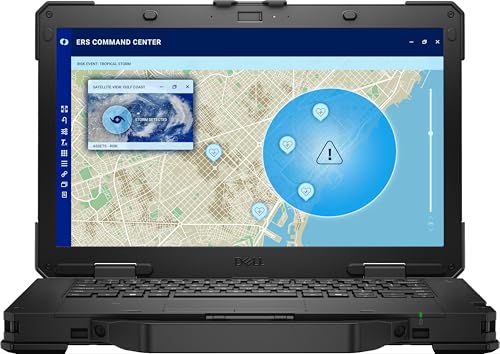
The Empowered PC Pro Rugged 14 is a traditional laptop built to endure tough conditions while delivering exceptional performance. It is designed to run demanding engineering software with its Intel 12-Core Ultra 7 165U processor and a large 4TB SSD for fast data access and storage. Its rugged design supports work in extreme weather, making it ideal for engineers on the go.
Using this laptop feels reliable and smooth, even when multitasking on resource-heavy applications like Revit or Staad Pro. The 14-inch FHD anti-glare display ensures clear visuals outdoors, while the dual battery offers long-lasting use without constant recharging. This combination makes fieldwork and office tasks less stressful and more productive.
Key Advantages for Structural Engineering
- Powerful 12-core Intel CPU handles complex engineering software efficiently
- Massive 96GB DDR5 RAM enables seamless multitasking and large model handling
- 4TB PCIe NVMe SSD for rapid boot-up and data transfer speeds
- Rugged MIL-STD-810H certified design works in extreme temperatures and conditions
- 14” anti-glare FHD display provides clear visuals in bright environments
- Long battery life with dual batteries, up to 21 hours of use
- Stable WiFi 6E and Bluetooth 5.3 connectivity for reliable networking
Considerations Before Choosing
- Relatively heavy at nearly 14 pounds, which may impact portability
- Integrated graphics may limit performance in graphics-intensive 3D rendering
- Premium price point may be higher than typical laptops
Who This Fits Best
This laptop suits structural engineers who need a durable machine that can handle demanding software like Revit and Staad Pro in challenging environments. It removes the worry of hardware failure due to weather or heavy workloads, offering dependable performance and longevity.
For engineers working both in the field and office, this device reduces downtime and speeds up project workflows. A helpful tip is to optimize your software settings to make full use of the RAM and SSD speeds for smoother operation. Its rugged build also means fewer surprises, giving peace of mind on site visits.
| Best for | Why |
|---|---|
| Field Engineers | Rugged design withstands harsh outdoor conditions |
| Heavy CAD/Modeling Work | High core count CPU and 96GB RAM handle large projects efficiently |
| Long Work Hours | Dual battery setup supports up to 21 hours of operation |
| Data-Intensive Tasks | 4TB NVMe SSD provides fast storage and data access speeds |
Empowered Pc Pro Rugged 14
This laptop is among the Best Laptops for Structural Engineers (Revit/Staad Pro) thanks to its rugged durability and powerful Intel Ultra 5 125U processor, designed for demanding engineering software.
The Empowered PC Pro Rugged 14 is a traditional laptop built to endure tough working environments, making it ideal for structural engineers using Revit or Staad Pro. Its Intel Ultra 5 125U CPU with 12 cores ensures smooth handling of complex engineering tasks, while the 1TB NVMe SSD provides fast boot and file access. The dual battery setup offers extended usage up to 21 hours, supporting long workdays without interruptions.
Using this laptop feels reliable and consistent even in harsh conditions, thanks to its MIL-STD-810H certification and IP-53 rating for dust and water resistance. The 14″ anti-glare display maintains clear visuals outdoors, enabling engineers to work comfortably on-site or in the office. This machine helps reduce downtime and supports focus on precise modeling and design.
Key Advantages for Structural Engineering
- Robust MIL-STD-810H certification ensures durability in extreme environments
- Powerful 12-core Intel Ultra 5 125U CPU handles demanding Revit and Staad Pro workflows
- Fast 1TB PCIe NVMe SSD accelerates project load times and data transfers
- 32GB DDR5 RAM supports seamless multitasking and large model handling
- Dual battery system offers up to 21 hours of use for extended field work
- 14″ FHD anti-glare screen provides clear visibility even in bright outdoor conditions
- Stable WiFi 6E and Bluetooth 5.3 for reliable connectivity on the go
Considerations Before Buying
- Weighs nearly 14 pounds, which may be heavy for frequent travel
- Integrated Intel graphics may limit performance in highly GPU-intensive tasks
- Higher price point compared to standard laptops due to rugged features
Who This Fits Best
This laptop is best suited for structural engineers working frequently on construction sites or in environments where durability and reliability are critical. It removes the worry of device failure under harsh conditions and reduces downtime with its long battery life and fast storage. To get the most from this laptop, pairing it with external GPUs or monitors can enhance complex visual workloads.
Engineers who prioritize stability and consistency over ultra-light portability will find this a dependable tool that supports extended project demands. Its rugged build offers peace of mind for those facing unpredictable field conditions.
| Best for | Why |
|---|---|
| On-site Structural Engineering | Durable build and weather resistance handle tough job site conditions |
| Running Revit and Staad Pro | Powerful CPU and large RAM enable smooth performance on engineering software |
| Long Field Work Sessions | Dual batteries provide up to 21 hours of continuous usage without recharging |
| Outdoor Use | Anti-glare 14″ screen ensures clear visibility in bright environments |
Munbyn Rugged Laptop Irx16
A strong contender among the Best Laptops for Structural Engineers (Revit/Staad Pro), the MUNBYN IRX16 offers rugged durability and solid performance for demanding engineering software.

The MUNBYN Rugged Laptop IRX16 is designed to meet the needs of professionals who require a durable and reliable system capable of running complex engineering programs like Revit and Staad Pro. Its Windows 11 Pro operating system and Intel i5-1235U processor provide a smooth experience even with resource-heavy applications.
Using this laptop in field or office settings is straightforward and confidence-inspiring thanks to its robust build quality and sunlight-readable 15.6″ display. The solid-state drive and fast DDR5 memory mean quick load times and consistent performance, reducing downtime during critical project phases.
Key Benefits for Structural Engineering Work
- Rugged design with IP65 and MIL-STD-810H certification withstands harsh environments
- 16GB DDR5 memory delivers faster data handling for large engineering files
- 512GB replaceable SSD allows storage upgrades up to 4TB for project data
- 1000-nit display ensures visibility under direct sunlight on job sites
- WiFi 6 technology provides reliable, fast wireless connections for remote collaboration
Considerations Before Buying
- Heavier than typical laptops at 3.52 kilograms, which may affect portability
- Higher price point compared to standard laptops due to rugged features
- Limited to Intel i5 processor, which may not suit extremely demanding multitasking
When the MUNBYN IRX16 Makes Sense
This rugged laptop is ideal for structural engineers who frequently work on construction sites or in environments where durability is critical. It removes the stress of hardware failure in tough conditions and the guesswork of whether your laptop can handle software like Revit or Staad Pro.
To get the most out of this laptop, consider upgrading the SSD if you handle very large project files regularly. The reliable performance and solid build provide peace of mind, ensuring fewer interruptions and consistent workflow. If you value a balance of ruggedness and computing power, this laptop fits well.
| Best for | Why |
|---|---|
| Field engineers | IP65 and military-grade protection withstands dust, water, and impacts onsite |
| Users of Revit and Staad Pro | 16GB DDR5 memory and Intel i5 processor support demanding structural software |
| Outdoor work environments | 1000-nit sunlight-readable screen allows clear viewing in bright conditions |
| Engineers needing fast wireless | WiFi 6 delivers smooth data transfer and video conferencing capabilities |
Mallrace 17.3″ Laptop For Engineers
This MALLRACE laptop stands out among Best Laptops for Structural Engineers (Revit/Staad Pro) by offering a large FHD display and solid performance for multitasking demanding software.

The MALLRACE 17.3-inch laptop is a traditional computer designed to handle structural engineering software with ease, powered by a 12th generation Alder Lake N95 quad-core processor. Its 16GB RAM and 512GB SSD support smooth multitasking and quick file access, which is crucial for running Revit or Staad Pro models efficiently.
Using this laptop feels reliable and spacious thanks to its large FHD IPS display, allowing engineers to view detailed plans without straining their eyes. The device’s quiet cooling system and long battery life provide consistent performance, so you can work uninterrupted whether at the office or on-site.
Key Advantages for Structural Engineering
- Large 17.3-inch FHD IPS display offers clear and immersive visuals for detailed design work.
- Powerful 12th gen Alder Lake N95 processor boosts performance beyond typical entry-level CPUs.
- 16GB DDR4 RAM enables effective multitasking with engineering software.
- 512GB SSD ensures fast storage and quick access to large project files.
- 6000mAh battery supports up to 5 hours of mobile work without charging.
- Quiet cooling fans minimize distractions during long work sessions.
- Metal casing improves durability for transport between sites.
Considerations Before Buying
- Weighs 1.75 kilograms, which is moderate but may not be ideal for frequent travelers.
- Connectivity Type-C port supports data only; no video output via USB-C.
- Battery life around 5 hours may require planning for longer workdays.
- Not equipped with latest WiFi 6, uses 802.11ac standard instead.
Who This Laptop Suits Best
This laptop is ideal for structural engineers needing a reliable, large-screen device for running Revit or Staad Pro without breaking the bank. It removes the guesswork of insufficient multitasking power by providing a solid processor and ample RAM.
For those working in mixed environments—office, site visits, or home—the quiet cooling and battery life reduce hassle and keep focus intact. A quick tip: invest in an external mouse for precision modeling on the larger screen.
Expect dependable performance and fewer surprises in your workflow, thanks to a well-balanced set of features and durable design. It fits well for professionals valuing screen size and steady operation over extreme portability.
| Best for | Why |
|---|---|
| Running Revit and Staad Pro | Powerful quad-core CPU and 16GB RAM handle complex models effectively |
| Viewing detailed structural plans | Large 17.3-inch FHD IPS display offers clear and immersive visuals |
| Working in mixed locations | 6000mAh battery and quiet cooling support mobile and uninterrupted work |
| Engineers needing durable build | Metal casing protects the laptop during transport and daily use |
Onerugged 14″ Rugged Laptop
This laptop stands out among Best Laptops for Structural Engineers (Revit/Staad Pro) by offering rugged durability and powerful AI-enhanced performance for demanding engineering applications.

The ONERugged 14-inch rugged laptop is designed to handle tough fieldwork and heavy engineering software like AutoCAD and Autodesk Inventor. Its Intel Core Ultra 5 125H processor with AI acceleration provides fast and reliable performance for structural engineering tasks such as Revit and Staad Pro modeling.
Using this laptop in outdoor or demanding environments feels secure thanks to its MIL-STD-810H certification and IP65 rating. The bright 1000-nit display ensures screen visibility under direct sunlight, making it easier to work on site without strain or interruptions.
Key Advantages for Structural Engineering
- Robust Intel Core Ultra 5 125H processor with AI for complex computations and graphics
- 32GB RAM and 256GB storage to smoothly run large engineering programs and data
- Sunlight-readable 14″ Full HD screen ideal for outdoor use on construction sites
- Hot-swappable dual batteries for uninterrupted work during long field sessions
- Military-grade durability with IP65 water and dust protection
- Pre-installed Windows 11 Pro for professional software compatibility
- Lightweight for a rugged laptop at 6.55 pounds, with a convenient carry handle
Considerations Before Buying
- At 6.55 pounds, it is heavier than typical consumer laptops, which may impact portability
- Storage is 256GB, so additional external storage may be needed for very large projects
- Price point is higher, reflecting its rugged design and specialized features
Who This Laptop Suits Best
This rugged laptop fits structural engineers who often work on-site or in harsh environments and need reliable, powerful computing for software like Revit and Staad Pro. It removes the stress of hardware failures in the field and ensures your work progresses without interruption.
For best results, pair it with cloud backup solutions to manage large files beyond the internal storage. Its durable design provides peace of mind, reducing surprises from environmental damage during critical projects. This machine balances toughness with performance, perfect for engineers who prioritize reliability over lightweight convenience.
| Best for | Why |
|---|---|
| Field engineers working outdoors | Sunlight-readable screen and rugged build withstand harsh conditions |
| Running complex CAD and BIM software | High-performance Intel processor and 32GB RAM handle heavy software smoothly |
| Long on-site shifts without power access | Hot-swappable dual batteries enable continuous use without shutdown |
| Users needing secure data handling | Built-in TPM 2.0 offers enhanced security for sensitive engineering projects |
Kaigerr 18.5 Inch Laptop
This laptop is among the Best Laptops for Structural Engineers (Revit/Staad Pro) due to its capable Intel N150 processor and ample RAM for handling complex engineering software smoothly.

The KAIGERR 18.5 inch Laptop is designed for users who need reliable performance for demanding tasks like running Revit and Staad Pro. With a 12th Gen Intel N150 processor and 16GB of RAM, it provides the power needed to handle structural engineering software without lag.
Using this laptop feels stable and consistent, thanks to its fast SSD and Full HD IPS display that offers clear visuals essential for detailed engineering work. Its battery life and portability also make it convenient for professionals who work on the go or in multiple locations.
Key Advantages for Structural Engineering Tasks
- Strong multitasking ability with a 12th Gen Intel N150 processor and 16GB RAM
- Ample 512GB NVMe SSD for quick file access and storage of large project files
- Large 18-inch Full HD IPS display ensures detailed and clear visuals
- Extended battery life over 6 hours supports longer working sessions
- Comprehensive connectivity options including HDMI and USB Type-C for external devices
- Lightweight design enhances mobility for engineers on site or traveling
Considerations Before Buying
- Intel N150 is efficient but not a high-end CPU for very heavy 3D modeling
- Weighs over 6 pounds, which is heavier than ultraportable laptops
- Does not include premium graphics dedicated for advanced rendering tasks
Who This Laptop Works For
This laptop fits structural engineers and students who need a dependable machine to run Revit and Staad Pro without overspending on ultra-high-end specs. It removes the hassle of slow performance during multitasking and offers peace of mind with reliable battery life and a crisp display.
For better results, pairing this laptop with an external mouse and a comfortable workspace will enhance precision and ease during long design sessions. It’s a solid choice for those valuing balance between power and portability.
| Best for | Why |
|---|---|
| Running Revit and Staad Pro | Processor and RAM handle engineering software efficiently |
| On-the-go engineers | Long battery life and moderate weight support mobility |
| Large project file storage | 512GB NVMe SSD allows fast access and ample space |
| Clear detailed viewing | 18-inch Full HD IPS screen improves design clarity |
Mallrace Lx15 15.6″ Laptop
This MALLRACE LX15 is one of the Best Laptops for Structural Engineers (Revit/Staad Pro), offering a strong Intel 12th Gen processor and ample RAM for smooth multitasking.

The MALLRACE LX15 is a traditional 15.6-inch laptop designed for business and professional use. It addresses the need for efficient processing with its Intel 12th generation Alder Lake-N97 quad-core CPU, which can handle engineering software like Revit and Staad Pro effectively. With 16GB DDR4 RAM and a 512GB SSD, it supports fast data access and storage to keep your projects running smoothly.
Using this laptop feels stable and responsive, thanks to its updated cooling system that keeps performance steady without distracting noise. Its lightweight design and multiple ports make it easy to connect to external displays and peripherals, ideal for engineers who often switch between office and site work.
Key Features for Structural Engineering Work
- Powerful 12th Gen Intel N97 processor for reliable multitasking with engineering apps
- 16GB DDR4 RAM to handle complex models and data without lag
- 512GB SSD offers fast storage with option to expand up to 2TB for large project files
- Quiet and efficient cooling system ensures consistent performance during long sessions
- Variety of ports including HDMI and USB-C for versatile connectivity
- Lightweight and portable at 3.75 pounds, suitable for on-the-go professionals
Considerations Before Buying
- Integrated graphics may limit performance on highly demanding 3D rendering tasks
- Screen resolution and color accuracy details are not highlighted, which may matter for detailed design work
- Overall sales rank is moderate, suggesting it’s not a top seller compared to competitors
Who This Laptop Works For
This laptop fits structural engineers who need a dependable machine for software like Revit and Staad Pro but don’t require high-end dedicated graphics. It removes the stress of slow processing with a modern CPU and generous memory, helping you focus on designs rather than waiting for files to load.
For best results, consider expanding the storage if you work with very large datasets. The quiet cooling system offers peace of mind during long workdays, making it easier to concentrate in meetings or on-site. If you value portability without sacrificing essential power, this model suits well.
| Best for | Why |
|---|---|
| Structural engineers using Revit/Staad Pro | Processor and RAM support smooth CAD and analysis workflows |
| Professionals needing portable workstations | Lightweight design and multiple ports enable easy mobility and connectivity |
| Users requiring quiet operation | Advanced cooling keeps fan noise minimal during heavy workloads |
| Those wanting expandable storage | Supports up to 2TB SSD for growing project files and data |
Kaigerr Lx15 Laptop
This KAIGERR LX15 offers solid performance and storage, making it a reliable choice among Best Laptops for Structural Engineers (Revit/Staad Pro) who need smooth multitasking and file handling.

The KAIGERR LX15 Laptop is a traditional laptop designed to handle daily computing tasks with ease. It features a 15.6-inch IPS screen and is powered by the Intel 12th generation Alder Lake N-series CPU, offering enough power for software used by structural engineers. With 16GB DDR4 RAM and a 512GB SSD, it provides ample memory and storage for large project files and smooth application loading.
Using this laptop feels straightforward and dependable, with a compact design that fits well in a work or study environment. The strong wireless connectivity and variety of ports help maintain seamless communication with other devices and networks, reducing interruptions during important modeling or analysis work.
Key Advantages for Engineering Tasks
- Latest Intel 12th gen N-series CPU delivers efficient processing for engineering software
- 16GB DDR4 RAM supports multitasking and reduces memory bottlenecks
- 512GB SSD ensures fast startup and ample storage for large project files
- 15.6-inch IPS display with thin bezels offers clear visuals for detailed designs
- Multiple ports including HDMI, Type-C, and USB3.2 enhance connectivity options
- WiFi 5 and Bluetooth 5.0 provide stable and fast wireless connections
- Lightweight and portable at 3.86 pounds for easy mobility
Considerations Before Choosing
- Intel N-series CPU is efficient but not as powerful as higher-end Intel Core processors
- Laptop does not come with advanced graphics cards, which may limit 3D rendering speed
- No mention of extended battery life, so may require frequent charging under heavy use
When This Laptop Works Well
This laptop suits structural engineers who need a dependable machine for running Revit, Staad Pro, and similar software without extreme rendering demands. It removes the stress of slow system response and storage limitations, allowing you to focus on your projects with confidence.
For better results, keep your software updated and manage background processes to maximize performance. Its reliable build and connectivity mean fewer workflow interruptions, which is valuable during tight deadlines. If you prefer a straightforward, no-frills laptop that balances power and portability, this one fits nicely.
| Best for | Why |
|---|---|
| Structural engineers working with Revit and Staad Pro | Offers sufficient CPU power and RAM to handle common engineering applications smoothly |
| Users needing fast startup and quick file access | 512GB SSD reduces load times and stores large CAD and analysis files efficiently |
| Engineers requiring multiple device connections | Wide range of ports including HDMI and USB-C supports diverse peripherals |
| Professionals valuing portability and durable design | Compact size and lightweight frame make it easy to carry to job sites or meetings |
Kaigerr Lx15 15.6″ Laptop
A reliable choice among Best Laptops for Structural Engineers (Revit/Staad Pro) offering solid performance with Intel N97 CPU and 16GB RAM for smooth engineering software use.
The KAIGERR LX15 is a 15.6-inch traditional laptop designed to handle everyday tasks and moderate professional workloads. Equipped with the Intel 12th generation Alder Lake N97 CPU and 16GB DDR4 RAM, it supports smooth operation of structural engineering applications like Revit and Staad Pro without lag.
Using this laptop feels straightforward and dependable with its fast SSD storage and clear IPS display. Its compact, lightweight design makes it easy to take on-site or between meetings, helping engineers stay productive without carrying bulky hardware.
Key Performance Advantages
- Intel 12th gen N97 CPU provides solid processing for engineering software
- 16GB DDR4 memory reduces latency and supports multitasking
- 512GB SSD ensures fast startup and ample file storage
- 15.6-inch IPS screen offers clear visuals for detailed modeling work
- Multiple ports including HDMI and Type-C for easy device connectivity
- WiFi 5 and Bluetooth 5.0 enable stable wireless connections
- Lightweight and portable design suitable for field use
Considerations Before Buying
- Processor is efficient but not the highest tier for very intensive simulations
- No dedicated graphics card, relying on Intel UHD Graphics
- Traditional laptop build may be bulkier than ultrabooks or convertibles
Who This Works For
This laptop fits structural engineers who need a dependable machine for modeling and calculations without overspending on high-end specs. It removes the hassle of slow software loading and limited storage, helping you focus on your projects.
To maximize performance, keep software updated and consider external graphics options if working on very complex 3D models. The KAIGERR LX15 offers peace of mind with a solid build and lifetime technical support, making it a practical everyday tool.
| Best for | Why |
|---|---|
| Running Revit and Staad Pro | Reliable CPU and 16GB RAM handle common structural engineering software well |
| Field engineers and site visits | Lightweight and portable design eases transport |
| Users needing multiple device connections | Includes HDMI, USB3.2, Type-C ports for peripherals |
| Budget-conscious professionals | Offers balanced specs at an affordable price point |
Kaigerr 2025 Laptop
A solid choice among Best Laptops for Structural Engineers (Revit/Staad Pro) thanks to its reliable Intel Quad-Core processor and ample RAM for smooth multitasking.

The KAIGERR 2025 Laptop is designed to handle demanding software used by structural engineers like Revit and Staad Pro. It offers a 15.6-inch Full HD display and a powerful Intel Quad-Core processor that can reach speeds up to 3.6GHz, ensuring smooth operation of complex models and calculations. With 16GB of DDR4 RAM and a 512GB SSD, it can manage large files efficiently without slowing down your workflow.
Using this laptop feels balanced and responsive, making it easier to focus on engineering tasks without worrying about lag or storage issues. Its metal shell and slim design add portability and durability, which is helpful for engineers who need to carry their laptop between job sites or offices. The variety of ports and fast wireless connectivity help keep you connected and productive throughout the day.
Key Benefits for Engineering Work
- Intel Quad-Core CPU delivers reliable multitasking for complex engineering software
- 16GB DDR4 RAM supports smooth handling of large models and multitasking
- 512GB M.2 SSD offers fast file access and enough storage for project files
- 15.6-inch Full HD IPS display provides clear visuals for detailed designs
- Variety of ports including USB 3.2, HDMI, and Type-C enhances connectivity
- Lightweight metal shell combines portability with durability
- Windows 11 ensures compatibility with the latest engineering applications
Considerations Before Buying
- Does not include dedicated graphics card, which may limit advanced 3D rendering speed
- Weight is about 3.75 pounds, heavier than ultraportable models
- Limited to 15.6-inch screen size, which might feel small for extensive CAD work
Who This Laptop Works For
This laptop fits structural engineers who need a dependable machine for running Revit and Staad Pro without overspending on high-end graphics. It removes the stress of system slowdowns during multitasking or large file handling. For better results, consider adding an external monitor for extended workspace.
Its durable build and solid performance offer peace of mind for daily use across office and site environments. If you prefer a straightforward, no-frills laptop that balances power with portability, this model suits well.
| Best for | Why |
|---|---|
| Running Revit and Staad Pro | Powerful quad-core CPU and 16GB RAM ensure smooth software operation |
| Engineers needing portable but sturdy laptop | Metal shell and moderate weight make it durable and easy to carry |
| Working with large project files | 512GB SSD allows fast loading and ample storage |
| Users requiring multiple connectivity options | Includes HDMI, USB 3.2, Type-C, and TF card slot for versatile use |
Choosing The Right Rugged Laptop For Your Needs
Understand Your Work Environment
Rugged laptops are designed for tough conditions. Consider the level of dust, water exposure, temperature range, and impact resistance you need. Models with higher IP ratings and MIL-STD certifications offer better protection for extreme environments.
Balance Performance and Portability
Higher performance laptops with powerful processors and large RAM are ideal for demanding tasks but tend to be heavier. If mobility is a priority, look for lighter models with efficient processors that still meet your software requirements.
Battery Life and Power Management
Some rugged laptops offer dual or hot-swappable batteries for uninterrupted use. Evaluate how long you need to work away from power sources and choose a model with adequate battery capacity and convenient replacement options.
Connectivity and Expansion
Check the available ports and wireless standards. WiFi 6 or 6E and Bluetooth 5+ improve connectivity speed and stability. Ensure the laptop supports the peripherals and networks you rely on.
Common Mistakes When Selecting A Rugged Laptop
- Choosing a rugged laptop solely based on specs without considering the environmental durability needed.
- Overestimating battery life under real-world conditions—check if batteries are easily replaceable or swappable.
- Ignoring the weight and size impact on portability, especially if frequent travel or field work is involved.
- Failing to verify compatibility with essential software and hardware peripherals before purchase.
Care And Maintenance Tips For Rugged Laptops
Even rugged laptops benefit from proper care. Clean dust and debris regularly, especially from ports and cooling vents. Avoid prolonged exposure to extreme temperatures beyond the device’s specifications. Use protective cases or sleeves during transport to prevent scratches and impacts. Regularly update system software for security and performance improvements.
Frequently Asked Questions
What does MIL-STD-810H certification mean?
It is a military standard that tests laptops against harsh conditions like shock, vibration, temperature extremes, and humidity. It ensures the device can withstand rough environments but does not guarantee absolute indestructibility.
Are rugged laptops heavier than regular laptops?
Generally, yes. Rugged laptops use reinforced materials and protective features, which add weight. However, some models balance durability with portability, so consider your mobility needs carefully.
Can rugged laptops run standard business software?
Yes. Most rugged laptops run common operating systems like Windows 11 Pro and can handle typical office and engineering software effectively.
How important is WiFi 6E for a rugged laptop?
WiFi 6E offers faster speeds and less interference, which is beneficial in busy networks or remote work sites. It enhances wireless connectivity but is not a strict requirement for all users.
What should I look for in battery specifications?
Consider battery capacity, estimated runtime, and whether the laptop supports dual or hot-swappable batteries. This impacts how long you can work without charging and ease of battery replacement in the field.
Final Thoughts On Rugged Laptop Selection
Choosing a rugged laptop involves balancing durability, performance, and portability according to your specific needs. Understanding your work environment and usage patterns helps narrow down options. Prioritize essential features like battery life and connectivity while keeping the device’s weight manageable. Proper maintenance extends the life of your rugged laptop, ensuring it remains a reliable tool for demanding tasks.