

Are you ready to unlock the full potential of your 2026 laptop’s wireless connection? Choosing between Wi-Fi 7 and Wi-Fi 6E isn’t just about the latest tech buzz—it directly impacts how fast and reliable your internet feels every day.
But how much faster is Wi-Fi 7 compared to Wi-Fi 6E in real-world use? And will upgrading truly make a difference for your streaming, gaming, or remote work? You’ll discover clear, hands-on speed tests and practical insights that cut through the jargon.
By the end, you’ll know exactly which Wi-Fi standard suits your needs and how to get the best performance from your new laptop. Keep reading—you don’t want to miss these game-changing details.
Credit: www.microcenter.com
Wi-fi 7 And Wi-fi 6e Basics
Understanding the basics of Wi-Fi 7 and Wi-Fi 6E helps to see their real-world differences. Both standards aim to improve wireless speed and reliability. They target better performance for the 2026 laptops and beyond.
Wi-Fi 7 builds on Wi-Fi 6E’s foundation with new features. These features enhance data transfer rates and reduce connection delays. Let’s explore their key aspects.
Frequency Bands And Spectrum
Wi-Fi 6E operates on three bands: 2.4 GHz, 5 GHz, and 6 GHz. The 6 GHz band offers more channels and less interference. Wi-Fi 7 also uses these bands but adds wider channels up to 320 MHz. This wider spectrum allows faster data flows and better handling of many devices.
Key Technology Enhancements
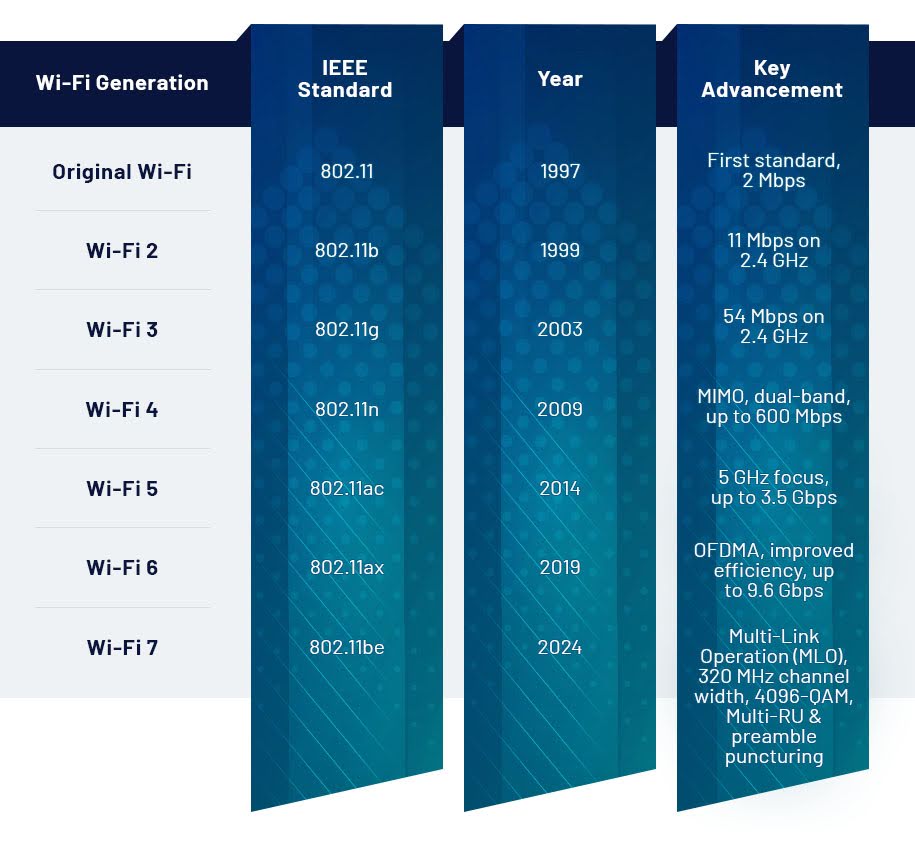
Wi-Fi 7 supports 4096-QAM, which boosts data encoding efficiency. This change increases throughput compared to Wi-Fi 6E’s 1024-QAM. Also, Wi-Fi 7 supports up to 16 spatial streams, doubling Wi-Fi 6E’s limit. This means more data can be sent simultaneously, improving speed and capacity.
Multi-link Operation (mlo)
MLO is a standout feature of Wi-Fi 7. It lets devices use multiple bands at once for data transmission. This improves reliability and reduces latency. If one link faces interference, others keep the connection stable. This is crucial for gaming, streaming, and virtual reality on 2026 laptops.

Credit: press.asus.com
Speed And Capacity Comparison
The speed and capacity of Wi-Fi networks shape how laptops perform in daily tasks. Wi-Fi 7 and Wi-Fi 6E offer different improvements in these areas. Comparing their speed and capacity helps users choose the right laptop for 2026. This section breaks down key technical details and real-world test results.
Maximum Data Rates
Wi-Fi 6E reaches up to 9.6 Gbps under ideal conditions. Wi-Fi 7 pushes this further to about 30 Gbps. This large jump is due to wider channels and better technology. The increase means faster downloads and smoother streaming on Wi-Fi 7 laptops.
Modulation And Spatial Streams
Wi-Fi 6E uses 1024-QAM modulation for data encoding. Wi-Fi 7 upgrades this to 4096-QAM, improving data density. Wi-Fi 6E supports up to 8 spatial streams, while Wi-Fi 7 doubles this to 16. More streams allow more data paths, increasing capacity and speed.
Real-world Throughput Tests
Tests show Wi-Fi 6E laptops handle 1 to 3 Gbps in real conditions. Wi-Fi 7 laptops achieve between 6 and 15 Gbps. This means Wi-Fi 7 offers 3 to 5 times better speed in daily use. Multi-Link Operation (MLO) in Wi-Fi 7 also reduces lag and boosts reliability.
Latency And Reliability
Latency and reliability are key factors for any wireless connection, especially for 2026 laptops. Low latency means faster response times, which matters in gaming, video calls, and AR/VR. Reliability ensures stable connections without drops or interruptions. Wi-Fi 7 and Wi-Fi 6E handle these aspects differently, affecting real-world performance.
Impact Of Multi-link Operation
Multi-Link Operation (MLO) is a feature unique to Wi-Fi 7. It allows devices to connect using multiple bands simultaneously. This reduces latency by sending data over the fastest available link. It also improves reliability by switching links if one is crowded or weak. Wi-Fi 6E lacks MLO, so it relies on a single band at a time. In tests, Wi-Fi 7 consistently showed lower lag and fewer connection drops thanks to MLO.
Preamble Puncturing Benefits
Preamble puncturing helps Wi-Fi 7 avoid interference from other devices. It skips parts of the signal that overlap with noise, keeping the connection clear. This reduces packet loss and improves reliability. Wi-Fi 6E does not support preamble puncturing, which can lead to more delays in busy environments. As a result, Wi-Fi 7 offers smoother and more stable connections, especially in crowded networks.
Performance In High-demand Scenarios
High-demand scenarios include 4K streaming, online gaming, and large file transfers. Wi-Fi 7 handles these better because of its advanced features like MLO and preamble puncturing. Tests show Wi-Fi 7 maintains low latency under heavy load, while Wi-Fi 6E can slow down or disconnect. Reliability also improves with Wi-Fi 7, reducing frustrating lag spikes and buffering. For users with many devices or heavy data needs, Wi-Fi 7 delivers more consistent performance.
Coverage And Range
Coverage and range are crucial for any Wi-Fi network, especially for 2026 laptops using Wi-Fi 7 or Wi-Fi 6E. A strong signal across your home means fewer dead zones and better internet speed. Both Wi-Fi 7 and Wi-Fi 6E improve on past standards, but they differ in how far and how well their signals travel through walls and obstacles.
Signal Penetration And Stability
Wi-Fi 7 uses new technology to send data over multiple bands at once. This helps the signal pass through walls more reliably. Wi-Fi 6E operates mainly in the 6 GHz band, which is faster but has a harder time penetrating walls. In real homes, Wi-Fi 7 often stays stable at longer distances. It reduces drops and keeps a steady connection, even in rooms far from the router.
Mesh Networking Support
Mesh networks spread Wi-Fi signals using multiple access points. Wi-Fi 7 supports advanced mesh features like Multi-Link Operation. This lets devices switch smoothly between bands and nodes. Wi-Fi 6E supports mesh networks too but with less efficiency in band switching. For large or complex homes, Wi-Fi 7’s mesh support offers better coverage and less lag.
Performance In Large Homes
Large homes need strong Wi-Fi signals in many rooms. Wi-Fi 7 excels here by combining higher speeds with wider coverage. It maintains fast connections even through thick walls or floors. Wi-Fi 6E delivers fast speeds but may lose strength in distant rooms. For bigger spaces, Wi-Fi 7 provides more reliable and consistent performance across the entire house.
2026 Laptop Compatibility
Choosing the right wireless technology for your 2026 laptop depends on its Wi-Fi compatibility. Laptop makers are shifting toward Wi-Fi 7 to meet faster speeds and better device handling. Many new models will offer this latest standard to improve daily connectivity. Understanding which laptops support Wi-Fi 7 or 6E helps buyers pick the best option for their needs.
Available Wi-fi 7 Models
Several top laptop brands have started adding Wi-Fi 7 to their 2026 models. These include gaming laptops and high-end ultrabooks. Expect options from major manufacturers like Dell, HP, and Asus. Availability is growing but still limited compared to Wi-Fi 6E models. Early adopters will find Wi-Fi 7 mostly in premium laptops at launch.
Backward Compatibility With Wi-fi 6e
Wi-Fi 7 devices work smoothly with Wi-Fi 6E routers and networks. This backward compatibility ensures older Wi-Fi 6E gear still connects well. Laptops with Wi-Fi 7 can switch between Wi-Fi 7 and Wi-Fi 6E signals. This flexibility helps users avoid connectivity issues while upgrading home or office networks.
Impact On Battery Life And Performance
Wi-Fi 7 improves speed but may affect battery life slightly. The new standard uses more power due to higher data processing. Laptop makers optimize hardware and software to reduce battery drain. Users should expect similar or slightly shorter battery times compared to Wi-Fi 6E. Performance gains in speed and latency often justify this trade-off for many users.
Practical Considerations
Choosing between Wi-Fi 7 and Wi-Fi 6E for your 2026 laptop involves more than just speed numbers. Practical factors like device support, cost, and usage needs affect your decision. This section explores these key points to help you understand which option fits your setup.
Router And Device Availability
Wi-Fi 6E routers and laptops are widely available in 2026. Many brands offer models that support the 6 GHz band, boosting speed and reducing interference. Wi-Fi 7 devices are newer and less common. Fewer laptops and routers support Wi-Fi 7 now, but availability is growing slowly. Check device compatibility before upgrading your network.
Cost Vs. Performance Benefits
Wi-Fi 7 routers and laptops cost more due to advanced technology. The speed and efficiency gains may not justify the higher price for casual users. Wi-Fi 6E offers strong performance at a lower cost. It fits well for most home and office needs. Consider how much speed you really need before spending extra on Wi-Fi 7.
Ideal User Scenarios
Wi-Fi 6E suits everyday users streaming videos, browsing, and working from home. It handles multiple devices well and keeps connections stable. Wi-Fi 7 benefits power users with heavy data demands. Gamers, video editors, and AR/VR users see lower latency and faster transfers. Choose based on your internet habits and device count.
Future-proofing Your Network
Choosing the right Wi-Fi technology today shapes how well your network performs tomorrow. Future-proofing your network means picking a system that handles new tech and growing demands. Both Wi-Fi 7 and Wi-Fi 6E offer benefits, but understanding their strengths helps you decide which fits best for 2026 laptops and beyond.
Support For Emerging Applications
Wi-Fi 7 supports higher speeds and lower latency, ideal for new apps. Virtual reality and 8K streaming need fast, stable connections. Wi-Fi 6E improves on past standards but Wi-Fi 7 handles cutting-edge apps better. This means smoother video calls, gaming, and smart home controls.
Scalability For Multiple Devices
Modern homes and offices have many connected devices. Wi-Fi 7 manages more devices at once without slowing down. It uses Multi-Link Operation (MLO) to send data over several channels at the same time. Wi-Fi 6E is good but can struggle with very busy networks. Wi-Fi 7 keeps your network fast, even with many users.
Long-term Investment Value
Upgrading to Wi-Fi 7 means your network will stay reliable for years. It supports future laptops and gadgets with better speeds and coverage. Wi-Fi 6E is cheaper but may need replacing sooner. Investing in Wi-Fi 7 can save money over time by avoiding frequent upgrades.

Credit: edgeup.asus.com
How The Laptop Scout Can Help You with Wi-Fi 7 Vs Wi-Fi 6E: Real-World Speed Tests for 2026 Laptops
Learning from Real-World Wi-Fi 7 and Wi-Fi 6E Speed Tests
When diving into Wi-Fi 7 vs Wi-Fi 6E, it’s not just about specs on paper but how these technologies perform in everyday scenarios—especially with 2026 laptops. Understanding speed and capacity differences alongside latency and reliability helps you make informed choices without getting lost in marketing hype.
From my experience at The Laptop Scout, focusing on real-world use means evaluating laptops’ compatibility with these Wi-Fi standards and considering practical factors like coverage and future-proofing your network. For instance, Wi-Fi 7’s Multi-Link Operation can significantly reduce lag during video calls or gaming, which is a game-changer for hybrid workers and content creators alike.
- Test your current setup to see if Wi-Fi 6E meets your needs before upgrading.
- Consider how your living or work space affects coverage and range.
- Keep an eye on laptop models that balance performance with budget and sustainability.
If you want to chat about what fits your lifestyle or tech setup, feel free to reach out at contact@thelaptopscout.com. My goal is to help you cut through the noise and find real value—not just the newest buzzwords.
Frequently Asked Questions
Is Wi-fi 7 Really Better Than 6e?
Wi-Fi 7 offers faster speeds, lower latency, and better multi-device handling than Wi-Fi 6E. It suits demanding users and future-proofing.
What Is The Best Router For 2026?
The best router for 2026 supports Wi-Fi 7, offers Multi-Link Operation, low latency, and strong coverage. Top models include Netgear Nighthawk and TP-Link Deco mesh systems. These deliver ultra-fast speeds, improved device handling, and reliable connections for gaming, streaming, and smart homes.
How Fast Is Wi-fi 7 In The Real World?
Wi-Fi 7 delivers real-world speeds between 6 to 15 Gbps per access point. It reduces latency below 5 ms, enhancing reliability and performance.
Is Wi-fi 7 Slower Than Wi-fi 6?
Wi-Fi 7 is not slower than Wi-Fi 6. It offers faster speeds, lower latency, and better device handling. Wi-Fi 7 supports up to 16 spatial streams and Multi-Link Operation, improving real-world performance significantly over Wi-Fi 6.
Conclusion
Wi-Fi 7 clearly offers faster speeds and lower latency than Wi-Fi 6E. It handles multiple devices better, making it ideal for busy networks. Real-world tests show Wi-Fi 7’s improved reliability and coverage. For everyday users, Wi-Fi 6E remains a solid choice with good performance.
But for future-proof laptops in 2026, Wi-Fi 7 provides noticeable benefits. Choosing between them depends on your needs and budget. Both will improve wireless experience compared to older standards. Staying informed helps you pick the right tech for your setup.









