

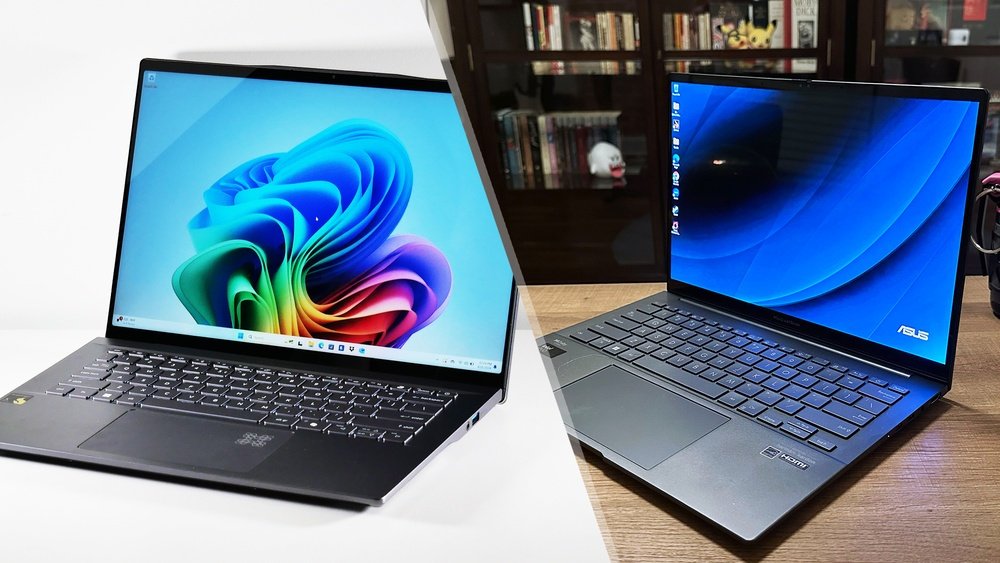
Choosing the right mid-range laptop can feel overwhelming, especially when top contenders like the Acer Swift Go 14 and the Asus Zenbook 14 OLED are on the table. You want a device that balances performance, design, and value without breaking the bank.
But which one truly fits your needs? Whether you’re focused on stunning visuals, smooth multitasking, or reliable battery life, this detailed comparison will help you see the strengths and weaknesses of each model clearly. Keep reading to find out which laptop deserves a spot in your daily routine and how it can elevate your productivity and entertainment experience.

Credit: www.rtings.com
Design And Build
The design and build quality define a laptop’s first impression. Both the Acer Swift Go 14 and Asus Zenbook 14 OLED offer sleek looks and sturdy frames. Each model balances style and durability to serve mid-range users well. The following details break down their design features.
Chassis And Materials
The Acer Swift Go 14 uses a lightweight aluminum chassis. It feels solid and resists fingerprints moderately well. Asus Zenbook 14 OLED also features an aluminum body but with a more polished finish. The Zenbook’s surface attracts fingerprints more easily but looks premium. Both laptops offer good durability for daily use.
Port Placement
Acer Swift Go 14 spreads its ports across both sides. This includes USB-C, USB-A, and a headphone jack, easing connectivity. Asus Zenbook 14 OLED places most ports on the left side, including dual USB-C slots. This setup might limit peripheral use for some users. Port arrangement affects convenience during work or play.
Ergonomics And Comfort
The keyboard on the Acer Swift Go 14 is spacious with good key travel. It supports long typing sessions comfortably. The Asus Zenbook 14 OLED offers a slightly smaller keyboard but with responsive keys. Both laptops have smooth touchpads with accurate tracking. The Zenbook’s hinge lifts the keyboard slightly for better typing angles.
Display Quality
The display quality plays a crucial role in choosing the right laptop. Both Acer Swift Go 14 and Asus Zenbook 14 OLED offer impressive screens. Their displays affect daily tasks such as browsing, watching videos, and photo editing. Understanding their screen technology, color accuracy, brightness, refresh rate, and viewing angles helps to decide which laptop suits your needs better.
Screen Technology
The Acer Swift Go 14 uses an IPS LCD panel. It provides clear images and decent color reproduction. The Asus Zenbook 14 OLED features an OLED panel. OLED offers deeper blacks and higher contrast. This technology enhances the visual experience, especially in dark scenes. OLED screens generally consume less power than LCDs. This factor may help extend battery life during video playback.
Color Accuracy And Brightness
Both laptops provide good color accuracy for mid-range devices. The Asus Zenbook 14 OLED covers nearly 100% of the DCI-P3 color space. It delivers vibrant and rich colors, ideal for creative work. The Acer Swift Go 14 covers around 72% of the NTSC color gamut. It is suitable for regular use and casual photo editing. Brightness levels differ as well. The Zenbook 14 OLED reaches up to 400 nits. The Swift Go 14 offers about 300 nits. Higher brightness ensures better visibility under bright conditions.
Refresh Rate And Viewing Angles
Both laptops come with a 60Hz refresh rate. This rate is standard for everyday tasks and media consumption. Neither has a high refresh rate tailored for gaming. Viewing angles on the Acer Swift Go 14 remain stable due to its IPS panel. Colors and clarity stay consistent from different angles. The Asus Zenbook 14 OLED also offers excellent viewing angles. It maintains color richness and sharpness at wide angles. This feature improves group viewing or multi-angle use.
Performance Specs
The performance specifications of a laptop define its ability to handle tasks smoothly. The Acer Swift Go 14 and Asus Zenbook 14 OLED offer solid mid-range specs. Each model balances power and efficiency differently. Understanding their CPU, GPU, and RAM helps choose the right fit. Below is a detailed comparison of their core performance features.
Cpu Comparison
The Acer Swift Go 14 runs on Intel’s latest 12th Gen processors. It offers up to an Intel Core i7 option. This chip delivers strong performance for daily use and creative work. The Asus Zenbook 14 OLED also features 12th Gen Intel CPUs. Its top choice is similar but focuses more on power efficiency. Both CPUs handle multitasking and demanding apps well. Acer’s CPU may have a slight edge in raw speed.
Gpu Capabilities
The Acer Swift Go 14 uses integrated Intel Iris Xe graphics. It supports casual gaming and video editing but is not for heavy gaming. The Asus Zenbook 14 OLED pairs Intel Iris Xe with optional discrete NVIDIA graphics. This option boosts performance in creative and gaming tasks. Asus’s GPU options provide better graphics power for users needing extra muscle. Acer suits users focused mainly on everyday tasks and media.
Ram And Multitasking
Both laptops offer RAM options from 8GB to 16GB. This range supports smooth multitasking and moderate workloads. Acer’s RAM runs at standard speeds, sufficient for common applications. Asus often includes faster RAM variants, improving responsiveness under load. Both models allow upgrading RAM before purchase. More RAM means better handling of multiple apps and browser tabs.
Storage Options
Storage options play a key role in choosing the right laptop. They affect speed, capacity, and future upgrades. Both Acer Swift Go 14 and Asus Zenbook 14 OLED offer solid storage features. Let’s explore their differences and strengths.
Type And Capacity
The Acer Swift Go 14 uses a fast NVMe SSD. It comes in sizes from 256GB to 512GB. This suits everyday tasks and moderate file storage.
The Asus Zenbook 14 OLED also features NVMe SSDs. It offers larger capacities up to 1TB. This benefits users with big media files or multiple apps.
Speed And Upgradeability
Both laptops provide quick read and write speeds. This improves boot times and app launches. The Zenbook’s SSD tends to have slightly higher speeds on paper.
Upgrade options vary. The Acer Swift Go 14 allows SSD upgrades, making it flexible. The Zenbook 14 OLED may have soldered storage on some models. This limits upgrades but keeps the design slim.
Battery Life
Battery life plays a key role in choosing the best mid-range laptop. Both the Acer Swift Go 14 and Asus Zenbook 14 OLED offer solid runtimes. Understanding how long each lasts during real use and how fast they recharge helps buyers decide which fits their needs.
Real-world Usage
The Acer Swift Go 14 can run for about 8 hours on a single charge. This suits typical office work, web browsing, and video streaming. The Asus Zenbook 14 OLED lasts slightly longer, reaching up to 9 hours with moderate use. Its OLED screen helps save power during dark mode or low brightness settings. Both laptops support all-day productivity without constant charging breaks.
Charging Speed
Acer Swift Go 14 charges from zero to full in roughly 1.5 hours. It uses a standard USB-C charger with decent power delivery. The Asus Zenbook 14 OLED offers faster charging, topping up in about 1 hour. Its charger supports quick charge technology, giving more power in less time. Fast charging helps reduce downtime between tasks and keeps users mobile.
Audio And Webcam
Audio and webcam quality play vital roles in daily laptop use. Clear sound and sharp video matter for calls, meetings, and media enjoyment. Both Acer Swift Go 14 and Asus Zenbook 14 OLED offer decent options here. Their features suit work, study, and casual entertainment.
Speaker Quality
The Acer Swift Go 14 delivers balanced sound with good volume. Its speakers handle voices well but lack deep bass. Music sounds clear enough for light listening.
The Asus Zenbook 14 OLED features richer audio with fuller tones. It offers louder output and better clarity. This model suits users who want more immersive sound.
Both laptops avoid distortion at high volume. The Zenbook edges out slightly for multimedia use. Acer focuses more on clear voice playback.
Microphone And Camera
The Acer Swift Go 14 includes a standard HD webcam. It provides clear video in well-lit rooms. The built-in microphone captures voice with minimal background noise.
The Asus Zenbook 14 OLED sports a similar HD camera. It performs well with natural colors and sharpness. Its microphone picks up sound crisply but may catch some ambient noise.
Both laptops support video calls and online meetings effectively. Neither offers advanced features like noise cancellation. Users can expect reliable basic webcam and mic performance.
Connectivity Features
Connectivity features shape how easily you can link your laptop to devices and networks. Both Acer Swift Go 14 and Asus Zenbook 14 OLED offer solid options. Their wireless and wired connections support daily tasks and entertainment needs.
Wi-fi And Bluetooth
The Acer Swift Go 14 supports Wi-Fi 6, allowing faster internet speeds and better range. Its Bluetooth 5.2 ensures stable connections with wireless headphones and peripherals. The Asus Zenbook 14 OLED also uses Wi-Fi 6 and Bluetooth 5.0, which works well for most users. Both laptops provide reliable wireless communication for smooth streaming and file sharing.
Available Ports
Acer Swift Go 14 includes a USB-C port, two USB-A ports, and a headphone jack. It also offers an HDMI output for external displays. Asus Zenbook 14 OLED features two USB-C ports supporting Thunderbolt 4, which allows fast data transfer and charging. It also has one USB-A port, a microSD card reader, and a headphone jack. The Zenbook’s ports suit users needing high-speed connections and media expansion.

Credit: www.youtube.com
Thermal Performance
Thermal performance plays a key role in how laptops handle demanding tasks. It affects speed, comfort, and longevity. Both Acer Swift Go 14 and Asus Zenbook 14 OLED have compact designs that challenge heat dissipation. Efficient cooling systems and noise control are vital to keep these laptops running smoothly. Let’s explore how each model manages heat and fan noise under pressure.
Cooling System
The Acer Swift Go 14 uses a single fan combined with heat pipes to move heat away from the CPU and GPU. This setup keeps the temperature stable during regular tasks. The fan activates more often when running heavy software but remains effective in preventing thermal throttling.
The Asus Zenbook 14 OLED also features a single fan design. It uses an advanced airflow system to improve heat flow inside its slim body. This system helps maintain cooler temperatures during extended use. Asus focuses on balancing cooling with quiet operation, aiming for steady performance.
Fan Noise And Heat Management
Acer’s fan noise is noticeable under heavy load but stays within a moderate range. It ramps up speed to cool components quickly, which can be distracting in quiet environments. Heat tends to build around the keyboard area but does not become uncomfortable for most users.
Asus Zenbook 14 OLED produces less fan noise thanks to its optimized cooling. The fan spins at lower speeds during typical use, resulting in a quieter experience. Heat is managed well, with temperatures spreading evenly to avoid hot spots. This makes it more comfortable for long work sessions.
Software And Drivers
Software and drivers play a key role in the daily use of any laptop. They affect how smoothly the system runs and how well hardware components perform. Both the Acer Swift Go 14 and Asus Zenbook 14 OLED come with different software setups and driver support. This section explores what each laptop offers in these areas.
Pre-installed Software
The Acer Swift Go 14 includes a selection of useful apps that help users get started quickly. It comes with basic tools for productivity and security. The software is light and does not slow down the system.
On the other hand, the Asus Zenbook 14 OLED offers a few more pre-installed apps. These include utilities for system optimization and display customization. Users can easily adjust the OLED screen settings for better color and brightness.
Both laptops avoid heavy bloatware, allowing users to install their preferred programs without clutter.
Driver Stability
Acer provides regular driver updates for the Swift Go 14. These updates improve hardware compatibility and fix bugs. Users report fewer crashes and smooth performance after updates.
Asus also delivers frequent driver updates for the Zenbook 14 OLED. The company focuses on optimizing drivers for the OLED display and audio system. This leads to consistent performance with minimal glitches.
Both brands maintain good driver support, but Asus may have a slight edge in managing the unique features of its OLED panel.
User Experience
User experience defines how comfortable and smooth using a laptop feels every day. Both Acer Swift Go 14 and Asus Zenbook 14 OLED aim to offer solid usability for mid-range buyers. This section examines key areas that impact daily use. Small details often shape overall satisfaction.
Keyboard And Touchpad
The Acer Swift Go 14 has a keyboard with good key travel and quiet feedback. Typing feels natural and responsive. Its touchpad is smooth and supports multi-touch gestures well.
The Asus Zenbook 14 OLED offers a slightly more tactile keyboard. Keys have a firm press and good spacing. The touchpad is large and precise, with quick response times. Both laptops support Windows Precision drivers, ensuring smooth cursor control.
Build Quality Issues
Acer uses a lightweight metal chassis but some users report sharp edges near the front lip. This can cause discomfort during long use. The metal surface also attracts fingerprints easily.
Asus Zenbook 14 features a premium aluminum build with a sturdy feel. Still, some owners mention the compact design traps heat under heavy use, raising temperature and fan noise. The single fan can become loud during intense tasks.
Common Problems And Fixes
Both laptops occasionally show issues with driver updates. Trackpad glitches like erratic cursor movement or missed clicks often fix with the latest driver install. Keeping BIOS and firmware updated improves stability.
Wi-Fi and Bluetooth connections sometimes drop due to outdated drivers. Restarting the device or reinstalling drivers usually restores connection strength. For battery drain, lowering screen brightness and closing unused apps help extend run time.
Price And Value
Price and value play a major role in choosing the right mid-range laptop. Buyers want the best features without spending too much. Both Acer Swift Go 14 and Asus Zenbook 14 OLED offer good options, but their pricing and value differ. Understanding these differences helps you pick the best fit for your budget and needs.
Cost Comparison
The Acer Swift Go 14 generally costs less than the Asus Zenbook 14 OLED. Acer targets users who want solid performance with a smaller budget. Asus Zenbook 14 OLED is priced higher due to its OLED display and premium build. The price gap can be around $100 to $200 depending on the model and retailer. Acer offers good specs at a more affordable price point. Asus provides advanced features but with a higher cost.
Features Vs Price
Acer Swift Go 14 includes strong specs like a fast processor and good battery life for its price. It lacks an OLED screen but still offers a bright and clear display. Asus Zenbook 14 OLED has a vibrant, high-contrast OLED panel that suits media lovers. It also includes premium materials and extra features such as a touchscreen and better speakers. The higher price of Asus is justified for users who want a vivid display and refined design. Acer is great for budget-conscious buyers who need reliable performance without extra frills.
Final Verdict
The Acer Swift Go 14 and Asus Zenbook 14 OLED each serve different needs well. Both offer solid performance and good screens. Choosing the right one depends on what you want most from your laptop.
Best Use Cases
The Acer Swift Go 14 fits users who prioritize portability and battery life. Its light design suits people who travel often or work on the go. It handles everyday tasks smoothly, like browsing and document editing.
The Asus Zenbook 14 OLED stands out for those who need a vibrant display. Its OLED screen is perfect for photo editing, watching videos, and creative work. It also performs well with multitasking and moderate gaming.
Who Should Buy Which
Buy the Acer Swift Go 14 if you want a budget-friendly laptop that lasts long on battery. It is great for students and professionals needing basic performance in a compact frame.
Choose the Asus Zenbook 14 OLED if screen quality matters most. Creative professionals and entertainment lovers will appreciate its rich colors and sharp visuals. It also suits users who need a bit more power for their tasks.

Credit: www.rtings.com
How The Laptop Scout Can Help You with Acer Swift Go 14 Vs Asus Zenbook 14 Oled: Best Mid-Range Laptop Comparison
Learning from the Acer Swift Go 14 vs Asus Zenbook 14 OLED Comparison
When choosing between these two mid-range laptops, it’s helpful to think beyond specs and focus on what truly fits your everyday needs. For instance, if display quality matters most—say for content creation or binge-watching—the Zenbook’s OLED panel could offer richer visuals. But if battery life and thermal performance top your priority list, the Swift Go’s endurance and cooling system might serve you better.
At The Laptop Scout, I always encourage looking at real-world user experience and software support alongside raw hardware numbers. This approach helps you avoid marketing noise and find a laptop that balances performance, value, and longevity. It’s also worth considering storage options: does your workflow demand speedy SSDs or more flexible configurations?
If you want to dive deeper or have specific questions, feel free to reach out at support@thelaptopscout.com. I’m here to help you navigate the nuances without any sales pressure—just honest advice tailored to your lifestyle and budget.
Frequently Asked Questions
Which Is Better Asus Or Acer Laptop?
ASUS excels in gaming with better GPUs, while Acer offers superior CPU performance and screen quality. Choose based on your needs.
Is The Acer Swift Go 14 Oled A Good Laptop?
The Acer Swift Go 14 OLED offers vibrant display quality and solid performance for everyday tasks. It suits users valuing portability and screen clarity. Some thermal and connectivity issues may arise under heavy use. Overall, it provides good value with its OLED screen and lightweight design.
What Are Common Problems With The Asus Zenbook 14?
Common ASUS ZenBook 14 issues include overheating, loud fan noise, Wi-Fi drops, driver glitches, fast battery drain, and sharp edges causing discomfort.
Is It Harder To Repair Acer Or Asus Laptops?
Acer and ASUS laptops have similar repair difficulty. Acer parts may be easier to find, while ASUS often uses compact designs, making repairs slightly more complex. Overall, repair challenges depend more on the specific model than the brand.
Conclusion
Choosing between the Acer Swift Go 14 and Asus Zenbook 14 OLED depends on your priorities. The Swift Go offers a bright screen and solid performance for daily tasks. The Zenbook shines with its OLED display and better graphics for media and light gaming.
Both laptops have some heat and fan noise issues under load. Battery life and port placement might influence your choice too. Think about what matters most: screen quality, gaming, or general use. Either way, these mid-range laptops deliver good value for the price.









