

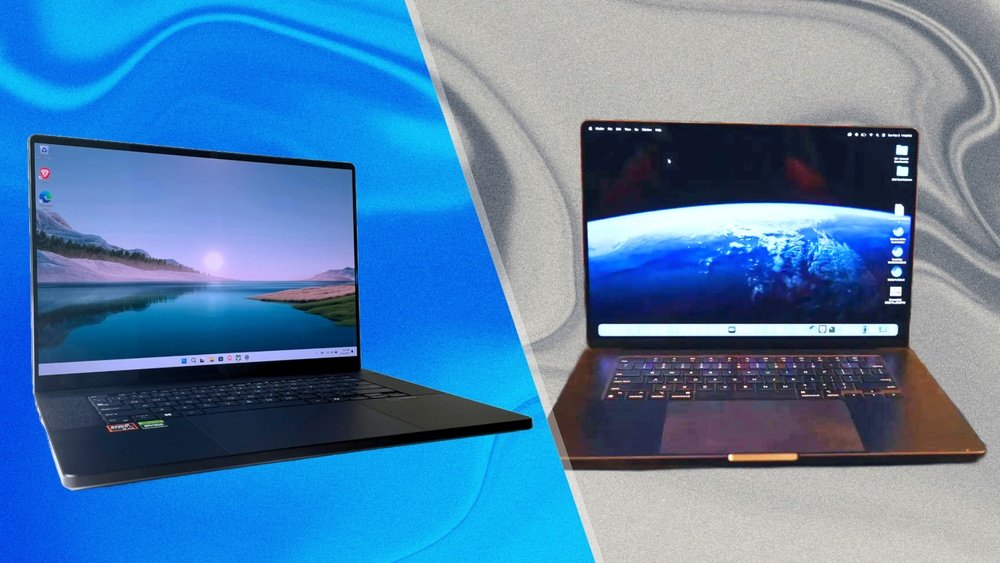
Choosing the perfect laptop as a creator can feel overwhelming, especially when top contenders like the MacBook Pro 16 (M4 Pro) and the Asus ProArt P16 are on your radar. You want a machine that not only handles your creative workload smoothly but also fits your style, workflow, and budget.
So, which one truly stands out for your needs? You’ll discover how these two powerhouses compare in performance, display quality, portability, and more—helping you make a confident choice that elevates your creative projects. Keep reading to find out which laptop will be your ultimate creative companion.
Design And Build
The design and build quality of a laptop play a key role for creators. These factors affect how comfortable and reliable a device feels during long work hours. Both the MacBook Pro 16 (M4 Pro) and Asus ProArt P16 bring strong design elements but differ in some important ways.
Materials And Durability
The MacBook Pro 16 features a sleek aluminum body known for its strength and smooth finish. This metal shell protects internal parts well and resists scratches. Asus ProArt P16 uses a combination of metal and high-quality plastic. It offers solid durability but may not feel as premium as the MacBook’s full metal frame.
Both laptops withstand daily use. The MacBook’s unibody design adds extra rigidity. The ProArt’s design focuses on robustness with reinforced corners. Either choice provides good protection for creative work on the go.
Portability And Weight
The MacBook Pro 16 is slim and lightweight for a powerful laptop. It weighs around 4.7 pounds, making it easier to carry in a backpack or briefcase. The Asus ProArt P16 is slightly heavier, about 5.3 pounds, due to its mixed materials and extra ports.
Portability matters for creators who move between workspaces. The MacBook’s thinner profile helps save space. The ProArt offers more connectivity but adds some bulk. Both remain portable enough for travel and daily use.
Keyboard And Trackpad Experience
Apple’s MacBook Pro has a well-known Magic Keyboard with responsive, quiet keys. The typing feels comfortable for long sessions. Its large Force Touch trackpad supports smooth gestures and precise control. The Asus ProArt P16 provides a backlit keyboard with good key travel and feedback. Its trackpad is accurate but smaller than Apple’s.
For creators, the keyboard and trackpad impact productivity. The MacBook’s input devices offer a refined experience that many users prefer. Asus delivers solid performance but may not match Apple’s seamless feel.
Display Quality
The display quality plays a crucial role for creators. It affects how you view and edit your work. Both the MacBook Pro 16 (M4 Pro) and the Asus ProArt P16 offer strong displays. Let’s explore their key features to see how they compare.
Resolution And Color Accuracy
The MacBook Pro 16 features a sharp Retina display with 3456 x 2234 pixels. This high resolution brings out fine details in images and videos. It also supports the P3 wide color gamut, offering vibrant and accurate colors. Asus ProArt P16 offers a 2560 x 1600 resolution. It covers 100% of the AdobeRGB color space, ideal for print and digital work. Both screens deliver excellent color accuracy but target slightly different needs.
Brightness And Contrast
The MacBook Pro 16 reaches up to 1000 nits of brightness. This helps in bright environments and HDR content. It also has excellent contrast thanks to its mini-LED backlighting. Asus ProArt P16 offers 400 nits brightness, enough for most indoor settings. Its contrast ratio ensures deep blacks and bright whites. The MacBook Pro leads in brightness and contrast for vivid viewing.
Screen Size And Aspect Ratio
The MacBook Pro 16 has a 16.2-inch screen with a 16:10 aspect ratio. This ratio gives more vertical space for editing timelines and documents. Asus ProArt P16 features a 16-inch screen with a 16:10 ratio as well. Both are similar in size and shape, giving creators plenty of room to work. The slight size difference won’t affect usability for most users.
Performance Specs
Performance specs matter most for creators who need reliable power. Both the MacBook Pro 16 (M4 Pro) and Asus ProArt P16 offer strong hardware. They handle heavy tasks like video editing, 3D modeling, and graphic design well. Let’s explore their core specs to see how they compare.
Processor And Graphics
The MacBook Pro 16 features Apple’s M4 Pro chip with an 8-core CPU. It delivers fast and efficient processing for creative apps. The integrated GPU has up to 16 cores, boosting graphics performance smoothly.
Asus ProArt P16 runs on Intel’s 13th Gen Core i7 or i9 processors. It pairs with NVIDIA RTX 4060 or 4070 graphics cards. This setup handles rendering and complex visuals with strong performance.
Ram And Storage Options
MacBook Pro offers 16GB or 32GB of unified RAM. This helps apps run faster by sharing memory between CPU and GPU. Storage ranges from 512GB to 8TB SSD, providing quick access to large files.
Asus ProArt P16 supports 16GB to 64GB DDR5 RAM. It allows heavy multitasking and smooth workflows. Storage options include up to 2TB NVMe SSD, which is fast but less than MacBook’s max capacity.
Thermal Management
MacBook Pro uses an advanced cooling system with dual fans and heat pipes. It keeps the laptop cool and quiet under pressure. This helps maintain stable performance during long tasks.
Asus ProArt P16 features a robust cooling design with multiple heat pipes and fans. It manages heat well during intensive work. The system ensures consistent performance without overheating.

Credit: www.youtube.com
Creative Software Compatibility
Creative software compatibility is crucial for creators choosing between the MacBook Pro 16 (M4 Pro) and the Asus ProArt P16. Both laptops support popular creative tools, but their performance varies across different software types. Understanding how each handles video editing, graphic design, and 3D work helps creators pick the right device.
Video Editing And Rendering
The MacBook Pro 16 with the M4 Pro chip excels in video editing software like Final Cut Pro and Adobe Premiere Pro. Its hardware and macOS optimization deliver smooth playback and fast rendering times. The Asus ProArt P16 runs Windows-based software such as DaVinci Resolve and Adobe Premiere Pro efficiently. It offers good GPU power, which benefits rendering speed. Both handle 4K video editing well, but MacBook’s tight integration offers fewer crashes and better stability.
Graphic Design And Illustration
MacBook Pro 16 supports Adobe Photoshop, Illustrator, and Affinity Designer with fluid responsiveness. Its Retina display produces accurate colors, essential for design work. Asus ProArt P16 features a wide color gamut and high resolution, ideal for detailed illustration. It runs Windows versions of design software smoothly. The choice depends on software preference and display needs. Both machines perform well but serve slightly different creative workflows.
3d Modeling And Animation
For 3D modeling and animation, the Asus ProArt P16 benefits from powerful NVIDIA graphics and Windows support for Blender, Autodesk Maya, and 3ds Max. It handles complex scenes and animations with ease. The MacBook Pro 16 supports these applications too, but some software performs better on Windows. macOS versions may have fewer features or slower updates. Creators working heavily in 3D might prefer Asus for its broader software compatibility and GPU power.
Connectivity And Ports
Connectivity and ports are vital for creators who juggle multiple devices. Both the MacBook Pro 16 (M4 Pro) and Asus ProArt P16 offer strong options. They support various connections to streamline your workflow. The choice affects how easily you connect peripherals and external displays.
Available Ports And Expansion
The MacBook Pro 16 features three Thunderbolt 4 (USB-C) ports. It also includes an HDMI port, an SDXC card slot, and a headphone jack. These ports cover most needs but limit USB-A connections without adapters.
The Asus ProArt P16 offers more diverse ports. It has two USB-C ports, two USB-A ports, an HDMI port, a full-size SD card reader, and a headphone jack. This gives creators more direct options for legacy and modern devices.
External Display Support
The MacBook Pro 16 supports up to two external displays at 6K resolution. This suits creators who need high-quality color accuracy on multiple screens. The Asus ProArt P16 supports up to three external displays. It offers flexibility for multi-screen setups without extra adapters.
Wireless Options
Both laptops support Wi-Fi 6E for fast and stable wireless connections. The MacBook Pro 16 includes Bluetooth 5.3, the latest standard for low-energy device connections. The Asus ProArt P16 has Bluetooth 5.2, still strong but slightly older. Wireless choices are robust on both machines for transferring files and connecting accessories.
Battery Life
Battery life is a key factor for creators who work on the go. Both the MacBook Pro 16 (M4 Pro) and Asus ProArt P16 offer strong battery performance, but they differ in how they manage power and charging. Understanding these differences helps choose the right laptop for long creative sessions.
Real-world Usage
The MacBook Pro 16 (M4 Pro) can last up to 14 hours with mixed tasks like video editing and browsing. The Asus ProArt P16 generally offers around 8 to 10 hours under similar conditions. Apple’s optimization between hardware and software allows it to stretch battery life further. Asus provides solid performance but tends to drain faster during heavy workloads.
Charging Speed
MacBook Pro 16 supports fast charging and can reach 50% battery in about 30 minutes. Asus ProArt P16 also features fast charging but usually takes closer to 45 minutes for the same level. Both laptops support USB-C charging, making it easier to find compatible chargers and power banks.
Power Management Features
MacBook Pro uses advanced power management with macOS, reducing background activity when idle. It also adjusts performance dynamically to save energy. Asus ProArt P16 includes Windows power-saving modes and customizable profiles for different tasks. Creators can tweak settings to balance power use and performance effectively.
Audio And Webcam
The audio and webcam features are essential for creators. They impact video calls, recordings, and live streams. Both the MacBook Pro 16 (M4 Pro) and Asus ProArt P16 offer solid options. Each has strengths that suit different creative needs.
Speaker Quality
The MacBook Pro 16 delivers rich, clear sound with deep bass. Its six-speaker system creates an immersive experience. Creators enjoy precise audio for editing and playback.
The Asus ProArt P16 has a good speaker setup but sounds less full. It offers decent volume but lacks the same depth. For audio work, it may feel less vibrant than the MacBook.
Microphone Performance
MacBook Pro 16 features studio-quality microphones that capture clear voice tones. Background noise is minimized, making calls and recordings crisp. This benefit suits podcasters and video creators.
Asus ProArt P16 includes dual microphones that work well for general use. They pick up voice clearly but may allow more ambient sound. It serves casual meetings well but is less suited for professional audio capture.
Webcam Resolution And Features
The MacBook Pro 16 has a 1080p webcam with enhanced image processing. It produces sharp and bright video, even in low light. Face detection and noise reduction improve video quality.
The Asus ProArt P16 uses a standard 720p webcam. It offers basic video clarity but struggles in darker rooms. It lacks advanced features, making it less ideal for high-quality streams or recordings.

Credit: www.youtube.com
Operating System And Ecosystem
The operating system and ecosystem shape the creative workflow deeply. Both the MacBook Pro 16 (M4 Pro) and Asus ProArt P16 offer powerful platforms, but their OS and ecosystem differ greatly. Creators must consider how each system supports their tools, software, and device connections.
Macos Vs Windows For Creators
macOS is known for its smooth performance and stability. It runs creative apps like Final Cut Pro and Logic Pro with ease. The system feels intuitive and less prone to crashes. Windows powers the Asus ProArt P16 and supports a wide range of software. It offers more flexibility and customization options. Windows is compatible with many industry-standard apps like Adobe Creative Cloud and 3D modeling tools. Both systems handle creative tasks well but appeal to different user preferences.
Software Ecosystem
Apple’s macOS has a tightly controlled app ecosystem. This ensures apps run efficiently and securely. Many creative professionals prefer Mac for video editing, music production, and design. Windows has a larger variety of software available. It supports many niche and specialized creative tools. The Asus ProArt P16 benefits from Windows’ compatibility with professional apps and plugins. Software updates are frequent on both platforms but differ in approach. Creators may choose based on the software they use daily.
Integration With Other Devices
The MacBook Pro excels in integration with other Apple devices. Features like AirDrop, Handoff, and Universal Clipboard speed up workflows. iPhones, iPads, and Macs work seamlessly together. The Asus ProArt P16 supports Windows-based peripherals and external devices well. It offers more ports and easier hardware customization. However, its device ecosystem is less unified compared to Apple’s. Creators who use multiple Apple gadgets find macOS integration a major advantage. Those needing more hardware flexibility might prefer the Asus.
Price And Value
Choosing the right laptop for creators depends heavily on price and value. Both the MacBook Pro 16 (M4 Pro) and Asus ProArt P16 offer strong performance. Yet, their costs and long-term worth differ. Understanding these differences helps in making a smart purchase decision.
Base Model Comparison
The MacBook Pro 16 starts at a higher price than the Asus ProArt P16. Apple’s base model includes its powerful M4 Pro chip and a sharp Retina display. Asus offers a lower starting price with solid specs and a color-accurate screen made for creators. Both base models suit creative tasks but target different budgets.
Upgrade Costs
Upgrading the MacBook Pro 16 is costly. Adding more RAM or storage significantly raises the price. The Asus ProArt P16 offers more affordable upgrade options. Users can increase RAM and storage at lower costs. This flexibility suits creators who need more power over time without huge expenses.
Long-term Investment
The MacBook Pro 16 holds its value well over time. Apple’s ecosystem and build quality attract buyers even after years of use. Asus ProArt P16 may depreciate faster but offers excellent performance for the price. Creators should consider how long they plan to keep their laptop before deciding on value.

Credit: www.asus.com
User Feedback And Reviews
User feedback and reviews offer valuable insights into the real-world performance of the MacBook Pro 16 (M4 Pro) and Asus ProArt P16. Creators rely on these opinions to choose the right device for their needs. This section gathers thoughts from professionals, common praises, complaints, and views on reliability and support.
Professional Creators’ Opinions
Many professional creators praise the MacBook Pro 16 for its smooth software integration and powerful performance. Video editors and graphic designers highlight its color accuracy and display quality. The Asus ProArt P16 receives recognition for its wider port selection and flexibility. Some creators appreciate its Windows ecosystem, which supports various creative tools. Overall, both laptops fit different workflows depending on user preference.
Common Praise And Complaints
Users often praise the MacBook Pro’s battery life and quiet operation. Its sleek design and lightweight build earn positive remarks. Some complaints focus on the limited external display support and higher price. Asus ProArt P16 users like the variety of ports and strong performance under heavy loads. Yet, some report the laptop runs hotter and has shorter battery life compared to the MacBook Pro. Both laptops show strengths and weaknesses based on user priorities.
Reliability And Support
Apple’s customer service is widely rated as fast and helpful. Many users trust the MacBook Pro for long-term reliability. Asus offers solid hardware but mixed reviews on customer support exist. Some creators mention delays in service and repairs. Warranty coverage and support options can influence the final choice. Reliability and after-sales service remain key factors for creators investing in a new laptop.
How The Laptop Scout Can Help You with Macbook Pro 16 (M4 Pro) Vs Asus Proart P16 for Creators
Practical Learning from the MacBook Pro 16 (M4 Pro) Vs Asus ProArt P16 Debate
When weighing options like the MacBook Pro 16 (M4 Pro) and Asus ProArt P16, it’s helpful to reflect on how their differences impact your daily creative workflow. From my experience as a trusted tech scout at The Laptop Scout, it’s not just about raw performance specs or display quality—though those are crucial—but also how these elements mesh with your software needs and environment.
- For instance, if you rely heavily on macOS-optimized creative software, the MacBook’s ecosystem might offer smoother integration and longevity.
- Meanwhile, the Asus’ wider port selection can be a practical advantage if you often connect multiple external displays or specialized peripherals.
- Battery life and user feedback also reveal how these machines handle real-world use beyond specs sheets.
Understanding these nuances helps you make a choice that aligns with your lifestyle and budget, rather than just following brand hype. If you want to dive deeper or have specific questions, feel free to reach out to us at contact@thelaptopscout.com. We’re here to help cut through the noise with honest advice tailored to your creative journey.
Frequently Asked Questions
Is The Asus Proart P16 Good For Graphic Design?
The ASUS ProArt P16 offers accurate colors and powerful performance, making it suitable for graphic design tasks and creative workflows.
Which Is Better, Asus Or Macbook?
MacBook offers better build quality, battery life, and ecosystem integration. ASUS provides more ports and customization. Choose based on your needs.
Which Is Best For Everyday Use, M4 Or M4 Pro?
The M4 Pro suits everyday use better with enhanced performance and features. The M4 is simpler but less powerful.
Is The Asus Proart P16 Good For Video Editing?
The ASUS ProArt P16 offers strong performance, a color-accurate display, and powerful specs ideal for video editing tasks.
Conclusion
Both the MacBook Pro 16 (M4 Pro) and Asus ProArt P16 offer strong choices for creators. MacBook shines with smooth performance and longer battery life. Asus ProArt stands out with more ports and better display options. Consider your workflow and needs carefully before deciding.
Each laptop supports creative work but suits different styles. Choose based on what matters most to your projects. Either way, both deliver reliable power for creators.









