

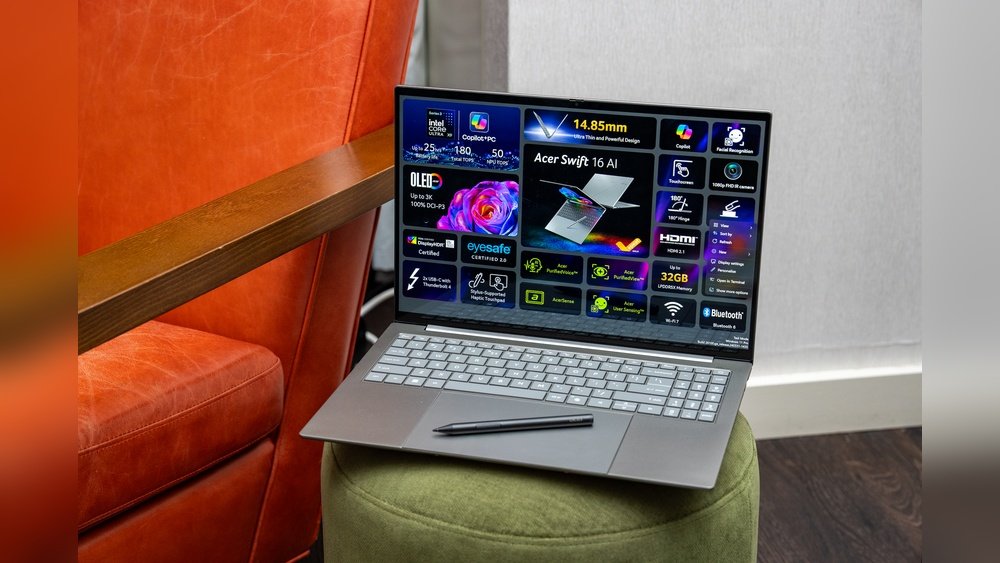
When it comes to boosting your daily productivity, every little detail counts—especially the tools you rely on most. If you use a laptop, the trackpad is one of those tools that can either smooth your workflow or slow you down.
But with so many options out there, how do you choose between a haptic trackpad and a mechanical one? Which one will feel better under your fingers, reduce strain during long hours, and keep up with your fast-paced tasks? You’ll discover the key differences between haptic and mechanical trackpads and find out which one truly matches your productivity style.
Keep reading to make an informed choice that could transform the way you work every day.
Credit: www.tomsguide.com
Haptic Trackpads Features
Haptic trackpads offer a unique way to interact with your device. They provide feedback you can feel without moving parts. This technology combines touch sensitivity with vibrations to create a realistic clicking sensation. Many users prefer haptic trackpads for their smooth and quiet operation.
These trackpads often appear in modern laptops. They support precise gestures and taps, enhancing daily productivity. Understanding their key features helps decide if they fit your needs.
How Haptic Feedback Works
Haptic feedback uses small vibrations to mimic the feel of a physical click. Sensors detect pressure from your finger. When pressure reaches a certain point, the system triggers a vibration. This vibration creates the illusion of pressing a real button. The trackpad surface itself does not move much, if at all.
This tech improves accuracy and reduces noise. It also makes using the trackpad more comfortable over long periods.
Durability And Design Benefits
Without mechanical parts, haptic trackpads last longer. Physical switches in traditional trackpads wear out over time. Haptic trackpads avoid this issue by relying on sensors and vibrations. Their slim design saves space inside laptops. This allows manufacturers to create thinner and lighter devices.
The flat surface is easier to clean and less prone to damage. This increases the overall lifespan of the trackpad.
Customization Options
Users can adjust haptic feedback strength and click sensitivity. This lets you tailor the feel to your preference. Some systems allow changing vibration patterns for different actions. Custom gestures can also be programmed for quick access to commands.
These options help create a more personal and efficient user experience.

Credit: www.crowdsupply.com
Mechanical Trackpads Features
Mechanical trackpads use physical buttons for clicking actions. They offer a clear, tactile response that users can feel. These trackpads have been common in laptops for many years. Their design focuses on delivering a straightforward clicking experience. Many people prefer mechanical trackpads for their simple and familiar feel.
The features of mechanical trackpads affect daily productivity. They provide feedback that confirms every click. This helps users avoid mistakes during work. Understanding these features can help decide which trackpad suits your needs.
Physical Click Mechanism
Mechanical trackpads rely on a physical button beneath the surface. Pressing down triggers a real click sound and movement. This gives clear feedback that the click registered. The physical movement feels natural to most users. It helps in tasks that need precise clicking.
Reliability And Consistency
Mechanical trackpads deliver consistent feedback every time you click. Their physical parts make them reliable over long use. They rarely miss a click or register false inputs. This consistency supports smooth workflow during repetitive tasks. Users can trust the trackpad to respond accurately.
Common Use Cases
Mechanical trackpads work well in various settings. They are common in office laptops and older models. Users who prefer clear tactile feedback often choose them. They suit tasks like writing, browsing, and data entry. Mechanical trackpads help reduce errors in precise clicking work.
Comparing User Experience
The user experience between haptic and mechanical trackpads differs in several key areas. These differences affect how comfortable and efficient you feel while working. Understanding these aspects helps in choosing the right trackpad for daily productivity.
Both types have unique features that appeal to different users. Let’s explore how they compare in tactile sensation, pressure sensitivity, and comfort.
Tactile Sensation Differences
Mechanical trackpads provide a physical click when pressed. You feel a clear, physical movement under your finger. This feedback confirms each click is registered.
Haptic trackpads do not physically move. Instead, they use vibrations to simulate a click sensation. This can feel less natural for some users but offers a smooth surface.
Users who prefer clear, physical feedback may favor mechanical trackpads. Those who like a flat design might choose haptic trackpads.
Pressure Sensitivity And Response
Mechanical trackpads respond to the actual press force on the pad. The click happens only when pressed down fully. This can require more effort over time.
Haptic trackpads sense varying pressure levels. They can detect lighter touches and adjust feedback accordingly. This allows for faster and more precise control.
Pressure sensitivity in haptic trackpads helps with tasks needing fine adjustments. Mechanical trackpads feel consistent but less flexible in response.
Impact On Wrist And Hand Comfort
Mechanical trackpads need finger pressure and movement that can cause strain. The physical clicking action may stress wrists during long use.
Haptic trackpads offer a flat, smooth surface with no physical clicks. This reduces finger movement and pressure, easing wrist strain.
For extended work sessions, haptic trackpads often provide better comfort. Mechanical trackpads might cause fatigue faster due to their clicking mechanism.
Performance And Productivity
Performance and productivity are key factors when choosing between haptic and mechanical trackpads. Both types affect how fast and accurately you can work. They also influence how well you manage multiple tasks and use gestures. Understanding these differences helps improve your daily workflow.
Speed And Accuracy
Mechanical trackpads offer a physical click, which some users find more precise. This can help with tasks that need exact control, like editing or design work. Haptic trackpads respond to pressure without moving parts. They allow faster finger movements but may feel less tactile. For quick navigation, haptic trackpads often provide smoother control.
Multitasking And Gesture Support
Haptic trackpads usually support more advanced gestures. Swipes, pinches, and taps can speed up switching between apps or windows. Mechanical trackpads support gestures but often fewer types. Users who rely on multitasking may find haptic trackpads more flexible. This helps in managing several tasks without slowing down.
Effect On Daily Workflow
The choice between haptic and mechanical trackpads shapes daily work habits. Haptic trackpads fit well in thin laptops, saving space and weight. They reduce finger fatigue due to less physical clicking. Mechanical trackpads may feel more familiar and give clear feedback. Choosing the right one depends on your work style and comfort needs.
Durability And Maintenance
Durability and maintenance are key factors when choosing a trackpad for daily use. Your trackpad should last long and require little care. This section compares haptic and mechanical trackpads on these points. Understanding how each type handles wear, costs, and environment helps you decide which fits your needs.
Wear And Tear Over Time
Mechanical trackpads have moving parts that press down when used. These parts wear out after heavy use. Buttons may become less responsive or stick.
Haptic trackpads have no physical buttons. They use vibrations to simulate clicks. This means fewer parts break over time. They usually stay smooth and responsive for years.
Repair And Replacement Costs
Mechanical trackpads often cost more to fix. Replacing worn buttons or switches can be tricky. Parts may not be easy to find.
Haptic trackpads are simpler inside. If they fail, replacement is usually the only option. Repair costs tend to be lower since fewer parts are involved.
Suitability For Different Environments
Mechanical trackpads can struggle in dusty or humid places. Dirt can get inside and cause problems. They may need frequent cleaning to work well.
Haptic trackpads seal their components tightly. This protects them from dust and moisture. They perform better in tough environments and need less maintenance.

Credit: mashable.com
Choosing The Right Trackpad
Choosing the right trackpad can affect your daily productivity and comfort. Trackpads come in two main types: haptic and mechanical. Each offers different benefits and drawbacks. Understanding these helps you pick the best one for your needs.
Trackpads are essential for navigation, clicking, and gestures. They impact how fast and accurately you work. Selecting the right trackpad improves your workflow and reduces hand strain.
Matching Trackpads To User Needs
Haptic trackpads provide smooth, silent feedback by simulating clicks. They suit users who want quiet operation and customizable settings. Mechanical trackpads offer a physical click feel. They appeal to those who prefer tactile confirmation with each press.
For heavy clickers, mechanical trackpads may feel more natural. Haptic trackpads work well for gesture-heavy users. Consider your daily tasks and preferences before deciding.
Considerations For Laptop Design
Haptic trackpads are thinner and fit better in slim laptops. They use less space inside the device, allowing for lighter designs. Mechanical trackpads need room for moving parts, making laptops thicker.
Battery life can also differ. Haptic trackpads use less power due to fewer moving components. Mechanical trackpads may draw more energy during clicks. Design and battery needs influence which trackpad fits best.
Future Trends In Trackpad Technology
Trackpads continue to evolve with better sensors and feedback systems. New haptic models aim to mimic physical clicks more closely. Mechanical trackpads may shrink in size but keep their tactile feel.
Developers are working on multi-sensory feedback, combining touch, pressure, and motion. This could improve precision and user experience. The future points to smarter, more responsive trackpads for all users.
How The Laptop Scout Can Help You with Haptic Vs Mechanical Trackpads: Which is Better for Daily Productivity?
Learning Through Real-World Use: Making the Most of Your Trackpad Choice
When deciding between a haptic and a mechanical trackpad, it’s helpful to reflect on daily productivity scenarios and how each design supports your workflow. From my experience scouting tech for The Laptop Scout, I’ve found that understanding the nuances in user experience and durability can make all the difference. For instance, haptic trackpads offer customization and a sleeker design, which suits those prioritizing portability and maintenance ease. Mechanical trackpads, meanwhile, provide a more tactile feel that some users find better for precision tasks.
To truly grasp which trackpad fits your style, consider experimenting with both types if possible—whether at a store, through friends, or borrowing devices. This hands-on approach aligns with our mission to cut through marketing noise by focusing on real-world performance rather than hype.
- Test responsiveness and feedback during your typical tasks
- Observe how each trackpad affects your comfort over extended use
- Note maintenance needs and how durability fits your lifestyle
If you want to dive deeper or have specific questions, feel free to reach out to us at contact@thelaptopscout.com. We’re here to help you find a balance between technology and practical daily use without the sales pressure.
Frequently Asked Questions
Is A Haptic Trackpad Better?
Haptic trackpads offer durable, customizable feedback without physical switches. They save space and provide precise pressure sensing, enhancing user experience.
What Are The Disadvantages Of Using A Touchpad?
Touchpads can cause wrist strain with prolonged use and may lack precision compared to a mouse. They also offer limited gesture support and can be less comfortable for detailed tasks.
What Is The Difference Between Haptic And Tactile Touchpad?
Haptic touchpads simulate clicks using vibrations without physical movement. Tactile touchpads provide physical feedback through actual button presses or surface texture changes. Haptic offers customizable, durable feedback, while tactile relies on mechanical sensations for basic touch responses.
Is A Trackpad Bad For Carpal Tunnel?
Using a trackpad can strain wrists and worsen carpal tunnel symptoms if used excessively. Ergonomic use and breaks help reduce risks.
Conclusion
Choosing between haptic and mechanical trackpads depends on your daily needs. Haptic trackpads offer durability and space-saving design. Mechanical trackpads provide tactile feedback through physical clicks. Both types support productivity but differ in feel and function. Consider comfort, laptop design, and personal preference before deciding.
Testing each can help find the best fit. Your daily workflow will benefit from the right choice. Simple, reliable tools make work easier every day.









