

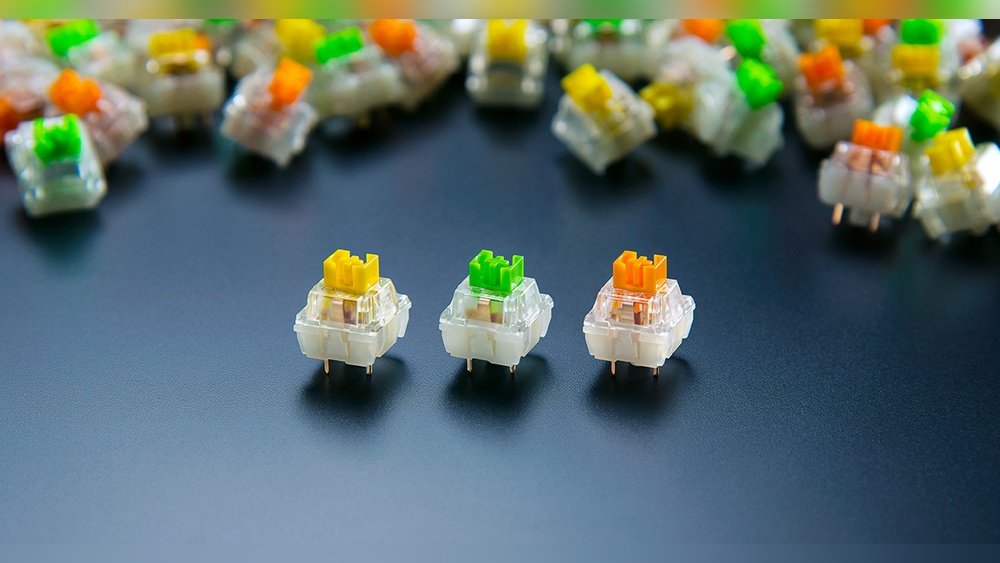
When it comes to choosing the perfect keyboard, you might find yourself stuck between haptic keyboards and traditional scissor switches. Both promise a smooth typing experience, but which one truly fits your style and needs?
Imagine typing with a keyboard that not only responds to your touch but also gives you a satisfying feedback that keeps your fingers in rhythm. Or perhaps you prefer the quiet, reliable feel of a scissor switch that’s been trusted for years.
Understanding these differences can transform the way you type every day. Ready to discover which keyboard will make your fingers dance and boost your productivity? Let’s dive into the detailed showdown of haptic keyboards versus traditional scissor switches—your ultimate typing scout.

Credit: bayoulifemag.com
Haptic Keyboards Basics
Understanding the basics of haptic keyboards helps to see how they differ from traditional options. These keyboards offer a unique typing experience by using touch feedback. This feedback improves typing accuracy and user satisfaction. Exploring the fundamentals shows why some users prefer haptic keyboards over scissor switches.
How Haptic Feedback Works
Haptic keyboards use small motors or actuators under each key. These create vibrations or pulses when a key is pressed. The feedback mimics the feel of a physical key press. This sensation confirms the key has been registered without needing to press fully down. The result is faster, more precise typing with less finger fatigue.
Common Features
Most haptic keyboards come with adjustable feedback intensity. Users can customize how strong the vibrations feel. They often include quiet key presses, making them suitable for shared spaces. Many models support wireless connectivity and long battery life. The design usually focuses on slimness and portability without sacrificing comfort.
Scissor Switch Keyboards Basics
Scissor switch keyboards are common in laptops and slim keyboards. They offer a balance between the soft feel of membrane keyboards and the precision of mechanical ones. Understanding their basics helps to know why many prefer them for daily typing tasks.
These keyboards use a special mechanism that improves key stability and responsiveness. They are designed for quiet and comfortable typing with minimal key wobble. Let’s explore their core features under the hood.
Mechanism And Design
Scissor switches have two plastic pieces that interlock beneath each key. This scissor-like design holds the keycap steady. When pressed, the key moves down smoothly and evenly.
This design reduces key wobble and increases durability. The mechanism sits on a rubber dome that provides resistance. It registers a keystroke when fully pressed down.
Scissor switches keep keyboards thin and lightweight. Their compact design fits well in slim laptops and portable keyboards.
Key Travel And Sound
Key travel is the distance a key moves when pressed. Scissor switch keys usually have short travel, around 1 to 2 millimeters. This allows faster typing with less finger movement.
The sound from scissor switches is soft and quiet. They produce a gentle “click” or “thud” without loud noise. This makes them ideal for offices and quiet environments.
Compared to traditional mechanical switches, scissor switches offer a quieter and more muted typing experience. Users enjoy less fatigue from typing on these keyboards for long periods.
Typing Experience Comparison
The typing experience shapes how users interact with their keyboards daily. Comparing haptic keyboards and traditional scissor switches reveals key differences. These differences affect comfort, speed, and accuracy during typing tasks.
Understanding how each keyboard type feels and performs can help choose the right device for various needs. Below, we explore tactile feedback, accuracy, typing speed, and comfort factors.
Tactile Feedback And Accuracy
Haptic keyboards offer a unique sensation by simulating physical feedback through vibrations. This feedback helps users know when a key is registered without pressing too hard. It reduces typing errors and improves precision.
Traditional scissor switches provide a quieter and softer keypress with a slight tactile bump. Their mechanism supports stable key travel and responsiveness but lacks the enhanced feedback of haptic systems. Accuracy depends more on finger placement and pressure.
Typing Speed And Comfort
Haptic keyboards may boost typing speed by giving instant confirmation of key presses. The vibration feedback helps maintain rhythm and reduces hesitation. Some users find this method less tiring over long sessions.
Scissor switch keyboards excel in comfort due to their low-profile design and gentle key action. They offer a smooth, consistent typing feel suited for extended use. However, their feedback may not be as noticeable, potentially slowing down some typists.

Credit: www.razer.com
Durability And Maintenance
Durability and maintenance are key factors in choosing between haptic keyboards and traditional scissor switches. Both have unique designs that affect how long they last and how easy they are to care for. Understanding these differences helps users pick the right keyboard for daily use.
Cleaning Challenges
Traditional scissor switch keyboards often trap dust and crumbs under the keys. Their design leaves spaces where dirt can build up quickly. Cleaning requires careful removal of keycaps or using compressed air. This process can be time-consuming and may risk damaging the switches.
Haptic keyboards usually have a more sealed design. This makes it harder for debris to enter the keyboard. Wiping the surface regularly keeps the keyboard clean. Users find haptic keyboards simpler to maintain over time.
Long-term Reliability
Scissor switches can wear out after heavy use. The plastic parts may loosen, leading to less stable keypresses. Over years, this wear affects typing accuracy and feel. Repairing or replacing individual keys is often difficult.
Haptic keyboards rely on electronic feedback mechanisms. These parts are less prone to physical wear. Users experience consistent key response even after long periods. This durability suits heavy typists and office environments.
Noise Levels
Noise levels play an important role in choosing between haptic keyboards and traditional scissor switches. The sound each keyboard makes affects comfort and focus. Some users prefer quieter keyboards, while others like a bit of sound feedback. Understanding noise differences helps pick the right keyboard for work or home use.
Typing Sound Differences
Haptic keyboards produce minimal noise. They rely on vibrations for feedback, not loud clicks. This makes them very quiet during typing. Traditional scissor switches create a soft but noticeable clicking sound. The noise is less than mechanical keyboards but louder than haptic types. Each key press has a light snap sound, which some users find satisfying.
The sound of scissor switches comes from the plastic pieces snapping back. Haptic keyboards avoid this by using electronic feedback. Thus, haptic keyboards suit quiet places better.
Impact On Work Environments
In offices, noise can distract coworkers or break concentration. Haptic keyboards keep noise low, helping maintain a calm space. They suit open-plan offices and shared rooms. Scissor switches may cause mild disturbance but are still quieter than older keyboard types. They work well in home offices or small teams.
Choosing a quieter keyboard can improve focus and reduce stress. It also shows respect for others nearby. Noise level is a key factor for many when deciding which keyboard to buy.
Customization And Compatibility
Customization and compatibility define user experience in keyboards. They shape how well a keyboard fits personal preferences and device needs. Haptic keyboards and traditional scissor switches differ in these areas. Understanding their software options and device support helps choose the right one.
Software And Settings
Haptic keyboards often come with dedicated software. This software allows users to adjust vibration intensity and feedback patterns. Users can customize typing feel to match their style. Some models offer profiles for different tasks or apps. Traditional scissor switch keyboards rarely provide software customization. Their settings are mostly fixed and hardware-based. This limits personalization but ensures simplicity and ease of use.
Device Support
Compatibility varies between haptic and scissor switch keyboards. Haptic keyboards usually support modern operating systems like Windows, macOS, and some Linux versions. Their advanced features may need specific drivers or apps. Scissor switch keyboards have broad device support. They work well with laptops, desktops, and tablets without extra software. This makes scissor switches a reliable choice for many users.
Pros And Cons Summary
Understanding the pros and cons of haptic keyboards and traditional scissor switches helps you choose the best typing experience. Each type offers unique benefits and some drawbacks. This summary breaks down the key points clearly and simply.
Advantages Of Haptic Keyboards
Haptic keyboards provide tactile feedback without loud clicks. They improve typing accuracy by confirming each key press. This feedback reduces typing errors and speeds up work. Users enjoy a more responsive and satisfying typing feel. Haptic keyboards also tend to be quiet, ideal for shared spaces.
Advantages Of Scissor Switches
Scissor switches offer a low-profile design, making keyboards thinner and lighter. They require less force to press, which reduces finger fatigue. These switches provide a stable key feel with little wobble. Scissor keyboards are common in laptops and are generally affordable. They deliver a familiar typing experience for most users.
Drawbacks To Consider
Haptic keyboards usually cost more than scissor switch models. Their technology can drain battery faster in wireless devices. Sometimes, haptic feedback feels artificial or inconsistent. Scissor switches can be harder to clean due to gaps around keys. Dirt buildup may cause keys to stick or lose responsiveness over time.
Credit: bayoulifemag.com
Choosing The Right Keyboard
Choosing the right keyboard affects your comfort and typing speed. Different keyboards offer unique experiences. Some focus on tactile feedback, others on quiet operation. Understanding your needs helps pick the best fit.
Consider what feels comfortable and what suits your daily tasks. The choice between haptic keyboards and traditional scissor switches depends on your typing habits and environment.
User Preferences
Some users prefer a keyboard that provides strong feedback. Haptic keyboards simulate a physical press with vibrations. This feedback helps reduce typing errors and improve speed. Others like the soft, quiet feel of scissor switches. They offer a smooth, low-profile key press. Personal comfort and typing style guide the choice.
Use Case Scenarios
For office work or long typing sessions, keyboards with tactile feedback can reduce fatigue. Haptic keyboards suit users who want clear confirmation of each key press. Scissor switch keyboards work well in quiet spaces. They are less noisy and provide a sleek design. Gamers might prefer faster response from haptic keyboards. Writers may enjoy the steady feel of scissor switches.
How The Laptop Scout Can Help You with Haptic Keyboards Vs Traditional Scissor Switches: The Typing Scout
Practical Learning with Haptic and Scissor Switch Keyboards
When deciding between haptic keyboards and traditional scissor switches, I find it helpful to focus on real-world typing experience and maintenance. For instance, while haptic keyboards offer tactile feedback that can improve typing accuracy, scissor switches tend to be quieter but require more care to prevent debris buildup.
Testing both types in everyday scenarios—whether writing reports, coding, or content creation—can reveal which feels more natural and efficient to you. Pay attention to factors like noise levels, key travel, and how each keyboard holds up over time. This hands-on approach aligns with the straightforward guidance I aim to provide at The Laptop Scout, cutting through marketing hype to find what truly works for your needs.
- Try typing long documents to assess comfort and fatigue
- Consider maintenance ease based on your environment
- Reflect on customization options if you have specific preferences
If you want to discuss more or have questions on finding the right keyboard, feel free to reach out via contact@thelaptopscout.com. Sharing real experiences can help you make a confident choice that fits your lifestyle and work habits.
Frequently Asked Questions
What Are The Disadvantages Of A Scissor Switch Keyboard?
Scissor switch keyboards can trap dirt easily, making cleaning difficult. Keys may lose responsiveness over time. They offer less tactile feedback than mechanical switches. Limited customization and durability also affect long-term use.
Which Switches Are Better For Typing?
Tactile and clicky mechanical switches are better for typing. They provide clear feedback, improve accuracy, and reduce errors. Scissor switches offer quieter typing but less tactile response. Choose based on your preference for feedback and sound.
Are Scissor Switch Keyboards Good?
Scissor switch keyboards offer quiet, low-profile typing with decent tactile feedback. They suit compact designs but may trap debris over time. Overall, they provide a reliable, comfortable typing experience, especially for laptops and slim keyboards.
What Is The Best Scissor Switch Keyboard?
The Logitech MX Keys and Apple Magic Keyboard rank among the best scissor switch keyboards. They offer quiet, precise typing with durable build quality.
Conclusion
Choosing between haptic keyboards and traditional scissor switches depends on your typing needs. Haptic keyboards offer clear feedback through touch, improving accuracy. Scissor switches provide a quieter and familiar typing feel. Both have pros and cons, like cleaning challenges for scissor switches and cost for haptic ones.
Consider comfort, typing style, and budget before deciding. Testing both types can help find your best fit. Typing comfort matters most for productivity and enjoyment. Your perfect keyboard awaits.