

Finding The Right Laptop For Writing
When you sit down to write, you want a laptop that feels just right. Whether it’s for jotting down ideas at a café or working through a long manuscript, comfort and ease matter. But choosing the right laptop for writing isn’t always simple.
There are many factors to balance. You might want something light and portable but also with a keyboard that’s easy on your fingers. Some laptops focus on battery life, while others offer more power or larger screens. Prices vary widely, adding another layer of choice.
This guide will help you understand the key points to consider. It won’t overwhelm you with specs but will focus on what truly matters for writing—so you can pick a laptop that suits your style and needs.
What Matters Most For Writers
For writers, the feel of the keyboard is often the top priority. A quiet, responsive keyboard can make long writing sessions much more pleasant. Portability is another key factor; a laptop that’s too heavy or bulky can slow you down.
Battery life is also important if you like to work away from outlets. Screen quality and size matter too, but often as a balance between clarity and portability. You don’t always need the fastest processor or most storage, but having enough speed to handle your writing apps without lag is helpful.
Common Confusions When Choosing
It’s easy to get lost in specs that don’t impact your writing experience much. High-end graphics or gaming features don’t add value for most writers. Similarly, very large screens might look nice but can reduce portability.
Price can be confusing as well. Sometimes a mid-range laptop offers all the essentials without paying extra for features you won’t use. On the other hand, budget options might compromise on keyboard comfort or build quality.
How To Think About Your Decision
Focus on your daily writing habits. Do you move around a lot, or mostly write at a desk? Do you prefer a touchscreen or a traditional laptop? Consider how much storage and memory you realistically need. Think about battery life if you often write away from home.
Choosing a laptop is about finding the right balance for your workflow. This means weighing portability, keyboard quality, battery life, and price in a way that fits your personal style.
Below, you’ll find a selection of laptops chosen to cover different writing needs and preferences. Each option has strengths for various types of writers, from those who value lightness to those who want extra power or screen space.
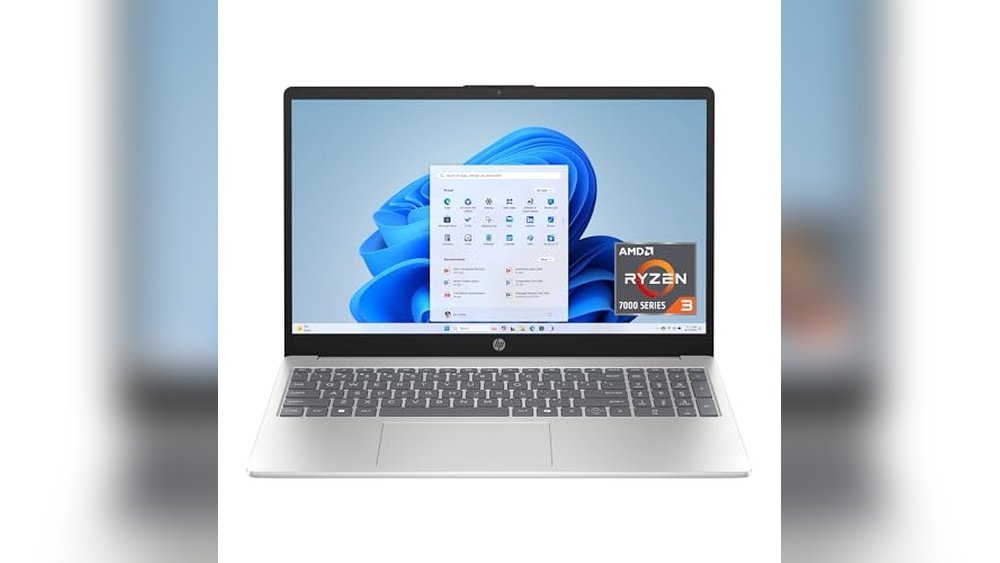
Hp 15.6″ Ryzen 3 Laptop
This model stands out in Best Laptops for Writers (Portable + Best Keyboards) by combining a touchscreen with efficient AMD Ryzen performance for smooth writing and multitasking.

This HP laptop offers a practical writing tool with a 15.6-inch touchscreen and a responsive AMD Ryzen 3 processor. It delivers reliable performance with 8 GB RAM and a fast 128 GB SSD, helping writers manage documents and apps without lag.
Using this laptop feels smooth and intuitive thanks to its touchscreen and lightweight design. The natural silver finish and standard keyboard layout provide a comfortable experience for extended writing sessions.
Key Advantages for Writers
- Touchscreen allows easy navigation and note-taking with taps and swipes
- AMD Ryzen 3 processor supports everyday writing and multitasking tasks efficiently
- Fast SSD storage speeds up file access and program launches
- 8 GB LPDDR5 RAM balances performance and power efficiency
- Windows 11 Home in S Mode enhances security while writing online
- Lightweight at 3.52 pounds for easy portability
- Natural silver color offers a professional look
Considerations Before Buying
- HD 1366 x 768 resolution may feel less sharp compared to Full HD screens
- 128 GB storage might fill up quickly with large projects or media files
- Windows 11 in S Mode limits installation to Microsoft Store apps unless switched out
Who This Works For
This laptop is ideal for writers needing a budget-friendly, portable device with touchscreen features for note-taking or editing on the go. It removes the hassle of slow performance and complex setups by offering reliable speed and security in a simple package.
To get the most from it, consider upgrading storage or switching out of S Mode if you need broader app access. The balance of portability and responsive performance gives peace of mind for daily writing tasks without surprises.
| Best for | Why |
|---|---|
| Writers on a budget | Affordable price with solid performance for text-based work |
| Students and bloggers | Lightweight and portable, easy to carry between classes or cafes |
| Note-takers and editors | Touchscreen simplifies interaction and quick edits |
| Users valuing security | Windows 11 Home in S Mode reduces malware risks during writing |
Hp Omnibook 5 14 Inch Ai Pc
This HP OmniBook is one of the Best Laptops for Writers (Portable + Best Keyboards), offering long battery life and a sharp OLED display for focused work anywhere.

The HP OmniBook 5 is a traditional laptop designed to handle writing tasks efficiently with a 14-inch OLED display that shows crisp text and vivid colors. Its Snapdragon X Plus processor ensures responsive multitasking, ideal for writers who need reliability and speed without interruptions.
Using this laptop feels smooth and consistent, with a keyboard that supports comfortable typing sessions and a battery life that lasts through extended writing periods. It’s a solid choice for writers needing a portable device that won’t slow down their workflow.
Advantages for Writing and Portability
- Up to 34 hours of battery life supports long writing sessions without frequent charging.
- Fast charging restores 50% battery in about 30 minutes, minimizing downtime.
- OLED display offers sharp visuals and excellent color accuracy for comfortable reading and editing.
- 16 GB LPDDR5x RAM ensures smooth multitasking with writing apps and research tools.
- 1 TB PCIe Gen4 NVMe SSD provides ample and fast storage for documents and projects.
- Qualcomm Adreno GPU enhances graphics responsiveness without draining battery.
Considerations Before Buying
- Weighs over 4.6 pounds, which may be heavier than ultraportable laptops.
- Screen resolution is 1920×1200, good but not 4K, which might matter for some creatives.
- Non-touch screen limits interaction styles for users who prefer touch input.
Why This Laptop Works for Writers
This laptop is best for writers who value a long-lasting battery and a clear, vibrant screen to reduce eye strain during long hours of work. It removes the hassle of frequent charging and slow performance, letting you focus on your writing without interruption.
To get the most out of it, I recommend pairing it with cloud backup tools to keep your work safe and accessible. The reliable hardware means fewer surprises, so you can trust it to be ready whenever creativity strikes.
| Best for | Why |
|---|---|
| Writers needing all-day battery life | Battery lasts up to 34 hours, reducing charging breaks |
| Users wanting vivid, sharp displays | 2K OLED screen delivers clear, colorful text and images |
| Those who multitask with AI and writing software | Snapdragon X Plus processor and 16 GB RAM handle multitasking smoothly |
| Writers who prefer traditional laptops over tablets | Full laptop form factor with comfortable keyboard and solid build |
Lenovo Ideapad 3i Touchscreen Laptop
This Lenovo IdeaPad 3i combines portability and a smooth typing experience, making it one of the Best Laptops for Writers (Portable + Best Keyboards) who value a vibrant display and responsive performance.

The Lenovo IdeaPad 3i is a touchscreen laptop designed to handle everyday tasks smoothly with its Intel Core i3 processor and 12GB RAM. It offers a clear 15.6-inch Full HD display, making it easy to work on documents and browse the web without eye strain. Its lightweight design supports mobility for writers who work from different locations.
Using this laptop feels comfortable and efficient thanks to its smart thermal management that keeps the system cool and quiet. The privacy shutter on the webcam adds peace of mind for those working from home or public places. Overall, it provides a reliable typing experience with enough power and storage for writing projects.
Key Benefits for Writers
- Ample 12GB RAM ensures smooth multitasking with multiple writing apps and browser tabs.
- 15.6″ Full HD touchscreen offers clear visuals and easy navigation.
- Thin and light design supports portability for writers on the go.
- Windows 11 enhances productivity with better window layouts and app compatibility.
- Privacy shutter on the webcam protects user privacy during video calls.
- 256GB SSD enables fast boot times and quick access to files.
- Quiet operation reduces distractions in quiet work environments.
Considerations Before Buying
- Processor is Intel Core i3, which may limit performance for very heavy multitasking or multimedia editing.
- Does not include a mouse, so an external mouse may be needed for some users.
- Battery life details are not specified, which may affect long sessions away from power outlets.
My Practical Take
This laptop is ideal for writers who prioritize a clear, large screen and portability without needing top-tier processing power. It removes the hassle of slow performance and offers peace of mind with privacy features and quiet cooling. For better results, pairing it with an external ergonomic keyboard can enhance comfort during long writing sessions.
If you often write from cafes or libraries, the light design and reliable performance will support your workflow while keeping distractions low. It’s a solid choice for students, bloggers, and casual writers seeking dependable hardware without overspending.
| Best for | Why |
|---|---|
| Portable writers | Thin and light design makes it easy to carry between work spots. |
| Writers needing clear display | 15.6″ Full HD touchscreen offers sharp text and easy control. |
| Privacy-conscious users | Webcam privacy shutter ensures control over camera use. |
| Multi-tasking with multiple apps | 12GB RAM allows smooth handling of writing and research tools simultaneously. |
Hp 15.6″ Business Laptop
This HP model stands out among the Best Laptops for Writers (Portable + Best Keyboards) by combining solid performance with a free lifetime Microsoft Office suite, ideal for productivity on the go.

This HP 15.6″ Business Laptop is designed to help writers tackle their work with ease, offering a comfortable keyboard experience and a reliable Intel 6-core i3 processor. It includes a free lifetime license for Microsoft Office 2024, removing the need for additional software purchases and streamlining document creation.
Using this laptop feels straightforward and dependable, thanks to its responsive touchscreen display and ample 16GB RAM for smooth multitasking. Writers will appreciate the balance between portability and power, making it easier to stay productive whether at home or on the move.
Key Advantages for Writers
- Free lifetime Microsoft Office 2024 pre-installed, perfect for writing and editing without extra cost
- Intel 12th Gen i3 processor with 6 cores delivers consistent performance for daily writing tasks
- 16GB RAM supports smooth multitasking with multiple documents and apps
- 1TB SSD storage offers fast file access and plenty of space for writing projects
- Touchscreen allows for quick navigation and note-taking options
- Lightweight design at 3.75 pounds makes it portable for writers on the go
- Copilot AI chat assistant helps with productivity and idea generation
Considerations Before Buying
- Display resolution is HD (1366 x 768), which may feel less sharp for some users
- Not a touchscreen with high color accuracy, so less suited for detailed graphic work
- Battery life details are general; heavy users should verify real-world endurance
Who This Fits Best
This laptop is ideal for writers who want a dependable, no-fuss machine with built-in office tools and solid performance. It removes the hassle of purchasing separate writing software and provides enough speed for everyday writing and research tasks.
For those who value portability without sacrificing multitasking ability, this HP offers a good balance. A quick tip: use the Copilot AI assistant to brainstorm ideas or get help organizing content, which can save time and reduce writer’s block. You can count on this laptop for steady, reliable use over time.
| Best for | Why |
|---|---|
| Writers needing built-in Office software | Includes free Microsoft Office 2024 with lifetime license, ready to use |
| Portable writing on the go | Lightweight at 3.75 pounds and compact size for easy travel |
| Users wanting smooth multitasking | 16GB RAM supports multiple apps and documents without slowdown |
| Writers who want AI assistance | Copilot AI chat helps with creativity and productivity |
Hp 17 Silver Laptop
This HP 17 Silver Laptop stands out in the Best Laptops for Writers (Portable + Best Keyboards) category by offering a large touchscreen and powerful specs for smooth multitasking.

The HP 17 Silver Laptop is a traditional laptop computer designed to handle heavy workloads with its Intel Core i7 processor and 32GB RAM. Its 17.3-inch HD+ touchscreen gives writers a large, clear workspace, helping with multitasking and detailed editing. The 2TB SSD ensures fast startup times and quick access to files.
Using this laptop feels spacious and efficient, especially for writers who need to juggle multiple documents or apps at once. The touchscreen adds versatility, making navigation and note-taking more intuitive. It’s a reliable choice for those who want a solid, comfortable keyboard and a large display without sacrificing performance.
Key Advantages for Writers
- Large 17.3″ touchscreen for easy reading and editing
- High-speed 32GB RAM for smooth multitasking
- Massive 2TB SSD for fast boot and ample storage
- Intel Core i7 processor handles demanding writing software
- Windows 11 Home offers a modern, efficient interface
- Fingerprint reader adds quick and secure access
- Multiple USB ports and HDMI for connectivity needs
Considerations Before Buying
- Heavier weight (6.2 pounds) reduces portability
- HD+ resolution (1600 x 900) is lower than full HD
- Larger size may not fit well in small bags
Who This Works For
This laptop is ideal for writers who prioritize screen space and performance over extreme portability. It removes the hassle of slowdowns during heavy multitasking, offering a dependable machine for long writing sessions. To get the best experience, consider pairing it with an external mouse for easier navigation on the touchscreen.
You’ll appreciate the peace of mind from its solid build and fast storage, ensuring fewer interruptions and reliable operation. If you prefer a traditional laptop with a roomy display and strong specs, this HP 17 fits well.
| Best for | Why |
|---|---|
| Writers needing large screen space | 17.3″ touchscreen offers ample room for editing and multitasking |
| Users with heavy multitasking demands | 32GB RAM supports multiple apps and browser tabs smoothly |
| Those who want fast storage | 2TB SSD ensures quick boot-up and access to large files |
| Writers valuing security and connectivity | Fingerprint reader and multiple USB/HDMI ports enhance security and flexibility |
Lenovo Ideapad 1i Laptop
This model is a solid pick among Best Laptops for Writers (Portable + Best Keyboards) offering a balance of portability and reliable performance for writing tasks.

The Lenovo IdeaPad 1i Laptop is a compact, lightweight device designed to support writers who need to work on the go. It features a 14-inch anti-glare screen that helps reduce eye strain during long typing sessions, paired with an Intel Celeron processor that handles multitasking for writing and productivity software.
Using this laptop feels straightforward and dependable. Its 11-hour battery life means you can write for extended periods without searching for outlets, and features like Flip to Start add convenience to your workflow. The physical privacy shutter on the webcam also ensures peace of mind during video calls.
Key advantages for writers
- Portable 14″ anti-glare screen reduces eye fatigue during long writing sessions
- Lightweight design (3.5 pounds) makes it easy to carry around
- Includes one-year Microsoft 365 subscription for writing and productivity tools
- Physical webcam shutter offers privacy when not in use
- Long 11-hour battery life supports extended writing without charging
- Smart Noise Cancelling improves audio clarity on calls
Considerations before buying
- Intel Celeron processor is suitable for basic tasks but may lag with heavy multitasking
- Limited storage with 128GB SSD may require cloud storage for large files
- Does not include a mouse, which some writers might prefer for navigation
Who This Fits Best
This laptop is ideal for writers who value portability and long battery life over raw processing power. If you mostly work with word processors and web research, this device keeps things simple and efficient.
It removes the hassle of frequent charging and offers privacy features that matter for online meetings. To get the most from it, pair the laptop with cloud storage to compensate for limited onboard space.
Reliable and straightforward, it’s a good match for focused writing sessions away from the desk.
| Best for | Why |
|---|---|
| Writers on the move | Lightweight and portable with long battery life for mobile work |
| Privacy-conscious users | Physical webcam shutter ensures control over camera use |
| Budget-conscious buyers | Affordable price with essential features for writing tasks |
| Users needing Microsoft Office | Includes one-year Microsoft 365 subscription for writing software |
Hp 17.3″ Laptop For Writers
This HP laptop stands out among Best Laptops for Writers (Portable + Best Keyboards) by offering a large, clear display and a responsive backlit keyboard ideal for long writing sessions.

The HP 17.3″ Laptop is designed for writers who need a spacious screen and reliable performance for everyday and demanding tasks. Its 13th Gen Intel i5 processor and 16GB RAM provide smooth multitasking, while the full HD anti-glare display reduces eye strain during extended use.
Typing on its backlit keyboard feels comfortable and consistent, which is crucial for productivity and accuracy. The larger screen enhances focus and makes reviewing content easier, helping writers maintain a steady workflow without distractions.
Key Advantages for Writers
- Large 17.3-inch Full HD display for comfortable viewing and less eye fatigue
- Responsive backlit keyboard supports typing in various lighting conditions
- Powerful 10-core Intel i5 processor handles multitasking smoothly
- Fast 512GB SSD storage ensures quick file access and ample space
- Wi-Fi 6 and Bluetooth combo offer stable and secure connectivity
- Windows 11 Home provides a modern, user-friendly operating system
- Silver finish adds a professional look suitable for any workspace
Considerations Before Buying
- At 4.6 pounds, it is less portable than smaller laptops for on-the-go writing
- Larger size may require more desk space, not ideal for cramped environments
- Graphics are sufficient for content creation but not designed for heavy gaming
Who This Works Well For
This laptop suits writers who prioritize screen space and typing comfort over ultra-light portability. It removes the hassle of lag during multitasking, letting you focus on writing without interruptions. For best results, adjusting the keyboard backlight to your environment improves visibility and reduces fatigue.
Its reliable performance and clear display provide peace of mind for long writing hours. If you value a larger screen and strong multitasking capabilities, this HP model will meet your needs without surprises.
| Best for | Why |
|---|---|
| Writers needing a large display | Provides more screen space to view and edit documents comfortably |
| Users who type in dim environments | Backlit keyboard ensures visibility and typing accuracy in low light |
| Those wanting smooth multitasking | 10-core processor and 16GB RAM handle multiple apps and files efficiently |
| Home or office writers | Full-size laptop fits well on desks and offers a professional aesthetic |
Dell Inspiron 15 3530 Laptop
Among the Best Laptops for Writers (Portable + Best Keyboards), this Dell Inspiron offers powerful performance and a comfortable touchscreen that suits writers needing speed and versatility.

The Dell Inspiron 15 3530 is a touchscreen laptop with a 15.6″ Full HD anti-glare display, designed for writers who need reliable speed and multitasking capability. Its 13th Gen Intel 10-Core i5 processor and 32GB RAM handle complex tasks smoothly, making it ideal for writing and content creation.
Using this laptop feels responsive and consistent, especially when juggling multiple apps or browser tabs. Its long battery life and military-grade cooling ensure comfort and reliability during extended writing sessions without overheating or sudden shutdowns.
Key Advantages for Writers
- Powerful 10-core CPU offers fast multitasking and smooth app performance.
- Large 32GB RAM supports heavy workloads and many open tabs without lag.
- 15.6″ anti-glare touchscreen enhances readability and reduces eye strain.
- Long battery life supports over 10 hours of writing and editing on the go.
- Multiple ports including USB-C and Ethernet for versatile connectivity.
- Military-grade cooling keeps the laptop cool during long use.
- WiFi-6 ensures fast and stable wireless connections for online research.
Considerations Before Buying
- At 14.11 x 9.27 inches, it is less compact compared to ultraportables.
- Not a touchscreen laptop focused solely on writing keyboards—touchscreen may be unused by some writers.
- Weighs more than smaller notebooks, which may affect portability for some users.
Who This Laptop Suits Best
This Dell Inspiron is best for writers who need a powerful machine that also handles multimedia and multitasking without struggle. It removes the hassle of slowdowns and overheating during long work sessions.
To get the most from it, use the touchscreen for quick navigation or note-taking alongside your writing apps. The reliable battery life and cooling provide peace of mind for uninterrupted creativity.
If you prefer a balance of power and screen quality with enough ports to connect peripherals, this model fits well.
| Best for | Why |
|---|---|
| Writers needing strong multitasking | Handles many apps and browser tabs smoothly with 32GB RAM and a 10-core CPU |
| Those who prefer a larger screen | 15.6″ anti-glare touchscreen reduces eye strain and improves readability |
| Users requiring long battery life | Over 10 hours of productivity on a single charge supports all-day use |
| People wanting multiple connectivity options | Includes USB-C, Ethernet, HDMI, and SD card reader ports for flexibility |
Hp 15.6″ Portable Laptop
This HP model is a solid choice in the Best Laptops for Writers (Portable + Best Keyboards) category, offering reliable performance and a numeric keypad for comfortable typing.

This HP 15.6″ Portable Laptop combines essential features for writers needing both portability and a practical keyboard layout. It comes with a numeric keypad and a quad-core Intel processor, making it capable of handling multiple writing apps without lag. The included Windows 11 Home system adds modern usability and supports Android apps, which can expand your writing tools.
Using this laptop feels straightforward and dependable. The 16GB RAM ensures smooth multitasking, and the numeric keypad provides extra convenience when working on spreadsheets or research. Its size and weight make it easy to carry, fitting well in most workspaces or coffee shops without feeling bulky.
Key Writing and Portability Benefits
- Numeric keypad enhances data input efficiency and comfort.
- 16GB RAM supports smooth multitasking with multiple writing apps open.
- Lightweight design (around 3.5 pounds) for easy transport.
- HD 15.6″ screen balances readability and portability.
- Multiple ports (USB-A, USB-C, HDMI) allow flexible connectivity.
- Windows 11 Home offers updated features and better app support.
- Red color option adds a distinctive look without being distracting.
Considerations for Specific Needs
- HD screen resolution (1366 x 768) may feel less sharp compared to Full HD options.
- 128GB storage limits large file storage; external drives or cloud may be needed.
- Wi-Fi 5 standard is solid but not the latest for fastest wireless speeds.
Who This Works For
This HP laptop suits writers who prioritize a balance between portability and a functional keyboard layout, especially those who often work on the go or in small spaces. It removes the hassle of slowdowns when juggling multiple writing programs thanks to its 16GB RAM.
For anyone who needs a dependable machine without overspending, this model offers peace of mind with Windows 11’s stability and the inclusion of Microsoft 365 for a full writing suite. To maximize your experience, consider using cloud storage to manage the limited internal space.
| Best for | Why |
|---|---|
| Writers needing numeric input | Includes a numeric keypad for easier data entry and calculations. |
| Portable use in cafes or libraries | Lightweight and compact design fits in most bags and workspaces. |
| Multitasking with multiple writing apps | 16GB RAM ensures smooth performance even with many apps open. |
| Budget-conscious buyers | Offers solid specs and Microsoft 365 at an affordable price. |
Samsung 12.2″ Chromebook Plus
This model stands out among Best Laptops for Writers (Portable + Best Keyboards) with its versatile 2-in-1 design and responsive touchscreen, ideal for creative writing on the go.

The Samsung 12.2″ Chromebook Plus is a compact 2-in-1 laptop that combines portability with a touchscreen interface, making it suitable for writers who need flexibility. Its Intel Celeron processor and 4GB RAM offer efficient multitasking for writing and research tasks without lag.
Writing on this Chromebook feels smooth thanks to the responsive touchscreen and included stylus pen, which can enhance note-taking or editing. Its lightweight design and convertible form factor add convenience, letting you switch between laptop and tablet modes easily during long writing sessions.
Key Benefits for Writers
- Convertible 2-in-1 design adapts to laptop or tablet use
- Responsive 12.2″ FHD touchscreen for natural writing and navigation
- Includes stylus pen and wireless mouse for precise input
- Ample 224GB storage combining eMMC and docking station SSD
- Lightweight at under 3 pounds, easy to carry anywhere
- Chrome OS ensures fast boot times and security updates
- Multiple USB ports and MicroSD reader for connectivity and expansion
Considerations Before Buying
- Intel Celeron processor may limit heavy multitasking or demanding apps
- 4GB RAM is sufficient for basic tasks but not for intensive workloads
- Screen size may feel small for users accustomed to larger displays
Who This Works Best For
This Chromebook is ideal for writers who prioritize portability and versatility, such as students or business users needing a device for note-taking and document creation. It removes the hassle of carrying multiple devices by combining tablet and laptop functions.
To get the best experience, use the stylus for handwritten notes or quick edits, which adds a personal touch to your workflow. Its reliable Chrome OS environment means fewer distractions and smoother updates, giving peace of mind during long writing projects.
| Best for | Why |
|---|---|
| Writers on the move | Lightweight and convertible design supports writing anywhere |
| Note-taking enthusiasts | Stylus pen and touchscreen enable natural writing and sketching |
| Students and business users | Efficient Chrome OS and solid storage for documents and apps |
| Basic multitaskers | 4GB RAM handles writing and browsing without lag |
Choosing The Right Laptop For Your Needs
When selecting a laptop from this diverse range, consider what tasks you prioritize most. For everyday browsing, office work, and media consumption, models with solid mid-range processors and ample RAM will suffice. For more demanding tasks like video editing, gaming, or multitasking, look for higher RAM capacity and faster processors.
Portability vs. Screen Size
Laptops with larger screens (17 inches and above) offer better viewing comfort but tend to be heavier and less portable. Compact models (around 14 to 15.6 inches) strike a balance between usability and mobility, suitable for frequent travelers or students.
Battery Life Considerations
If you need a laptop that lasts through long workdays or travel without frequent charging, prioritize models known for extended battery life. Note that higher performance components may reduce battery duration.
Common Buyer Concerns
Operating System Restrictions
Some laptops come with Windows 11 Home in S Mode, which limits software installation to apps from the Microsoft Store. Consider if you need to switch out of this mode for full application compatibility.
Storage Needs
Storage sizes vary widely, from 128GB SSDs to 2TB SSDs. Evaluate your data needs—larger SSDs offer faster access and more space but come at a higher cost.
Touchscreen vs. Non-Touchscreen
Touchscreen laptops provide interactive control and may be preferred for design work or ease of navigation. However, they can add to the cost and sometimes reduce battery life.
Setup And Usage Tips
Initial Configuration
Upon first use, ensure you update the operating system and drivers to the latest versions for security and performance. Register your device with the manufacturer for warranty support.
Battery Care
Avoid letting the battery drain completely before recharging. Keeping the charge between 20% and 80% can extend battery lifespan.
Software and Security
Install trusted antivirus software and back up your data regularly. Use strong passwords and consider enabling biometric authentication if available.
Frequently Asked Questions
Can I upgrade the RAM or storage later?
Many traditional laptops allow RAM and storage upgrades, but it varies by model. Check the manufacturer’s specifications or consult support before purchasing.
Is a touchscreen necessary for productivity?
Touchscreens can enhance interactivity but are not essential for most productivity tasks. Consider your workflow and whether touch input adds value for you.
What is the difference between SSD and HDD?
SSDs are faster, more durable, and quieter than HDDs. They improve boot times and application loading but usually cost more per gigabyte.
How important is processor choice?
The processor determines how quickly your laptop handles tasks. For general use, mid-range processors are adequate. For intensive workloads, higher-end processors improve performance.
What does “Windows 11 Home in S Mode” mean?
It restricts app installation to Microsoft Store apps for added security and performance but can be switched off if you need more flexibility.
Final Thoughts
Choosing a laptop involves balancing your performance needs, budget, and lifestyle. Focus on what features align with your daily tasks and how you plan to use the device. Taking the time to evaluate these factors will help ensure your choice serves you well over time.









